Running Facebook Ads: the complete path from nothing to your first live ad
The full path is: personal account → create or acquire a Page → Business Manager (BM) → open an ad account → attach a payment method → build a campaign in Ads Manager. Beginners most often stall at "you cannot run ads without a Page", and when they stall there, they usually cannot tell that is where they are stuck.
The whole route on one page. From "where is Ads Manager" to "how do I raise budget", with every point people get stuck marked and linked to the detail.
If this is your first time running Facebook ads, this page is the map. Look at the whole route first, then decide which section you actually need.
It is long, and you are not meant to read it in one sitting. The way people use it: look at the diagram in section one, work out which layer you are stuck on, jump straight there. Every section ends with a link to the piece that goes deeper.
A note on names. Facebook ads, FB ads, Meta ads: same thing. Meta is the parent company's name since the 2021 rebrand, and most of the back-end interface says Meta now. This site uses all three interchangeably.
1. What the whole route looks like
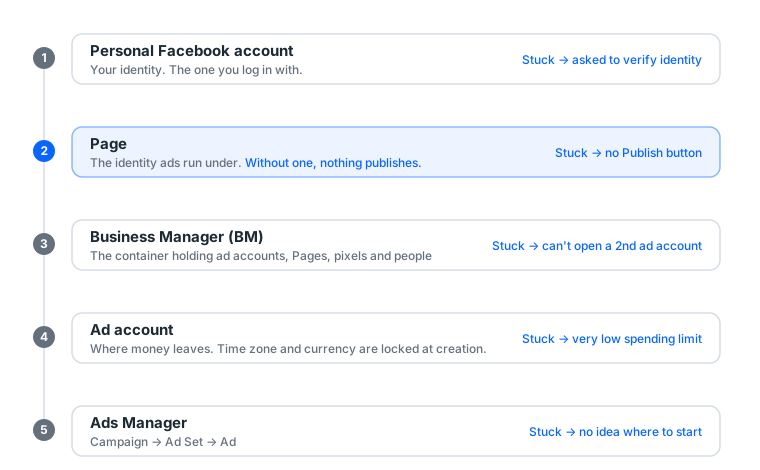
Five layers, and missing any one of them stops you. The most common beginner situation is being stuck on layer two without knowing it. You hunt around Ads Manager for the publish button, fail to find it, and conclude the interface is broken.
| Layer | What it is | Symptom when stuck | Detail |
|---|---|---|---|
| Personal account | Your identity | Asked to verify | Before you buy: device and network |
| Page | The identity ads run under | No Publish button | §3 below |
| BM | Asset container | Cannot open a 2nd ad account | What is Business Manager |
| Ad account | Where money leaves | Very low spend limit | What is an ad account |
| Ads Manager | The interface | No idea where to start | Ads Manager walkthrough |
One more term gets counted in alongside these: the developer account. It is not a sixth layer but another role on the same personal account, and only people calling the API ever touch it. One map of what hangs off what sorts the whole vocabulary out.
Working out which layer you are on
This is the highest-value thirty seconds on the page, because each layer has a completely different fix. Guess wrong and you lose hours.
Open facebook.com/adsmanager and see which of these you get:
You cannot get in; it asks you to verify your identity. Layer one. Something is wrong with your personal account and it has nothing to do with advertising. Go triage it in what to do at a checkpoint before spending any more time.
You get in, but at the last step of building an ad there is no Page to select. Layer two. This is the most common one, and the symptom is the most often misread as "the interface is broken". See §3.
You can build the ad, but publishing says the ad account is unavailable. Layer four. Open Account Quality for the reason. Usually a payment method that never fully attached, or an account restriction.
Everything works, you just do not know where to start. You are not stuck. Skip to §4 and follow the order.
2. Where Ads Manager is and how it is laid out
Ads Manager lives at facebook.com/adsmanager. You can also reach it from the left-hand menu on Facebook, and there is a separate mobile app. It has three levels:
- Campaign: what result you want (traffic, leads, conversions)
- Ad Set: who sees it, how much you spend, where it runs
- Ad: the actual image, video and copy
Budget goes on the ad set, not on the ad. This is the single most common first-time confusion.
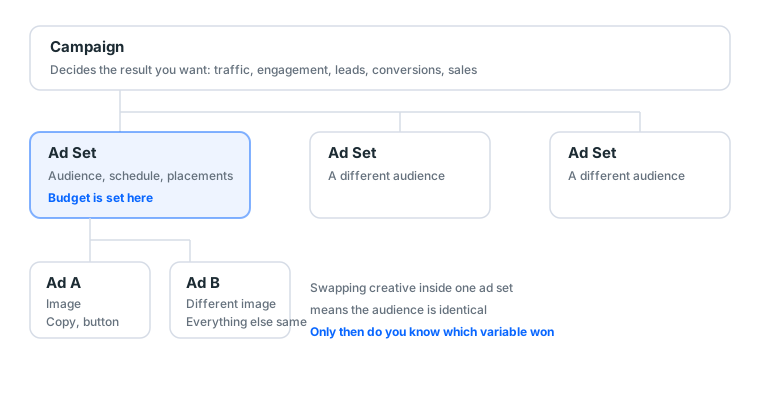
What each level actually decides
One campaign can hold several ad sets; one ad set can hold several ads. In practice that structure decides what you are able to test:
| What you want to test | Where to create the variant |
|---|---|
| Which of two images works better | Two ads inside one ad set |
| Which of two audiences responds better | Two ad sets inside one campaign |
| Whether traffic or engagement is cheaper | Two campaigns |
The classic mistake is running a creative test at the ad-set level. Now the creative differs and the audience sample differs, and when it finishes you cannot say which one won.
Should you turn on Campaign Budget Optimisation
There is a switch at campaign level that lets the system distribute budget to whichever ad set is performing.
Leave it off for your first run. Not because it is bad, but because it removes a variable you can reason about. When the system reallocates budget dynamically and one ad set spends very little, you cannot tell whether it performed badly or was simply never given a chance. Once you have two or three stable ads running, turn it on and let it save you work.
Full interface tour and first-time setup: what Ads Manager is, with a complete walkthrough.
3. Why no Page means no ads
Meta ads are published as a Page, the same way a post has an author. Which gives you four consequences:
- No Page = no publishing identity = the ad cannot go out. Hard requirement.
- Do not run ads from your brand Page. If the ad account gets into trouble, the attached Page goes into the same records. A dedicated Page isolates the risk.
- A brand-new Page has no trust. Older Pages with followers and post history clear review noticeably more often, and their cold-start CPM is friendlier.
- One Page per ad account. A reported Page then does not drag other assets down with it. This is standard practice among people who have been doing it a while.
What "publishing identity" actually means
Skip this concept and every later rule looks arbitrary, so it is worth a few sentences.
Every ad you see in your feed has a name and an avatar in the top left. That is not the advertiser's registered company name. It is a real Facebook Page. A user can click it, land on that Page, see its posts, its follower count, when it was created, and report it.
In other words, the Page is the ad's public face. Meta needs an entity that can be held responsible, reported and rated, and a personal profile is not built for that role.
Three things follow:
- Page history affects ad performance. A Page created three days ago with zero posts and zero followers running an ad reads as a scam to most users, the report rate goes up, and report rate feeds back into delivery.
- A Page reported enough times gets restricted, which restricts the ads running under it.
- A Page is an asset that survives independently. When an ad account dies the Page usually lives, and can be attached to the next ad account.
New Page versus aged Page: how much difference
Our catalogue currently carries 4 Facebook Page groups, priced from 8 to 80 USDT, median 80 USDT. The price gap is not about features. All four have identical features. It is about three things:
| New Page | Aged Page | 1k-follower Page | |
|---|---|---|---|
| Created | Just now | Usually 1+ year | 1+ year |
| Followers | 0 | Some | 1,000+ |
| Post history | None | Yes | Yes |
| User trust | Low | Medium | High |
| Cold-start CPM | Higher | Medium | Lower |
| Suits | Just needing an identity | General runs | Approval and conversion rate matter |
If your daily budget is $5 to $30, a new or aged Page is enough. Above $100 a day the extra few tens of dollars for a 1k-follower Page normally pays for itself in the first week, because the CPM difference multiplies across your entire spend.
This is why our scenario bundles always include a Page. Not to pad the price. Without one the route does not connect.
4. The correct order for a first run
Follow this order and you minimise the chance of stalling:
- Prepare the environment: one browser profile per account, stable network matching the account's region (detail)
- Get a Page: new or aged is fine, but make it a dedicated one
- Create or acquire a BM: BM3 is enough to start; the number is not a spend limit
- Add the Page to the BM
- Open an ad account under the BM
- Attach a payment method, then run nothing that day and try a small spend tomorrow
- Build your first ad in Ads Manager (step by step)
Leave at least a day between step 6 and step 7. A brand-new payment method plus an immediate high budget is the most sensitive combination there is.
What each step looks like when it worked
Knowing the order is not enough. You need to know what "done correctly" looks like, or you will carry a problem forward without noticing.
Step 1 done right: your browser's profile menu shows the profile you just created, and it has no other logged-in accounts inside it. The warning sign is Facebook greeting you with "Welcome back" and somebody else's name.
Step 2 done right: you can see the Page in Business Manager or under Page settings, and your role is Admin, not Editor or Moderator. Editor permission cannot add a Page to a BM, and a lot of people get stuck exactly there.
Step 3 done right: business.facebook.com loads, the BM name is in the top left, and Business Settings shows how many ad account slots you have.
Step 4 done right: the Page appears in the BM's Accounts → Pages list. If it does not, you are usually an Editor rather than an Admin, or the Page already belongs to a different BM. A Page can only belong to one BM at a time.
Step 5 done right: an act_-prefixed number appears in the ad account list. Check the time zone and currency carefully here, because neither can be changed afterwards. Time zone decides when a day closes; currency decides your billing. Getting it wrong means opening a new account.
Step 6 done right: the payment settings page shows the card as verified, usually after a tiny pre-authorisation (most banks display a hold of roughly one unit of currency, later released). If you never saw that hold, the card is not actually attached.
Step 7 done right: ad status moves from "In review" to "Active", and by the next morning there is a spend figure. Zero spend usually means the audience is too narrow, the bid is too low, or review is still running.
4b. Choosing the campaign objective
The first screen when building an ad is the objective, and that choice determines what every later field looks like. Choosing wrong produces no error message. It just means you spend money and do not get the thing you wanted.
Meta currently consolidates objectives into six:
| Objective | What the system optimises for | What you need | Beginner |
|---|---|---|---|
| Awareness | Reach and recall | Just creative | ❌ Hard to evaluate |
| Traffic | Sending people to a URL | A landing page that opens | ✅ Use this first |
| Engagement | Likes, comments, shares, messages | A post | ✅ Fine for creative tests |
| Leads | Contact details | A form or an installed pixel | 🟡 Need the form first |
| App promotion | Installs and in-app purchases | An app and SDK | ❌ |
| Sales | Website purchases | A pixel with accumulated events | ❌ No events means no signal |
Why traffic goes first. It is the only objective with no prerequisites, its unit of result is unambiguous (link clicks), it is cheap, and it can tell you within 24 hours whether the whole route works. Its purpose is not revenue. It is verification.
Why sales cannot be your starting objective. The system learns "who buys" from purchase events the pixel reports. A pixel installed yesterday with no accumulated events hands the system a blank sheet, so it guesses, and you pay for the guessing. The correct sequence is: run traffic, let the pixel accumulate, then switch to a conversion objective.
What choosing wrong actually costs you
Not "slightly worse results". A different thing entirely. Concretely:
You sell a $30 product and pick the engagement objective. The system will faithfully find you the people who love liking and commenting, and that group overlaps very poorly with the people who reach for a card. A week later you have beautiful engagement numbers, a very low cost per engagement, and zero orders.
Same product on the traffic objective: the system finds people who click links. You at least get real landing page traffic, so you can look at bounce rate, time on page and add-to-cart rate. Those numbers tell you whether the problem is the ad or the product page.
The objective decides who the system goes looking for. It is very obedient, so ask for the right thing.
4c. How wide the audience should be
This is the field beginners spend the most time on and which matters less than they think.
Three ways to set it
| Approach | How | When |
|---|---|---|
| Broad | Location and age only, no interests | Good budget, strong creative, let the system hunt |
| Interest-based | Location + age + 2–3 interests | First run, you have a basic hypothesis |
| Custom | Uploaded list or pixel retargeting | Once you have traffic or a list |
Use the middle one for a first run. Suggested settings:
- Location: the one you actually sell to. Do not pick worldwide, and do not add neighbouring markets because "more people".
- Age: start 25 to 45. Narrow later based on data rather than guessing up front.
- Gender: all, unless the product is inherently gendered.
- Detailed targeting: two to three interests only. Stacking more makes the audience both narrower and more expensive.
- Languages: leave empty unless you genuinely only serve one.
Why a very narrow audience is a bad start
Intuition says precision saves money. In practice it does the opposite.
A small audience means the learning phase never finishes. The system needs enough impressions to find a pattern, and with only tens of thousands of people the daily impressions available are limited, so accumulation is slow, learning drags, and costs during learning are elevated anyway. The result is that narrowing the audience to save money buys you a higher unit cost.
Practical floor: keep the estimated audience size above 500,000. The ad set page shows this live on the right; adjust while watching it.
The field most people skip: placements
Placements are where the ad appears: feed, Stories, Reels, Audience Network and so on.
Choose Advantage+ placements for a first run and let the system decide. Restricting placements manually shrinks what it can learn from, costs differ a lot between placements, and automatic allocation usually beats your guess.
Watch your aspect ratio though. Advantage+ will put your image everywhere: 1080×1350 portrait works in both feed and Stories, and 1080×1080 square is the most universal. Upload only landscape and Stories will crop it badly.
5. Raising budget without looking abnormal
| Period | Daily budget | Purpose |
|---|---|---|
| Days 1–3 | Minimum viable (say $5) | Prove the charge works and creative passes |
| Days 4–7 | Previous × 1.5 | Build payment history |
| Days 8–14 | × 1.5–2 again | Start getting meaningful volume |
| After | +20–50% each time, ≥48 hours apart | Normal scaling |
One sentence: no single increase above 50%, and at least two days between increases.
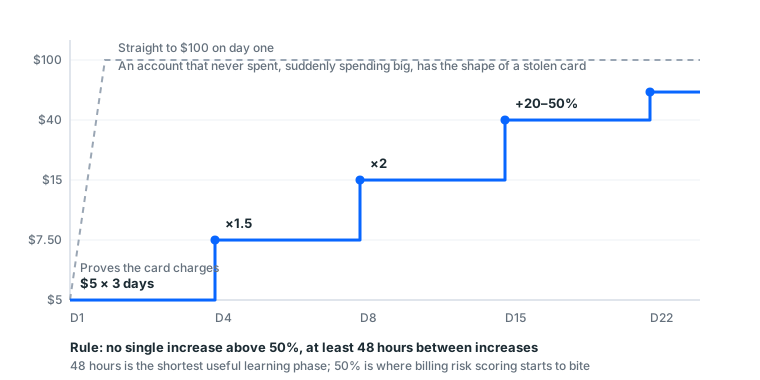
Why 50% and why 48 hours
Neither number is folklore. There are two separate mechanisms behind them.
50% is a billing-risk threshold. Ad systems apply a very intuitive test to new accounts: an account that has never spent suddenly wanting to spend $500 a day has, in billing-risk terms, the same shape as a stolen card. The system does not need to decide whether you are a good person. It only needs to decide whether the money is collectable. A gradually rising spend curve looks like normal business expansion. A vertical one looks like somebody got hold of a payment method that is not theirs.
48 hours is the length of the learning phase. Every significant change to an ad set re-enters learning. That covers a budget change past a certain proportion, an audience edit, or a major creative swap. Once it restarts, and the system has to work out who to show the ad to all over again. Change it again before learning finishes and the system is permanently probing, so cost never settles. Forty-eight hours is the minimum time for the previous change to produce enough data to judge.
What ramping too fast actually looks like
Not a dramatic instant ban. In practice these appear in order, and each one is a warning:
- Spend pacing goes strange. Budget unchanged, but the day's spend completes within a couple of hours. Or the reverse: only 10% of budget spent all day.
- Rejection rate rises. Two or three creatives that would previously have passed start getting rejected.
- Billing-related verification prompts appear, such as being asked to re-confirm the payment method.
- The spending limit is lowered, or drops to zero.
- The ad account is disabled.
Anything from 1 to 3 means stop. Hold the current budget for three to five days and change nothing. Most anomalies pass on their own. Continuing to scale during one is the standard procedure for turning a small problem into a permanent ban. Full detail in the gradual scaling curve.
Cost structure, meaning how to read CPM, CPC and ROAS, is in how Facebook ad costs are calculated.
6. The three places things go wrong
① No environment isolation. One browser profile holding several accounts means A's problem reaches B.
② Scaling too fast. See above.
③ No backup. Accounts die; there are no exceptions to this, only whether you have a second one ready that day. Share the BM and ad account with a second Facebook account as admin ahead of time. It is a built-in platform feature, and it changes everything on the bad day. See what to do at a checkpoint.
The fourth place: creative that keeps crossing the line
The first three are operational. This one is about content, and it is the only category where buying a more expensive account changes nothing.
Some things in Meta's ad policies will not pass regardless of how clean the account is: exaggerated earnings claims, copy that targets a reader's health condition or physical characteristics, unauthorised use of somebody else's brand or likeness, and implying platform endorsement. If your rejection reason is repeatedly the same category, the account is not the problem.
The test is simple: run the same creative on three different accounts. Rejected on all three, it is the creative. Rejected on one, it is that account.
The fifth place: the landing page
Ad review actually opens your link. These get rejected, and the rejection reason will usually not tell you the landing page was the issue:
- The page does not load, 404s, or takes more than ten-odd seconds
- The mobile layout is broken enough that you cannot tell what is being sold
- The page is about something different from the ad copy
- The page makes claims the ad copy did not
Click your own URL after pasting it, on a phone. That one second saves half a day of debugging.
6b. Following along: a $5 first ad
Everything above is principle. This section is what actually happens when you run one. Assume you already have a Page, a BM and an ad account with a card attached.
Day 0: building it
Open facebook.com/adsmanager and hit Create.
Pick Traffic. Name it 2026-08_test_traffic. Next.
At ad set level: conversion location Website. Daily budget $5. No end date. Audience: your country, 25–45, all genders, two interests you are confident relate to the product. Placements: Advantage+. Watch the audience size estimate on the right. Under 500,000, remove one interest.
At ad level: select your Page. Upload one 1080×1080 image. Get the point across in the first two lines of primary text. Headline under about 25 characters. Button: Learn More. Paste the URL, then open it on your phone yourself.
Hit Publish. Status becomes "In review".
How long this takes: about ten minutes once familiar. Maybe half an hour the first time, most of it spent finding the Page and adjusting audience size.
Day 1, morning: three numbers
Still "In review"? Wait. Past 24 hours, go look at Account Quality.
"Active"? Look at these three columns and ignore everything else:
| Column | The question | What wrong looks like |
|---|---|---|
| Amount spent | Did it get near $5 | $0.30 = audience too narrow or bid too low |
| Impressions | Are there thousands | Only dozens = same as above |
| Link CTR | Is it above 0.5% | Below 0.3% = the creative is not landing |
Day 1 has exactly one purpose: confirming the money goes out and somebody clicks. Do not judge cost. One day of data cannot tell you anything about cost.
Days 2 to 3: change nothing
The most counter-intuitive step, and the one most people fail.
Ads need the learning phase to stabilise. Deciding on day one that cost is too high and changing budget, then audience, then creative, restarts learning every time, and cost never comes down.
For the first three days do one thing: look at those three numbers every morning and write them down. After three days you have a curve, and a curve is what you can actually judge.
Day 4: the first judgement
Three days done, roughly $15 spent. Now calculate one number:
Cost per link click = total spend ÷ total link clicks
| This number | Means | Next |
|---|---|---|
| Within a range you can live with | The route works | Start the ramp in §5 |
| Clearly too high | Creative or audience is off | Change the creative first, not the audience |
| Spend stuck at zero | Audience too narrow, or still in review | Recheck audience size and delivery status |
| Ad rejected | Landing page or creative crossed a line | Read the rejection reason, see §6 |
Why creative before audience. Creative moves CTR far more than small audience adjustments do, and CTR sits in the denominator of the cost formula, so changing it has the most direct effect. It also disturbs the learning phase less than an audience edit.
What this ad actually produced
Not orders. Four facts you did not previously have:
- Whether your card charges cleanly
- Whether your creative passes review
- Whether your landing page is usable on a phone
- Whether your audience clicks
Any one of those coming back "no" is something you now know before spending real money. That is what the $15 bought.
6c. Creative specs and review in practice
Creative is the one variable a more expensive account cannot rescue, so it gets its own section. Before making any, open the Ads Library and look at the longest-running ads in your category: those are structures someone else has paid to validate, and they beat any template.
Sizes
| Placement | Recommended | Ratio |
|---|---|---|
| Feed (most universal) | 1080 × 1080 | 1:1 |
| Feed (portrait, more screen space) | 1080 × 1350 | 4:5 |
| Stories / Reels | 1080 × 1920 | 9:16 |
| Video | Under 15 seconds, something in the first 3 | As above |
Preparing only one set? Make it 1080×1350. It takes the most vertical space in feed and still reads when cropped to 1:1. For the Reels placement, the video length limits and the safe zone where the bottom 35% gets covered by buttons are covered in Instagram Reels length and ad specs.
What actually gets rejected
Rejection reasons are written vaguely ("does not comply with advertising policies"). Here is what they usually mean in practice:
| The stated reason | Usually means |
|---|---|
| Does not comply with advertising policies | Landing page will not open, or the creative overclaims |
| Personal health and appearance | Copy targets the reader's body ("your belly", "your acne") |
| Misleading claims | Earnings or efficacy promises, "guaranteed", "100%" |
| Intellectual property | Someone else's brand name, logo or a celebrity photo |
| Low quality or disruptive content | Landing page heavy with ads, pop-ups, auto-downloads |
Text on images: the hard 20% rule is gone, but heavy text still affects delivery cost. Keeping image text under about a fifth of the frame is the safe practice.
After a rejection
- Read which category the reason names
- Fix that one thing, not the whole set
- Resubmit the same ad; do not duplicate it into a new one, which accumulates rejection records
- Same creative rejected twice in a row: change the creative, stop appealing
How to tell creative from account: submit the same creative on another account. Rejected on both, it is the creative. Rejected on one, it is that account.
6d. Things that only bite non-US advertisers
These rarely appear in English tutorials, and they cost real money.
Pick your actual time zone, not UTC
The ad account's time zone decides when a day closes. On UTC, your "today's spend" resets at a time that has nothing to do with your working day, and you convert in your head every time you read a report. And it cannot be changed after creation.
Local currency or USD
| Local currency | USD | |
|---|---|---|
| Billing | Direct, no conversion | Bank adds a foreign transaction fee, typically 1.5% |
| Reconciliation | Easy | Depends on the rate that day |
| Budget units | Minimum thresholds are in local currency | Numbers you are used to comparing |
There is no right answer, but keep one business entity consistent. Half your accounts in one currency and half in another makes any consolidated view painful. Currency is also locked at creation.
Payment methods
Locally issued credit cards usually attach fine, with two caveats:
- Some banks default to declining "overseas e-commerce". If the first attempt fails, call the bank before assuming the account is at fault
- The cardholder details should be broadly consistent with the region you operate in. Do not attach a card from a country unrelated to the account
Invoices and accounting
Meta ad receipts download from the Billing page. Two things people ask constantly:
- The issuing entity is usually one of Meta's overseas entities, not a local company
- What downloads is a receipt, which is not the same as a locally compliant tax invoice in many jurisdictions
This runs into tax classification, and accountants handle it differently. That is outside what we can advise on. Ask yours.
7. What you actually need to buy
Everything above is process. This section is procurement. It is the part people ask about most and get wrong most, because the terminology in this market is a mess.
First, work out which layer you are missing
| Your symptom | What is missing | What to buy |
|---|---|---|
| Your own account is restricted, or you do not want to risk your main one | Personal account | Aged / once-cleared / twice-cleared |
| Cannot open a second ad account | BM | BM3 / BM50 |
| No Page to select at the last step | Page | New or aged Page |
| Ad account creation keeps failing | Ad account | Ad account |
The most overlooked one is the Page. Most "ad account" products bundle a personal account and an ad account only, with no Page, and without a Page the route does not connect.
What this market actually charges
Below is the real distribution in our catalogue right now (145 display groups, 36 of them Facebook-related), not market rumour:
| Type | Groups | Price band (USDT) | Median |
|---|---|---|---|
| Personal account | 15 | 4 – 50 | 10 |
| Aged account | 5 | 4 – 20 | 13 |
| Page | 4 | 8 – 80 | 80 |
| Self-registered | 4 | 4 – 8 | 4 |
| Cloned | 3 | 4 – 10 | 8 |
| BM | 2 | 10 | 10 |
| Ad account | 2 | 4 | 4 |
Two conclusions you can act on.
First, the personal-account band (4 to 50 USDT) is wider than the Page band, because the words "personal account" cover both a three-day-old blank profile and an account that has been through two restriction clearances. That is a tenfold spread. Ask about registration year and clearance history rather than trusting the word "aged".
Second, a BM costs 10 USDT and has exactly one price point. Plenty of beginners assume BMs are expensive, put off buying one, and stay stuck at a single ad account. A 10 USDT item is not worth hesitating over.
What warranties actually look like
Almost nobody discusses this, and it decides whether you get your money back on a defective item. Warranty distribution across our 145 groups:
| Warranty we commit to | Groups | Share |
|---|---|---|
| 1 hour (first login only) | 120 | 82.8% |
| 36 hours | 15 | 10.3% |
| 24 hours | 1 | 0.7% |
| No after-sales at all | 9 | 6.2% |
Over 80% of items cover first login only. That is the market's standard line, not one vendor being stingy. The reason is practical: once you are logged in, the seller cannot verify what happened.
The genuinely important number is the 6.2% with no after-sales. Those are usually the cheapest batch, and you should treat them as consumables rather than assets. Our own rule: an item with no after-sales and a price above 30 USDT does not get listed automatically, because that combination is a bad deal for the buyer.
Stock depth tells you whether a price is real
The most useful and least discussed test. We measured cost distribution across every self-operated upstream item:
| Stock tier | Median cost |
|---|---|
| 1–9 units (not a real source) | 12.79 USDT |
| 10–99 units | 3.99 USDT |
| 100–999 units | 2.52 USDT |
| 1,000+ units (a real source) | 1.14 USDT |
An 11× difference in median cost. Single-digit stock usually means "we go and source it when somebody asks", so the price is arbitrary and uncompetitive. Four-digit stock is what is genuinely being produced at volume.
For a buyer: shallow-stock items are usually poor value and supply is unreliable. Our catalogue only auto-lists items with 100+ units in stock; currently 89 groups are graded A and 56 graded B.
Whether a bundle is worth it: do the arithmetic
Ignore "save 30%" claims. Compare the sum of the parts against the bundle price:
| Bundle | Bundle price | Parts total | Actual saving |
|---|---|---|---|
| First run | 39 USDT | 48 USDT | 9 USDT (18.8%) |
| Account died again | 49 USDT | 62 USDT | 13 USDT (21.0%) |
| Local market | 89 USDT | 108 USDT | 19 USDT (17.6%) |
| Steady running | 129 USDT | 143 USDT | 14 USDT (9.8%) |
The steady-running bundle has the smallest discount (9.8%) but contains the most expensive items. A low discount percentage does not mean poor value. What matters is which pieces you were going to buy anyway. If you only need two of them, buying separately is cheaper.
8. If you need to buy accounts, read these in order
- Get your device and network right before buying
- Which account type fits which situation: what budget calls for what
- Six things to know before buying a Facebook account: including risk and how to read a warranty
- Acceptance SOP: the 30-minute checklist after delivery
Rhythm after the account arrives
Buying is not the end. These four, in chronological order after you receive credentials:
- What to do in the first hour: your acceptance window is inside that hour
- How to use a 2FA key: where most people stall, and it takes thirty seconds
- The first seven days: from "it logs in" to "it can run ads"
- How Meta policy changes affect survival: telling a wave from your own mistake
Which BM to buy: BM3 vs BM50 vs BM250 and what the number means. It is an ad account count, not a spend limit.
8b. Which columns to watch in week one
Ads Manager gives you a dozen-plus columns by default, and watching all of them in week one only produces premature judgements. This section sorts them into three groups.
The three to check daily
| Column | What it answers | When to act |
|---|---|---|
| Amount spent | Is money going out | Far below budget means audience or bid problem |
| Cost per result | What one result costs | Three days well above your break-even |
| Link CTR | Is the creative landing | Below 0.3%, change creative |
Cost per result is the fastest single judgement of an ad. It already multiplies CPM, CTR and conversion rate together; every other column is just explaining why that number is high or low.
The three to check weekly
| Column | What it answers |
|---|---|
| CPM | Whether the auction environment moved. Compare to your own last week, not to somebody else |
| Reach vs impressions | The ratio is frequency. Above 3 usually means the audience is wearing out |
| Ad relevance rankings | Whether the system thinks your creative fits this audience. Consistently low means wrong creative |
What not to look at in month one
Brand awareness lift, video view percentages, breakdowns of individual engagement types. They only mean something once you have stable delivery. In month one they generate anxiety and over-adjustment.
A practical diagnostic order
When cost rises, check in this order rather than changing things at random:
- Did CPM move? Yes → it is the auction environment or account quality, not your creative. Observe for three days.
- CPM flat but CTR dropped? → Creative fatigue. Change creative.
- CPM flat, CTR flat, but cost per result high? → The problem is the landing page or the product, not the ad.
These three steps eliminate most blind fiddling. The most common error is swapping creative when CPM went up, which achieves nothing because that was never the problem.
8c. Five myths that cost money
These circulate widely and each one will waste your budget.
"More expensive accounts are harder to ban." Not true. Price buys starting trust and expected lifespan, not immunity. Operate a twice-cleared account the way you would a blank one and it may die faster, because an account that has been restricted before sits at a lower threshold. What actually determines survival is environment isolation, scaling rhythm and creative. Fix those three and a cheap account lasts a long time.
"Bigger BM is better." The number after BM is a cap on ad account count and has nothing to do with how much you can spend. A beginner buying BM50 has bought 47 slots they will never use. Our catalogue has BM at a single price point of 10 USDT. Put the difference into a backup aged account instead.
"A tighter audience saves money." Backwards. Too small an audience means the learning phase never completes and cost stays elevated. The practical floor is an audience size estimate of 500,000.
"Upload ten creatives at once to see which wins." New accounts get stricter review, and a batch of rejections makes your account's rejection rate look bad, which feeds into later delivery. Upload one or two, and add more once they pass.
"If it gets disabled, just appeal more times." Two rejected appeals on the same ad account means further appeals are usually pointless, especially during a policy-driven enforcement wave. Switching to another ad account is more efficient than grinding. An aged account is a little over ten dollars; two hours of your time costs more.
8d. Full checklist before you start
Print it or save it, and tick each line before your first run.
Assets
- A dedicated Page (not your brand Page)
- Your role on that Page is Admin, not Editor or Moderator
- The Page is added to the BM
- There is an ad account under the BM
- The ad account's time zone is correct
- The ad account's currency is correct and consistent with your other accounts
- Payment method attached, and one small charge has already succeeded
- BM and ad account shared with a second Facebook account as admin
Environment
- One browser profile per account
- Stable network, matching the account's region
- 2FA key configured (you can confirm the key is valid with our generator)
- A tracking sheet: account, purchase date, region, purpose, status
Creative
- One or two creative sets, not more
- 1080×1350 or 1080×1080
- Image text under about a fifth of the frame
- The point made in the first two lines of copy
- Landing page opens, and you have clicked it on a phone
- Landing page is about the same thing as the ad copy
Mindset
- I know the first ad is verification, not revenue
- I am prepared to change nothing for three days
- I have worked out my break-even ROAS
Anything unticked, fix that first. Pushing ahead with pieces missing only generates error messages you cannot interpret.
9. Quick glossary
| Term | In plain terms |
|---|---|
| BM | Business Manager, the container holding ad accounts and Pages |
| Ad account | The unit money actually leaves from, with its own spending limit |
| Page | The identity ads publish under. Mandatory |
| Pixel | Tracking code on your site that reports conversions |
| CPM | Cost per thousand impressions |
| CPC | Cost per click |
| CTR | Click-through rate, clicks divided by impressions |
| ROAS | Return on ad spend, revenue divided by ad spend |
| Learning phase | The period the system probes the audience; major edits restart it |
| CBO | Campaign Budget Optimisation, automatic budget distribution |
| Placement | Where the ad appears: feed, Stories, Reels and so on |
| Once/twice cleared | An account previously restricted and released once or twice |
| Checkpoint | The platform requiring verification before you can continue |
| Account Quality | The ad account's violation record page, where disable reasons appear |
10. Common problems, quick lookup
| Symptom | Usually | Section |
|---|---|---|
| No Publish button | No usable Page | §3 |
| Ads keep getting rejected | Landing page or creative crossing a line | §6 |
| Spend is zero | Audience too narrow, bid too low, or still in review | §4 |
| Cost suddenly doubled | New auction environment, observe three days | §5 |
| Spending limit stuck | Not enough payment history | §5 |
| Page will not add to BM | You are Editor not Admin, or it belongs to another BM | §4 |
| Wrong currency, already created | Cannot be changed, open a new one | §4 |
| Account keeps asking for verification | Network region keeps moving | Device and network |
Still unsure what to buy after all that? Start with the smallest combination: an aged account, a BM3, and an aged Page. That covers nine out of ten situations and is cheap enough that losing it does not hurt. Once you know which layer you actually get stuck on, upgrade that layer specifically.
Once the accounts are in place and you want to learn the whole process end to end, RedClaw Academy runs a Meta ads course. The first chapter of the basic level, Start here, is free and covers the course map, the reading order and what to prepare.
Sources (all official pages, checked 2026-09-08). Prices, catalogue distributions and warranty ratios in this article are our own catalogue and ticket data, not taken from these pages:
- Ads Manager — Meta for Business — facebook.com
- About the learning phase — Meta Business Help Centre — facebook.com
- How much it costs to advertise on Meta — Meta Business Help Centre — facebook.com
- How the ad auction works — Meta Business Help Centre — facebook.com
- The ad review process — Meta Business Help Centre — facebook.com
- Advertising Standards — Meta Transparency Center — transparency.meta.com
- Meta Pixel documentation — Meta for Developers — developers.facebook.com
FAQ
Do I really need a Facebook Page to run ads?
Yes. Meta ads are published as a Page, not as a person. It is a hard requirement, not an upsell. Without a Page, Ads Manager will not let you publish.
Are Ads Manager and Business Manager the same thing?
No. Business Manager (BM) is the container that holds your assets, ad accounts, Pages, pixels, people and their permissions. Ads Manager is the interface where you actually build and monitor ads.
What is the minimum budget for a first run?
There is no technical floor, but in practice start at about $5 a day for three days. The point is not performance; it is proving the charge goes through and the creative passes review.
Why is the spend limit on a brand-new ad account so low?
Limits grow out of payment history. The platform wants to confirm the money is collectable before it loosens anything. Pushing too fast trips risk controls instead.
What is the difference between Ads Manager and boosting a post?
Boosting is the stripped-down version. You get coarse audience controls, no conversion optimisation, and no placement control. Ads Manager lets you pick the conversion event, control placements and run proper tests. For the same money, boosting is usually more expensive per result.
Can I run ads from a personal account without a BM?
Technically yes, every personal profile comes with an ad account. But the moment you need a second ad account, want to work with someone, or want assets isolated from each other, you need a BM. Start with one.
How long does ad review take, and when is it too long?
Usually minutes to a few hours. Past 24 hours and still in review, the problem is normally at account level rather than with that one ad. Checking Account Quality beats waiting.
Why is my ad spending zero?
Three usual causes: the audience is too narrow, the bid is too low to win any placements, or the ad is still in review. Check the delivery status first, then the audience size estimate.
How many Pages can one ad account advertise for?
Technically several, but one Page per ad account is the practical standard. The layers are linked in the platform's records, so a reported Page draws attention to the ad accounts attached to it.
Should budget go on the campaign or the ad set?
Ad set, for a first run. Campaign Budget Optimisation redistributes spend automatically, which adds a variable you cannot see. You will not be able to tell a weak creative from an ad set the system simply starved.
Can a disabled account be recovered?
Depends which kind. Requests for a verification code usually clear. Requests for a government ID cannot be solved by anyone, because you do not hold the registrant's documents. Triage matters more than heroics.
Can I change the time zone or currency later?
No. Both are locked when the ad account is created. Choosing wrong means opening a new account. Time zone decides when a "day" resets; currency decides your billing.
What is a normal CPM?
There is no universal number. It swings with region, vertical, season and competition. The only comparison worth making is against your own CPM last week.
Do I need a pixel before my first ad?
Not for the first one. Pixels serve conversion and sales objectives, and your first ad should use the traffic objective, which needs nothing but a working landing page. Install the pixel once you know the route works.
How long should a purchased account warm up before running ads?
Seven days. Log in daily, increase activity gradually, only open Ads Manager around day six, and only attach payment after day seven. Skipping the week raises the failure rate.
Ready to start?
See the catalogRead next
Meta Ads Library: How to Search It, Read It, and Reverse-Engineer a Competitor's Ads (2026)
Most guides stop at what the Ads Library is. This one covers what to d
What Is Facebook Ads Manager? Interface Tour and First Setup
Ads Manager is Meta's console for building, running and monitoring ads
What Is BM in Facebook Ads? Business Manager, BM3 and BM50
BM is the container your ad assets live in, not the place you run ads
What is an ad account? How personal accounts, ad accounts, BMs and Pages relate
Four things get talked about interchangeably, but they are four separa
Facebook ad setup: from zero to your first live ad
Step by step, with a suggested value for every field. Follow it and yo
How Facebook ad costs work: CPM, CPC and ROAS unpacked
Ad cost is not one number. It is a chain of ratios multiplied together
Six things to know before buying a Facebook account
This market runs on serious information asymmetry. Here are the questi
Get your device and network right before buying
Nine times out of ten, an account that dies on first login is an envir
Cookie Login for Bought Accounts: AdsPower or No Software
"The seller says \"use the cookies to log in\" and stops there. This c
Account types and when to use each one
Blank, aged, once-cleared, twice-cleared, cloned, ad account. Plenty o
Facebook Ad Account Disabled? Work Out Which Ban You Actually Have
"Disabled" is at least five different states inside Meta's system, and
How to Get Blue Tick on WhatsApp Business (and Why Most Fail)
Three things decide whether you get it, and only one of them is paperw
Advertiser and Payer Verification for Taiwan Ads (September 2026)
The Page-level entry point is gone, and a verification no longer carri
Personal Account, Page, BM, Ad Account, Developer Account: One Map of What Hangs Off What
These terms get used interchangeably, but there is only one root. This