What to do when an account hits a checkpoint
Triage before deciding whether to invest time. A request for a verification code usually clears. A request for identity documents cannot be passed by anyone. What saves time and money is not knowing how to rescue an account; it is deciding quickly that it cannot be rescued.
Work out which kind you are looking at first. Some clear once you verify, some cannot be passed by anyone. Recognising the difference saves a lot of time and money.
First, what this piece does not contain: nothing about getting around verification. Verification is the platform's security mechanism. Getting around it is neither achievable nor something to attempt. What this covers is telling which kind you are facing, what to do about each, and when to stop.
In practice, what saves time and money is not knowing how to rescue an account. It is deciding quickly that it cannot be rescued.
1. Triage first
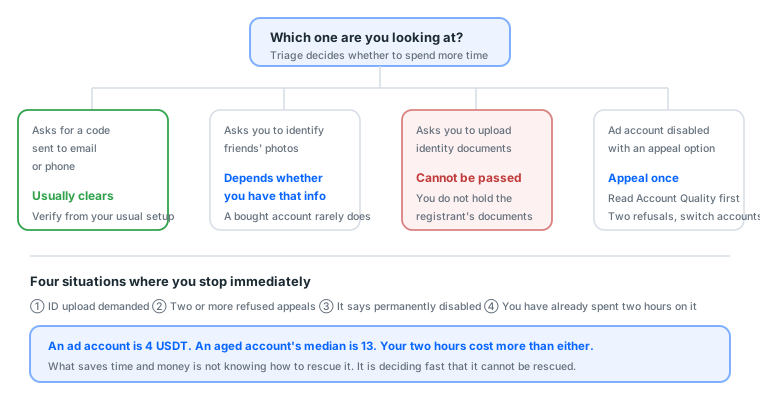
| What you see | Type | Can it clear |
|---|---|---|
| Enter a code sent to email or phone | Ordinary verification | ✅ Usually |
| Identify photos of friends | Ordinary verification | 🟡 Only if you have that information |
| "Confirm it is you" plus an ID upload | Identity verification | ❌ You do not have that person's documents |
| Ad account disabled, appeal available | Account level | 🟡 Appealable, depends on the reason |
| Account permanently disabled | Terminal | ❌ Not worth attempting |
Triage decides whether to keep investing time. The ID upload kind cannot be solved by anybody, because you do not hold the registrant's identity documents, and forging one is a criminal matter rather than a technical one.
A checkpoint and a disable are different things
The words get used interchangeably; the handling is completely different:
| Checkpoint | Disable | |
|---|---|---|
| Account state | Still there, pending verification | Closed |
| What you see | A verification page | "Your account has been disabled" |
| Recovery odds | Depends which verification | Depends on the reason |
| Route | Complete the verification | Appeal |
A checkpoint is "prove who you are before continuing". A disable is "we already decided to close it". The first is usually recoverable; the second depends on why.
Why identifying friends' photos is fatal for a bought account
The logic of that step is that the platform assumes an account's real owner recognises their own friends.
On an account you bought, you do not know a single one of them. This is one of the most common dead ends, and there is no way to prepare for it, because you cannot know in advance whether it will appear.
In practice: when you hit it, check whether it can be skipped (some offer "use another verification method"). If it cannot be skipped and you cannot guess, that account ends there.
2. The kinds you can handle
Code requests
- Confirm you have access to that email (credentials usually include it)
- Confirm the 2FA key is configured correctly (see how to use a 2FA key, or check validity with the 2FA generator)
- Verify from the environment you normally log in from, not a different computer or a different country
The last point is where most people go wrong. The instinct is "let me try a clean environment", which is exactly backwards: verifying from an unfamiliar environment triggers more security mechanisms and makes things worse.
Three reasons a code does not arrive
| Situation | How to tell | What to do |
|---|---|---|
| You cannot log into the email in the credentials | Try logging into that mailbox | Open a ticket; that is a credentials problem |
| The code goes to a phone number you do not have | Look at the last digits shown in the prompt | Most bought accounts are this; switch accounts |
| You have the email but no message arrives | Check the spam folder | Wait ten minutes and retry |
The second is both the most common and the most hopeless. The phone number bundled with a bought account is usually not one you can receive SMS on, so if verification only offers SMS, that account is finished.
A disabled ad account
Open the Account Quality page for the reason, then:
- Creative violation: fix the creative and appeal normally. Common, and the success rate is not bad
- Payment problem: resolve the payment method before appealing
- No reason given, or "does not comply with advertising policies": appeal once, and switch ad accounts if refused. Repeatedly appealing the same account rarely works
What to write in an appeal: short, specific, factual. State what you are promoting and what you changed. No long narratives, no repeat submissions.
What an effective appeal looks like
Three paragraphs, one or two sentences each:
I am promoting [specific product or service] at [URL].

I have amended the rejected creative, removing [specific items,
for example guarantee language, or copy referencing body
characteristics].

Please review again.
What not to write: how long you have been trading, how hard this has been, why you think the review system is wrong, who you will sue. The reviewer sees hundreds a day and wants to know whether the issue was fixed, not what your circumstances are.
3. When to give up
Any of these, stop investing and switch:
- ID upload demanded
- Two or more refused appeals
- The account says "permanently" disabled
- You have already spent two hours on it
An aged account costs a little over ten dollars. Your two hours cost more. A beginner's biggest money pit is not the price of accounts. It is time spent on accounts that were never coming back.
The arithmetic
A standalone ad account is 4 USDT in our catalogue; an aged account's median is 13 USDT.
Say your time is worth about 15 USDT an hour:
| Choice | Cost | Success rate |
|---|---|---|
| Two hours trying to save an account | About 30 USDT of time | Uncertain |
| Just buying another ad account | 4 USDT | 100% |
| Just buying another aged account | 13 USDT | 100% |
Two hours of rescue costs as much as seven ad accounts. And rescue has an uncertain success rate, while buying has a certain one.
This is not an argument against valuing accounts. It is an argument for making "when do I stop" a calculated decision rather than an emotional one.
The one thing to do before giving up
Pull the data out. Audience settings, pixel ID, the creative and copy that performed, the results. None of that disappears with the account, provided you saved it.
If you already separate assets from accounts, this takes thirty seconds. If you did not, what you lost is not a ten-dollar account. It is three months of accumulation.
Whether you can extract it depends on having a second admin identity. Which is the next section.
4. Preparing beforehand: this is the real subject
Checkpoints are inevitable, so what actually works is preparation rather than emergency response.
1. Share assets with a second account in advance
Share the ad account, the BM and the Page with your other Facebook account as admin. A collaboration feature the platform provides, used normally.
When the original account is stuck at a checkpoint, from the second identity you can:
- See the ad account's actual status and billing
- Extract audiences, pixel settings and creative
- Keep managing without touching the original account
It costs nothing and is worth a great deal on the bad day. Experienced buyers all do it; beginners mostly do not know about it.
The role must be Admin, not Advertiser
| Role | Build ads | Change budget | See billing | Add people | Move assets |
|---|---|---|---|---|---|
| Admin | ✅ | ✅ | ✅ | ✅ | ✅ |
| Advertiser | ✅ | ✅ | ✅ | ❌ | ❌ |
| Analyst | ❌ | ❌ | ✅ | ❌ | ❌ |
The last column is the difference. With Advertiser, the second identity cannot move assets out when the original is stuck, which defeats the purpose of having one.
This has to be done beforehand
Once the account is stuck you cannot share permissions, because you can no longer get in.
The practical habit: every time you open a new ad account or BM, adding a second admin is the first thing you do, at the same level of routine as attaching a payment method. Not "when I get around to it".
2. Keep credentials and records
- Account, purchase date, region and purpose, in one sheet
- 2FA key backed up separately (see how to use a 2FA key)
- Ad audiences, pixel IDs and creative all stored outside the account
What to store
| Data | Where | Why |
|---|---|---|
| Account list | A spreadsheet | Past three accounts you will not remember |
| 2FA keys | Password manager plus one offline copy | Losing the key means losing the account |
| Audience settings | Screenshot or text | No re-guessing when you switch accounts |
| Pixel ID | The tracking sheet | You reconnect it on the new ad account |
| Creative that performed | Your own cloud storage | The account goes, the images stay |
| Performance baseline | A spreadsheet | The only asset here that appreciates |
The last is the most overlooked. Your CPM range, average CTR and cost per result are numbers you paid to learn, and they live in no account. They live only in your sheet.
3. Always have the next one ready
Do not wait until something breaks. One half-warmed spare on hand at all times is basic equipment in this business.
The reason is that warming up takes seven days. Buying on the day something breaks means seven days before delivery resumes, and those seven days earn nothing.
| Your daily budget | Suggested backup |
|---|---|
| $5–30 | One half-warmed |
| $30–100 | One fully warmed |
| $100+ | Two fully warmed, plus a backup Page |
4b. The first thirty minutes after it happens
This section is for when you are already stuck and starting to panic. Follow the order; do not skip.
First 5 minutes: stop and look properly
The most important thing: do not keep retrying.
Repeated password attempts, repeated refreshes and switching devices all make it worse:
| What you do | Consequence |
|---|---|
| Retype the password repeatedly | Accelerates lockout |
| Refresh the verification page repeatedly | Some verifications have an attempt limit |
| Try a different device or network | Triggers more security mechanisms |
Screenshot first. The full screen, including the address bar and the prompt text. The screen changes; evidence does not.
Minutes 5 to 10: triage
Compare against the table in §1 and identify which kind you have.
Triage produces exactly two conclusions: "might clear" or "will not clear". There is no middle value, and do not drag it out on "maybe if I try again".
Minutes 10 to 20: act on the triage
If it might clear: complete the verification from your usual environment. Check the spam folder for email codes.
If it will not clear: go extract data. Log in from the second admin identity and export audiences, pixel ID, creative and results.
Minutes 20 to 30: wrap up
| Situation | What to do |
|---|---|
| It cleared | Do nothing else with that account today; let it sit |
| Will not clear, inside warranty | Screenshot and open a ticket with the order number |
| Will not clear, outside warranty | Bring out the backup, and review your environment and rhythm |
"It cleared, now do nothing else today" is where most people go wrong. An account that just passed verification is still under observation, and changing details or raising budget right afterwards easily triggers another one.
What these thirty minutes are for
Not rescuing the account. Making a decision before the time and emotional cost run away.
The typical failure is three hours of repeated attempts, followed by switching accounts anyway. That three hours already cost several times the account itself, and delivery was stopped throughout.
5. What the warranty covers
| Situation | Covered |
|---|---|
| Disabled before shipping (disable date precedes ship date) | ✅ First-login category, unconditional |
| ID upload demanded at first login | ✅ First-login category |
| Wrong password, wrong 2FA key | ✅ First-login category |
| Disabled after you started using it | ❌ Post-login death, judged by the price tier's warranty hours |
| Disabled after you changed details | ❌ Not covered |
That line is the same across the market, because once you are logged in the seller cannot verify what happened.
Our catalogue's actual distribution
Across 145 display groups:
| Warranty we commit to | Groups | Share |
|---|---|---|
| 1 hour (first login only) | 120 | 82.8% |
| 36 hours | 15 | 10.3% |
| 24 hours | 1 | 0.7% |
| No after-sales at all | 9 | 6.2% |
Over 80% cover first login only. Which is why the warming-up guides are what actually saves you money: a warranty compensates you, whereas warming up means you never need to claim.
5b. What actually triggers checkpoints
Knowing why you get stopped is more useful than knowing what to do afterwards. Here are the practical causes, ordered by frequency.
The seven causes, most common first
| # | Trigger | Can you control it | How to avoid it |
|---|---|---|---|
| 1 | First login from a new device or environment | ✅ | One fixed profile per account |
| 2 | Network region jumping around | ✅ | A stable connection, not three countries in a day |
| 3 | A burst of activity in a short window | ✅ | Sit still after logging in; change nothing immediately |
| 4 | Changing the password or email | ✅ | Wait 3–7 days of stable use |
| 5 | Scaling too fast | ✅ | Never above 50%, 48 hours apart |
| 6 | Creative reported heavily | 🟡 | Stop crossing policy lines |
| 7 | A platform rule adjustment | ❌ | Unavoidable; only your exposure can be reduced |
You control the first five, and they account for the overwhelming majority. Only the seventh has genuinely nothing to do with you.
Why 1 to 3 usually appear together
They are usually one scenario: you just bought an account, logged straight in, changed details straight away, and started using it.
From the platform's side, that sequence reads as: an unfamiliar device logged into this account and immediately changed its core details. That is identical to what somebody who stole an account does.
The platform does not need to decide whether you are the owner. It only needs to recognise the sequence.
The correct approach is in the first hour with a new account: after logging in successfully, leave it alone for thirty minutes and change nothing that day.
The right timing for cause 4
Changing the password and email is not forbidden. It is a question of timing:
| When you change it | Risk |
|---|---|
| The day it arrives | 🔴 Highest |
| Days 2 to 3 | 🟠 Still elevated |
| After 3–7 days of stable use | 🟢 Acceptable |
| During any period of unusual signals | 🔴 Do not |
Changing the email is riskier than changing the password, because email is the primary account recovery route. Leave it alone if you can, and if you must, do it last.
Cause 6: creative report rate
Indirect but consequential. Heavily reported creative gets the Page restricted, and a restricted Page affects the ad accounts attached to it.
The test: if your rejection reason is repeatedly the same category (exaggerated earnings, body characteristics, brand infringement), that is not bad luck. The creative is crossing a line.
6. When it is not your fault
Sometimes a batch of accounts breaks on the same day and you did nothing wrong.
Three diagnostic questions
- Is it happening across several accounts at once? A single account is usually an operational problem. Several unrelated accounts on the same day is external
- Did I change anything recently? Budget, creative, audience, payment method, Page. Anything touched in the 48 hours before it broke is the first suspect
- Are other advertisers reporting the same thing? A lot of people with identical symptoms on the same day means it is at rule level
All three pointing outward means do not rush to change your operation. Adjusting things now only adds variables, and afterwards you cannot tell whether the wave passed or your changes worked.
Handling an enforcement wave
| Do | Do not |
|---|---|
| Lower budget, do not stop completely | Repeatedly appeal the same account |
| Pause scaling | Immediately buy a pile of replacements |
| Bring backups out and warm them | Believe anybody claiming to have a workaround |
| Write it down (date, symptom, scope) | Change five things at once |
"Do not immediately buy replacements" deserves emphasis. New accounts entering while rules are tight have the highest mortality. Waiting a week costs considerably less.
Full detail in how Meta policy changes affect account survival.
7. Six situations you will actually meet
One: a bought account demands ID at first login
First-login category, handled unconditionally.
Do: screenshot (address bar and error message included), open a ticket with the order number, one sentence of explanation.
Do not: attempt it with your own documents. That binds the account to your identity, a completely different risk category.
Two: checkpointed after three days of use
That is post-login, judged by the price tier's warranty hours.
Items under 20 USDT cover first login only, so this usually falls outside.
Do: triage first (code or documents). Clear it if you can, switch if you cannot, and review whether the environment or scaling rhythm caused it.
Three: the ad account is disabled but the personal account still logs in
That is account level, not identity level. The assets are all still there; only that one ad account is unusable.
Do: read Account Quality for the reason and decide between appealing and switching ad accounts. Do not appeal the personal account, which is a different thing.
Four: the BM is disabled
The ad accounts inside usually go with it, but the Page mostly survives.
Do: confirm asset status from the second admin identity. If the Page is intact, it can be attached to a new BM and carry on.
Which is why you do not stake everything on one BM. See what is Business Manager.
Five: three accounts disabled at once
Run the three diagnostic questions (§6). All three pointing outward means a rule-level wave: lower budget and ride it out rather than changing five things at once.
Six: the account says "permanently disabled"
Not worth attempting. Extract the data if you can, and switch.
Every further minute on that account is pure loss, and it crowds out the time you need to warm up the replacement.
8. Three things that reduce your exposure
None of them costs money, and together they matter more than account quality.
① Environment isolation
One separate browser profile per account. Chrome's built-in "Add profile" is enough; no software purchase needed.
One profile that has held several accounts means A's problem reaches B. The most common and most avoidable way to lose an account.
② Scaling rhythm
Never increase by more than 50%, and leave at least 48 hours between increases.
50% is a billing-risk threshold; 48 hours is the length of the learning phase. Full detail in the gradual scaling curve.
③ Creative that stops crossing lines
If your rejection reason is repeatedly the same category (exaggerated earnings, body characteristics, brand infringement), that is a creative problem rather than an account problem.
The test: run the same creative on three different accounts. Rejected on all three, it is the creative. Rejected on one, it is that account.
A more fundamental note
If you find yourself buying new accounts every month, the problem is not account quality. It is the operating model.
High account mortality usually traces to one of the three above. A more expensive account solves none of them. With those three solved, cheap accounts last a long time.
8b. Four myths that cost money
"Changing IP or computer clears a checkpoint." Backwards. Verifying from an unfamiliar environment triggers more security mechanisms. Use the environment you normally log in from.
"Appeal enough times and it goes through." During a policy enforcement wave, appeals rarely work. Two refusals and switching accounts is the cheapest option.
"A more expensive account will not get checkpointed." Price buys starting trust and expected lifespan, not immunity. A twice-cleared account operated the same way may die faster, because an account that has been restricted sits at a lower threshold.
"Being checkpointed means I did something wrong." Not necessarily. Run the three diagnostic questions in §6 first. Several unrelated accounts on the same day is rule level, unrelated to your operation, and adjusting your operation then only adds variables.
8c. Three wrong responses
All three feel reasonable and all three make things worse.
① Changing the password after being stopped
The instinct: "the password may have leaked, safer to change it."
In practice: an account that was just stopped is under observation, and changing the password then is the single most stolen-account-shaped thing you can do. And if you bought the account, changing the password converts "faulty credentials" into "buyer's action", a completely different warranty scope.
The right move: complete verification, use it stably for three to seven days, then consider changing it.
② Using your own documents to pass verification
The instinct: "it is just a verification, my documents will do."
In practice: that binds the account to your real identity. Anything that account does afterwards is associated with you, and the point of buying an account was usually to isolate risk.
The right move: the ID upload kind cannot be passed. Switch.
③ Buying a backup only after something breaks
The instinct: "buy it when I actually need it, save a bit now."
In practice: warming up takes seven days. Buying on the day means seven days before delivery resumes, and those seven days earn nothing.
At 30 USDT a day and ROAS 2, seven days of downtime is roughly 420 USDT, and a backup account's median price is 13 USDT.
The right move: keep one half-warmed account on hand.
9. The preparation checklist
For every new account (same level of routine as attaching a card)
- The ad account is shared with a second Facebook account as Admin
- The BM is shared with a second Facebook account as Admin
- The second identity also holds admin rights on the Page
- Account, purchase date, region and purpose are in the sheet
- The 2FA key is backed up to a second location
Monthly
- The second admin is still in the People list
- No unfamiliar accounts in the People list
- The backup account still logs in (long inactivity triggers re-verification)
- No payment method about to expire
- Audience, pixel ID and creative backups are current
Always
- One half-warmed backup on hand
- Assets are not all in one BM
- The brand Page is not being used for advertising
Every line here only works if done beforehand. Done afterwards, all of them are too late.
9b. How ready a backup needs to be
The piece says "keep a backup on hand". This section is about what counts as ready.
Four levels of readiness
| Level | Contents | Time to resume after a failure |
|---|---|---|
| None | Buy when it breaks | 7–10 days |
| Bought, untouched | An account with no warm-up | 7 days |
| Half warmed | 3–4 days in | 3–4 days |
| Fully warmed | Seven days done, card attached | Same day |
"Bought and untouched" is closer to "none" than you would think, because the seven days of warming up is the bottleneck, not the purchase.
Which level is worth it
Judge by downtime cost:
| Daily budget | Cost of a day down (ROAS 2) | Suggested level |
|---|---|---|
| $5–30 | $10–60 | Half warmed |
| $30–100 | $60–200 | One fully warmed |
| $100+ | $200+ | Two fully warmed, plus a backup Page |
Somebody spending $100 a day loses $200 per day down, and two fully warmed backups cost about 26 USDT. That ratio says everything.
Backup is not only about accounts
People prepare a backup account and forget the other three:
| What to back up | Why | Cost |
|---|---|---|
| Personal account | You need an identity that can get in when the main one is stuck | 10 USDT |
| Page | A restricted Page means nothing publishes | 80 USDT |
| Ad account | You need one ready to run when yours is disabled | 4 USDT |
| BM | One BM going down affects everything inside it | 10 USDT |
The Page is the most expensive and the most overlooked. It is also the only layer where not having one means no ads at all, so once your budget grows, a backup Page ranks above a backup account.
Backups must stay active
The most overlooked item: a backup untouched for three months may already need re-verification.
Suggested practice:
- Log into the backup account once a month and stay five to ten minutes
- Run a tiny budget through the backup ad account monthly (say $1 a day) to keep it active and building payment history
- Confirm quarterly that the backup's payment method has not expired
A few minutes a month buys "the backup actually works on the day". A backup with no upkeep is not a backup, and you find out at the worst possible moment.
10. Write your stop-loss as a number
The core of this piece, because it turns "when do I give up" from an emotional judgement into arithmetic.
First, what your time is worth
Your hourly rate = monthly income ÷ monthly working hours
If you do not know, use a conservative figure of about 15 USDT an hour.
Then, what an account is worth
At our catalogue's real prices:
| Item | Median |
|---|---|
| Ad account | 4 USDT |
| Personal account | 10 USDT |
| Aged account | 13 USDT |
| BM | 10 USDT |
| Page | 80 USDT |
The stop-loss is where the two cross
Stop-loss time = the item's price ÷ your hourly rate
| What you are rescuing | Price | Stop-loss (at 15 USDT/hour) |
|---|---|---|
| Ad account | 4 USDT | 16 minutes |
| Personal account | 10 USDT | 40 minutes |
| Aged account | 13 USDT | 52 minutes |
| Page | 80 USDT | 5 hours |
Most people find "an ad account is worth 16 minutes" startling, and the number is correct.
Spend more than 16 minutes rescuing a 4 USDT ad account and you are already down, before counting the opportunity cost of ads not running during that time.
The Page is the only one worth real time
Visible in the table: the Page's stop-loss is nineteen times the ad account's.
Which reflects the same thing as everything else here: the scarce item on this route is the Page, not accounts. So a Page problem is worth effort, and an account problem is faster to replace than to fix.
Adding opportunity cost
The calculation above misses one thing: while you rescue, ads are not running.
| Daily budget | Opportunity cost per hour (ROAS 2) |
|---|---|
| $10 | About $0.80 |
| $30 | About $2.50 |
| $100 | About $8.30 |
| $300 | About $25 |
At $100 a day, an hour of rescue costs 15 USDT of time plus 8.3 USDT of opportunity, which is 23.3 USDT. That already exceeds an aged account.
The larger your budget, the more decisive your stop-loss should be. That runs against instinct: people spending more tend to be more reluctant to abandon an account, and the arithmetic says the opposite.
How to use this
Calculate it before anything breaks, and write it into your sheet.
In the moment you are flustered, and you will neither calculate it nor want to. Having "ad account 15 minutes, aged account 50 minutes, Page 5 hours" written down in advance means you just follow the table on the day.
Next: the acceptance SOP, the thirty-minute checklist.
Sources (all official pages, checked 2026-09-08). Prices, catalogue distributions and warranty ratios in this article are our own catalogue and ticket data, not taken from these pages:
- My personal Facebook account is suspended or disabled — Facebook Help Centre — facebook.com
- How two-factor authentication works on Facebook — Facebook Help Centre — facebook.com
- Get verification codes with Google Authenticator — Google Account Help — support.google.com
- Community Standards — Meta Transparency Center — transparency.meta.com
- Meta Pixel documentation — Meta for Developers — developers.facebook.com
FAQ
Is there any way past an ID upload request?
No. You do not hold the registrant's identity documents, and forging one is a criminal matter rather than a technical one. Switch to another account.
How many times should I appeal a disabled ad account?
Once. Two refusals and you switch ad accounts. Repeatedly appealing the same account rarely works.
What can I prepare in advance?
Share the ad account, BM and Page with a second Facebook account as admin. It is a built-in collaboration feature, it costs nothing, and it is worth a great deal on the day something breaks.
What is the difference between a checkpoint and a disable?
A checkpoint means "verify before continuing" and the account still exists. A disable means the account was closed. The first is usually recoverable; the second depends on the reason.
Can I pass the identify-your-friends step?
Only if you have that information. A bought account usually does not, because you do not know those people. This is one of the most common dead ends when buying accounts.
How long does an appeal take?
Usually hours to days. Past a week with no result, treating it as failed saves time.
How should I write an appeal?
Short, specific and factual. State what you are promoting and what you changed. No long narratives, no repeat submissions.
How many times can one account be appealed?
Once. Further appeals rarely work, especially during a policy enforcement wave.
Why do several accounts sometimes break on the same day?
Usually a platform rule adjustment or an enforcement wave. The test is whether it is happening simultaneously across unrelated accounts.
Can I still recover my audiences and creative when locked out?
Yes, if you shared the assets with a second identity as admin beforehand. Without that, you cannot get in.
Will changing IP or device clear a checkpoint?
No, and it makes things worse. Verifying from an unfamiliar environment triggers more security mechanisms. Use the setup you normally log in from.
What happens to the balance in a disabled account?
It depends on the reason and the platform's determination; recovery is not automatic. Which is a reason not to prepay a large balance into one account.
Can I get a refund if an account demands ID at first login?
Yes. That is first-login category and the buyer cannot possibly pass it, so it should be handled unconditionally.
How many backups should I keep?
One half-warmed account on hand at all times is basic equipment. Two once you have volume.
How do I reduce the chance of being checkpointed?
Environment isolation, scaling rhythm, and creative that stops crossing policy lines. None of the three costs money, and together they matter more than account quality.
Want the parts this article talks about?
See the "account died again" bundleRead next
Running Facebook Ads: the complete path from nothing to your first live ad
The whole route on one page. From "where is Ads Manager" to "how do I
Facebook Ad Account Disabled? Work Out Which Ban You Actually Have
"Disabled" is at least five different states inside Meta's system, and
The gradual scaling curve from day eight
Budget is not whatever you feel like setting. Scale too fast and the s
Acceptance SOP: what to do in the first 30 minutes
One checklist. Finishing it is what counts as taking delivery. Miss th
What is an ad account? How personal accounts, ad accounts, BMs and Pages relate
Four things get talked about interchangeably, but they are four separa