How to use a 2FA key
That string of capitals and digits in your credentials is not a code. It is a TOTP key (a seed). Enter it manually into any TOTP app, choosing Time-based, and the app produces a fresh 6-digit code every 30 seconds.
What you received is not a code. It is the seed that produces codes. Understand that distinction and this topic is finished.
The highest-volume support question there is, and a short answer.
1. What you actually received
That string in your credentials that looks like noise, for example JBSWY3DPEHPK3PXP, is not a code. It is a TOTP key, the seed.
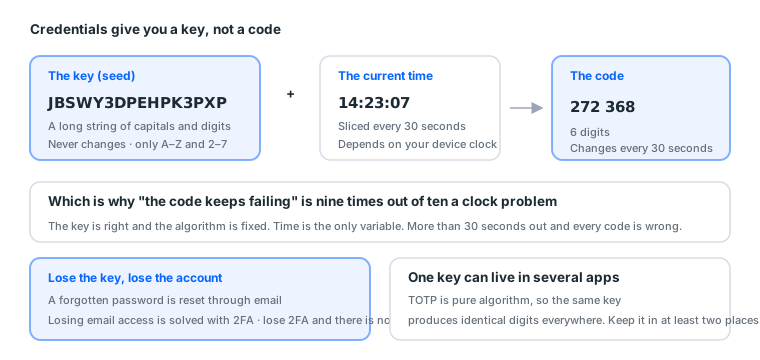
- A code: 6 digits, changing every 30 seconds
- A key: a long string of letters and digits, never changing
Your job is handing the key to a TOTP tool and letting it compute the current 6 digits.
In a hurry? Paste the key into our 2FA code generator and it produces the code. The whole thing runs in your browser and uploads nothing. For long-term use, still put it in an authenticator app.
How to spot it in the credentials
Credentials usually arrive as one undifferentiated string, and format tells you which is which:
| Field | Format signature |
|---|---|
| 2FA key | Only A–Z and 2–7, no 0, 1, 8 or 9, usually the longest field |
Contains @ |
|
| Facebook or BM ID | Eight or more digits, nothing else |
| Phone | Contains + or a separated digit string |
| What is left | Username and password |
"No 0, 1, 8 or 9" is the most reliable test. Base32 deliberately excludes those four characters, because they are easy to confuse with O, I, B and g.
So if the string you took for a key contains a 0 or a 1, it is something else. If you cannot tell, paste the credentials into the credential parser and it labels every field.
2. Thirty seconds of setup
Any TOTP app works (Google Authenticator, Microsoft Authenticator, 1Password, Bitwarden, Authy and others):
- Open the app → add account → choose enter a setup key manually (not scanning a QR code)
- Name it anything (the account name is a good choice)
- Paste the string into the key field
- Choose type Time-based
- Done. A 6-digit number appears and changes every 30 seconds
When login asks for a code, enter whichever 6 digits are showing.
Naming them
Past three accounts you will not remember which is which, so name them by a rule:
purpose-region-number e.g. main-tw-01, backup-us-02
Do not name them "Facebook". You will have several Facebook accounts, and giving them all the same name is the same as not naming them.
Differences between apps
| App | Cloud backup | Suits |
|---|---|---|
| Google Authenticator | Yes (tied to a Google account) | General use |
| Microsoft Authenticator | Yes | General use |
| 1Password / Bitwarden | Yes, stored alongside passwords | Recommended, because keys and passwords share one backup |
| Authy | Yes | General use |
TOTP is a standard algorithm and every app produces identical digits, so the choice does not affect the result. It only affects how convenient backup and management are.
A password manager is the better default, because it stores the username, password and 2FA key in one record. You never hit "I found the password but where is the key".
3. What to watch when pasting
- Delete every space. Some tools display keys in space-separated groups, and those spaces must go.
- No line breaks. Copying from our order page, select only that segment.
- Case does not matter (Base32 is case-insensitive), but paste it as given to be safe.
- Field order differs by product, and the 2FA key is usually the longest field containing only capitals and digits.
Three ways the paste goes wrong
| Error | Symptom | How to spot it |
|---|---|---|
| Spaces included | The app says the key is invalid | Delete every space and retry |
| Line break included | Same | Paste into a text editor and look for a break |
| Last few characters missing | The app accepts it, but every code fails | Count the characters against the original |
The third is the worst, because the app raises no error and you assume it is a clock problem and keep adjusting the time.
How to tell: paste the same key into the 2FA generator. If it produces the same digits as your app and login still fails, the key itself may have been truncated.
4. Codes keep failing: check the clock first
99% of "the key is right but the codes keep failing" is device clock drift. TOTP depends entirely on time, and more than about 30 seconds out means every code fails.
- Android and iOS: Settings → Date and time → enable automatic
- Google Authenticator has its own time correction feature; run it
- Desktop: confirm network time sync is enabled
Retry after syncing. Still failing? Open a ticket. That is a first-login category problem, handled unconditionally.
Why time is so decisive
TOTP's algorithm takes the key and the current 30-second window and computes from both.
code = algorithm(key, seconds since 1970 ÷ 30)
The key is fixed and the algorithm is fixed. Time is the only variable. So a device running a minute slow computes the code from two windows ago, and that code has already expired server-side.
The full troubleshooting order
Follow this in order without skipping:
| Order | Check | How |
|---|---|---|
| 1 | Device clock | Enable automatic time sync and retry |
| 2 | The app's time correction | Google Authenticator has it in settings |
| 3 | Whether the key was pasted completely | Cross-check with our generator |
| 4 | Whether you pasted the wrong field | Confirm the string has no 0, 1, 8 or 9 |
| 5 | All correct and still failing | Open a ticket, first-login category |
The first four take about five minutes and are all things you can do yourself. Clearing them before opening a ticket avoids a round trip out of your own warranty window.
5. Common misconceptions
"Can I delete the key? The account is already logged in." Do not. You will need it again when you change device, clear cookies, or are asked to re-verify. Losing the key means losing the account.
"Can one key live in two apps?" Yes. TOTP is pure algorithm, so the same key produces identical digits across apps. Keep it in at least two places.
"Can I switch to SMS verification?" You can, but not when the account is new. Changing a verification method is a high-risk action; schedule it after a week of stable use.
"There is no 2FA key in my credentials." Read the product description; not every product includes one. If it is not included and login demands 2FA, that is a description mismatch and grounds for a ticket.
"Are online 2FA generators safe?" It depends whether they send the key to a server. Ours computes in your browser, which you can verify by disconnecting: turn the network off and it still works. Anything that sends the key to a server is asking to hold your account.
6. Why the key needs two backups
The most important section here, because it covers the only irreversible mistake.
Three layers of recovery
An account's usual recovery routes:
| What you lost | What recovers it |
|---|---|
| The password | An email reset |
| Access to the email | 2FA verifying your identity |
| The 2FA key | No third route |
The key is the last line. A forgotten password is reset and lost email access is recovered with 2FA, but a lost key is genuinely lost.
And it is plain text, so backing it up costs essentially nothing: on paper, in a second password manager, in an offline file. Any of them works.
The suggested combination
| Primary | Backup |
|---|---|
| A password manager (stored with the credentials) | One offline text file or paper copy |
The two copies need to be in different places. Both on the same computer is not two copies, and the day that computer fails you lose both.
Do not keep it only in the authenticator app
A common approach with one problem: most apps do not let you export or view the key again.
You can compute codes with that app, but when you change phone, want a second app, or need to hand it over, the key is unreachable.
The right approach: store the key in a password manager the moment you receive it, then enter it into the app. In the other order you may never be able to retrieve the original key.
7. Four situations you will actually meet
One: credentials arrive and you cannot find the key
Use the format. The field containing only A–Z and 2–7 and long enough.
Still unclear? Paste them into the credential parser and it labels each one.
Two: the key is in the app but login never asks for 2FA
Normal. Not every login demands 2FA; it usually appears on a new device or when something looks unusual.
But do not delete the key over it. You will need it eventually.
Three: you changed phone and the app did not sync
With the key backed up, re-entering it on the new phone takes thirty seconds.
Without a backup but with the old phone still working: extract the key from the old phone first (some apps support export or transfer), then move it.
Without a backup and without the old phone: those accounts are essentially unrecoverable. Which is what the backup was for.
Four: five accounts arrive with five keys
One at a time. Enter one, name it clearly, confirm it produces a code, record it in your sheet, then start the next.
The most common error when handling five at once is mismatching pairs: the third account's key filed under the fourth account's name, discovered the day you need to log in.
8. This guide as one card
The long string of only A–Z and 2–7 in your credentials is the key, not a code

The order after receiving it:
  1. Store it in a password manager (with the credentials)
  2. Store a second copy offline
  3. Then enter it into an authenticator app
  4. Name it purpose-region-number

Settings when entering it:
  Enter a setup key manually (not a QR scan)
  Type: Time-based
  Delete every space, no line breaks

Troubleshooting a failing code, in order:
  1. Enable automatic time sync on the device
  2. Run the app's time correction
  3. Cross-check the key with /en/tools/2fa
  4. Confirm the string has no 0, 1, 8 or 9
  5. All correct and still failing → open a ticket (first-login category)

Never:
  Delete the key
  Keep it in one place only
  Switch to SMS verification on a new account
On this guide's length: the answer to this question is inherently short, so this piece runs shorter than the others. We did not pad it to hit a number. Everything worth saying is said, and then it stops.
Next: which account type to choose, and what budget calls for what.
Sources (all official pages, checked 2026-09-08). Prices, catalogue distributions and warranty ratios in this article are our own catalogue and ticket data, not taken from these pages:
- How two-factor authentication works on Facebook — Facebook Help Centre — facebook.com
- Get verification codes with Google Authenticator — Google Account Help — support.google.com
- RFC 6238: TOTP time-based one-time password algorithm — IETF — datatracker.ietf.org
FAQ
The code keeps being rejected, what now?
Nine times out of ten the device clock is off. TOTP depends entirely on time, and more than about 30 seconds out means every code fails. Enable automatic time sync and retry.
Can I delete the key?
No. You will need it again when you change device, clear cookies or are asked to re-verify. Losing the key means losing the account. Keep it in two places.
Can one key live in two apps?
Yes. TOTP is pure algorithm, so the same key produces identical digits in every app.
What is the difference between a key and a code?
The key is a long string of letters and digits that never changes. The code is 6 digits that changes every 30 seconds. Credentials give you the key.
How do I identify which field is the key?
Only A–Z and 2–7, with no 0, 1, 8 or 9, and usually the longest field in the credentials.
Which authenticator app should I use?
Any of them. TOTP is a standard algorithm and every app produces identical digits.
What should I watch when pasting the key?
Delete every space and avoid line breaks. Some tools display the key in space-separated groups, and those spaces must go.
Can I switch to SMS verification?
You can, but not when the account is new. Changing a verification method is a high-risk action, so schedule it after a week of stable use.
What if the credentials have no 2FA key?
Read the product description; not every product includes one. If it is not included and login demands 2FA, that is a description mismatch and grounds for a ticket.
Where should I back the key up?
A password manager plus one offline copy. It is the only thing that cannot be regenerated: passwords can be reset and email access can be recovered with 2FA, but 2FA has no third route.
Are online 2FA generators safe?
It depends whether they send the key to a server. Ours computes in your browser and you can verify that by disconnecting. Anything that sends the key to a server is asking to hold your account.
How much clock drift causes failures?
More than about 30 seconds, because TOTP slices time into 30-second windows.
Where is Google Authenticator's time correction?
In its settings, and running it calibrates the app's own clock without changing system time.
Can one app hold many keys?
Yes, and name them clearly. Past three accounts you will not remember which is which.
What should I watch when backing up keys?
Do not keep it in one place only. On paper, in a password manager, in an offline file: at least two of them.
Want the parts this article talks about?
Next: which account type to chooseRead next
Running Facebook Ads: the complete path from nothing to your first live ad
The whole route on one page. From "where is Ads Manager" to "how do I
The first hour with a new account
Get the order wrong and a healthy account dies anyway. This hour is al
Acceptance SOP: what to do in the first 30 minutes
One checklist. Finishing it is what counts as taking delivery. Miss th
What is an ad account? How personal accounts, ad accounts, BMs and Pages relate
Four things get talked about interchangeably, but they are four separa