The first seven days: how to warm up an account
Warming up solves a specific problem: the account's behavioural record does not contain you yet. The seven-day approach is appearing every day with activity rising gradually. D1 log in and sit idle, D3 first mobile login, D6 open Ads Manager without building, and only after D7 attach a payment method.
There are seven days between "it logs in" and "it can run ads". Skipping them is the most expensive way to save time.
Warming up is not folklore. It solves a very specific problem: the account's behavioural record does not contain you yet.
The account you bought has its own history: when it registered, existing posts, friends, login locations. From the moment you take over, that behavioural record needs to transition continuously to a new user rather than switching person off a cliff. Seven days is that transition.
1. The daily schedule
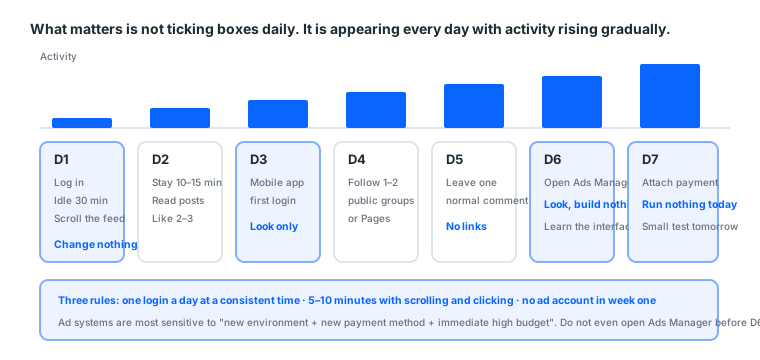
| Day | Do | Do not |
|---|---|---|
| D1 | Log in, idle 30 minutes, scroll the feed, close | Change details, use mobile, add friends |
| D2 | Log in 10–15 minutes, read posts, like 2–3 | Post, send messages |
| D3 | First mobile app login, look only | Use desktop and mobile simultaneously |
| D4 | Follow 1–2 public groups or Pages | Add friends in bulk |
| D5 | Leave one normal comment | Post links |
| D6 | Open Ads Manager once, look, build nothing | Build an ad immediately |
| D7 | Attach a payment method (if advertising) | Set a large budget right after attaching |
The point is not hitting a quota each day. It is appearing every day, with the volume of activity rising gradually.
Why each day is arranged that way
D1's thirty idle minutes. An account logged into from an unfamiliar device enters an observation state anyway. Doing nothing then tells the system this was one ordinary login.
D2 likes but does not post. Liking is consumption; posting is production. A newly taken-over account doing consumption first draws less attention.
D3 adds mobile. A brand-new desktop environment plus a brand-new mobile device on the same day is a strong anomaly signal. Adding it two days later looks like somebody settling into using this account.
D4 follows rather than friends. Following a public Page is one-directional and low-risk. Bulk friend adding is textbook bot behaviour.
D5 comments rather than links. A comment shows the account interacts. A link reads as promotion.
D6 only looks at Ads Manager. The purpose is putting "this account's owner is interested in advertising" into the behavioural record without acting on it yet.
D7 attaches payment. Attaching a payment method is one of the most sensitive account-level actions, so it goes last.
2. Three concrete rules
1. One login a day, at a consistent time
Real people have routines. An account appearing at 3am, 7am and 2pm, each time for 40 seconds, does not look like a person.
Pick a time that suits you and log in at roughly that time every day.
2. The session has to mean something
Logging in for five seconds then out is worse than not logging in. Stay at least 5 to 10 minutes, with scrolling and clicking.
What "a meaningful session" means
| Meaningless | Meaningful |
|---|---|
| Closing straight after logging in | Scrolling the feed for over a minute |
| Sitting on the home page unmoving | Opening a post and reading it |
| Clicking many things very fast | Browsing at normal speed |
| Keyboard shortcuts only | Mouse movement and scrolling |
"Clicking many things very fast" is more suspicious than doing nothing, because that is a signature of automation. Real browsing has pauses, hesitation, and scrolling back to re-read.
3. No ad account in week one
The most commonly broken rule: two days into warming up, people rush to create an ad account, attach a card and set a budget.
Ad systems are most sensitive to "new environment plus new payment method plus immediate high budget". Do not even open Ads Manager before D6.
3. The rhythm for attaching payment
- After D7.
- The cardholder details should reasonably match the region you actually operate in. Do not use a card unrelated to both the account's region and your network's region.
- Do not run anything the day you attach it. Run a very small budget the next day and confirm the charge lands.
- Then move on to the gradual scaling curve from day eight.
This site provides nothing about "attaching a card without tripping risk controls". Payment verification is a financial mechanism, not something to be worked around, and it should not be. What is described above is rhythm, not evasion.
Two common situations with locally issued cards
① Some banks default to declining "overseas e-commerce".
If the first attempt fails, call the bank and enable overseas transactions rather than retrying. Too many retries can get the account flagged.
② A successful attachment shows a small pre-authorisation.
Most banks post a hold of about one unit of currency, released later. If you never saw it, the card is not actually attached, and you may not find out until after publishing an ad.
The two days after attaching
| Day | Do |
|---|---|
| D7 | Attach, confirm the pre-authorisation appeared, run nothing today |
| D8 | Run the minimum budget for one day and confirm the charge lands |
| D9 onward | Start climbing along the gradual scaling curve |
D8's purpose is not performance. It is proving the money actually leaves. That is the foundation for every increase after it.
4. What you should have after seven days
At the end of seven days you should have:
- Seven consecutive days of login records
- Some ordinary interactions (likes, follows, a comment)
- Logins from both mobile and desktop
- A payment method attached and verified by one small charge
At that point the account is genuinely yours.
How to tell the warm-up worked
There is no direct indicator, but three things tell you indirectly:
| Signal | What good looks like |
|---|---|
| Whether logins are smooth | No extra verification demanded in seven days |
| Any restriction banners | The top of the page is clean |
| Whether Ads Manager opens | Normal when you check on D6 |
Seven days with no verification demanded is the best evidence the warm-up worked.
Conversely, being asked to verify on D2 or D3 usually means the environment has a problem (see device and network) rather than the warm-up method.
5. Common questions
Q: I bought five accounts. Can I warm them together? You can, with five separate environments, five different login times, and the discipline to actually spend that time daily. In practice, past three at once people start cutting corners, and the corners they cut die. Better to work in batches.
Q: Seven days is too long, can I shorten it? You can, and mortality rises. If you bought a cheap blank account you always intended to burn through, skipping is a valid strategy. But above about 30 USDT, skipping seven days is a bad trade.
Q: What if the account is asked to verify during the warm-up? Do what it asks (usually confirming a code or identifying photos). If it demands documents you do not have, that account ends there; see what to do at a checkpoint.
"Saving seven days" as arithmetic
At our catalogue's medians of 10 USDT and 13 USDT for aged accounts:
| Approach | Upfront cost | Expected lifespan | Replacements per month |
|---|---|---|---|
| No warm-up, use on arrival | 0 minutes | Short | Many |
| Seven-day warm-up | About 70 minutes | Noticeably longer | Few |
Seven days costs roughly 70 minutes of real time (ten minutes a day). At about 15 USDT an hour, that is around 17.5 USDT.
And if skipping it means two extra replacements a month at 13 USDT each, that is 26 USDT, before counting the downtime of warming up again and re-running the learning phase.
So "saving seven days" loses money in most cases, unless you bought the cheapest blanks and always treated them as consumables.
When skipping is genuinely fine
| Situation | Can you skip |
|---|---|
| A 4 USDT blank for testing creative | ✅ It was always a consumable |
| A 13 USDT aged account as your main | ❌ Bad trade |
| A 50 USDT high-trust account | ❌ Absolutely not |
| An account only used to log in and read | ✅ Little impact without advertising |
5b. What warming up is actually working against
Understand the mechanism and every rule above stops being "apparently you should" and becomes common sense.
What the platform looks at
The platform does not judge whether you are the account's original owner. It cannot, and it does not need to. What it reads is the shape of a behavioural sequence.
A normal user's shape is roughly:
Log in at a consistent time → stay a few minutes → consume content (read, like)
→ occasionally produce (comment, post) → log out → return the next day
A stolen account's shape is roughly:
Unfamiliar device logs in → password changed immediately → email changed
→ avatar and name changed → mass messaging or friend adding
Warming up means making your behaviour look like the first, not the second.
Which explains five rules
| Rule | The reasoning |
|---|---|
| Log in at a consistent time daily | Real people have routines |
| Stay 5–10 minutes with scrolling | Real people do not leave in five seconds |
| Consume before producing | A thief does not slowly read posts |
| Do not change details immediately | Those are a thief's signature actions |
| Add mobile two days later | Two new devices on one day is too abrupt |
None of them is a prohibition. Each is a concrete way of not looking like a takeover.
One commonly misunderstood point
Warming up does not prevent everything. It lowers the chance of being stopped for looking like a takeover. It does not prevent:
| Warming up helps with | Warming up does not help with |
|---|---|
| Verification demanded at first login | Creative rejected for policy violations |
| Checkpoints triggered by an unfamiliar device | Risk controls tripped by scaling too fast |
| Restrictions caused by abrupt behaviour | Rejections caused by landing page problems |
| Platform-wide rule adjustments |
So after the warm-up you still follow the gradual scaling curve and still keep creative away from policy lines. The three are independent, and doing one well does not make the other two safe.
5c. Warming up several accounts
One at a time is easy. Three or more at once is the hard part.
Why three is the threshold
Not a technical limit. A human one.
| Warming at once | Daily time | What actually happens |
|---|---|---|
| 1 | 10 minutes | Manageable |
| 2 | 20 minutes | Manageable |
| 3 | 30 minutes | Starting to feel like a chore |
| 5 | 50 minutes | You start skipping some |
And the skipped ones die first. Not a guess but a certainty: the effect of warming up comes from continuity, and a break means it never happened.
If you genuinely must warm several
Three necessary conditions:
- One separate browser profile each, clearly named (
us-01,tw-02…) - A different login time each, not five consecutive logins
- A sheet tracking which ones you logged in today
The third matters most. Without it, by day four you will not remember which ones you did.
A tracking sheet you can copy
| Account | Region | Profile | Login time | D1 | D2 | D3 | D4 | D5 | D6 | D7 |
|---|---|---|---|---|---|---|---|---|---|---|
| tw-01 | TW | tw-01 |
09:00 | ✅ | ✅ | ✅ | ||||
| us-01 | US | us-01 |
14:00 | ✅ | ✅ | |||||
| tw-02 | TW | tw-02 |
20:00 | ✅ |
Staggering start dates is another technique. Five starting on the same day means fifty minutes daily. Starting two days apart spreads the load, and you can apply what the first one taught you to the later ones.
The recommended approach
Batches. Two at a time, finishing before starting the next two.
Same total time, and every account genuinely gets warmed rather than five getting half-warmed.
6. Six things never to do while warming up
| Do not | Why |
|---|---|
| Change the password, email or name | The most stolen-account-shaped sequence |
| Upload an avatar or post heavily | Same |
| Add friends in bulk | Textbook bot behaviour |
| Log into five accounts at once | Environment cross-contamination |
| Operate through automation scripts | You bought an account, not a bot |
| Jump between different countries' connections | Triggers ordinary security verification |
The first two are the most common. A lot of people's first move on arrival is "let me put my own avatar on it", which is exactly the most dangerous action.
Why changing details is so sensitive
From the platform's side, an account logged into from an unfamiliar device that immediately changes core details produces a sequence identical to a thief securing an account.
A thief's typical behaviour: log in → change the password (so the owner cannot get in) → change the email (so the owner receives no recovery mail) → change the avatar and name (to avoid recognition).
Do the same things and the system has no way to tell you apart.
The right timing: change the password after 3 to 7 days of stable use, leave the email alone if you can, and change it last if you must. Confirm 2FA works first, or you lock yourself out.
7. Keeping an account healthy after the seven days
A warmed account left unused goes cold.
Two states
| State | Meaning | Risk |
|---|---|---|
| Running ads | Activity every day | Low |
| Warmed but sitting as a backup | No activity | Long inactivity may trigger re-verification |
The second is the typical backup situation and the one that most often goes wrong. You prepared a backup, and on the day you need it you cannot get in.
How to maintain a backup
| Frequency | Do | Time |
|---|---|---|
| Monthly | Log in and stay 5–10 minutes | 10 minutes |
| Monthly | Run $1 a day through the backup ad account | 5 minutes |
| Quarterly | Confirm the payment method has not expired | 2 minutes |
Under twenty minutes a month buys "the backup actually works on the day".
A backup with no upkeep is not a backup, and the cruelty of this is that you only find out at the moment you most need it.
7b. Five things that go wrong mid-warm-up
Following the plan does not guarantee nothing happens. These are the real situations and what to do.
One: verification demanded on D2
Usually not the warm-up method. Usually the environment.
Day one fine and day two stopped normally means the two logins used inconsistent environments: a different network, a different device, or a login from somewhere else in between.
Response: complete the verification, then confirm your profile and network are fixed. See device and network.
Two: stopped after adding mobile on D3
That mobile login was judged an unfamiliar device.
D3 mobile is normally safe. Getting stopped usually means the phone's network differs too much from the desktop's, for example desktop on home broadband and phone on mobile data through a different exit.
Response: connect the phone to your home Wi-Fi before logging in so both networks match.
Three: Ads Manager will not open on D6
That is an account-level restriction, not an Ads Manager problem.
Look for a restriction banner first. If there is one, the account itself is restricted, so pause the warm-up and deal with that.
Response: triage it per what to do at a checkpoint. Clear it if you can, switch if you cannot.
Four: the card will not attach on D7
Usually the bank blocking overseas transactions.
Response: call the bank and enable overseas transactions rather than retrying. Too many retries can get the ad account flagged.
Try again the next day rather than repeatedly the same day.
Five: you missed a day
No need to restart, but be more regular from here.
The effect comes from continuity. Missing one day does not undo everything, but missing three or more effectively means starting over.
Response: log in as normal the next day and shift that day's activity later (if D4 was following Pages, do it on D5). Push the whole schedule back a day.
What the timing tells you
| When it happened | Usually |
|---|---|
| D1–D2 | An environment problem |
| D3 | The phone's network does not match the desktop's |
| D4–D5 | Behaviour too abrupt (too many friends, posting links) |
| D6 | The account itself is restricted |
| D7 | A payment method problem |
The timing tells you the cause. Far more useful than blindly starting over.
8. This guide as one card
One session a day at a consistent time, 5–10 minutes, with scrolling and clicking.

D1  Log in → idle 30 min → scroll → close
D2  Stay 10–15 min, like 2–3 posts
D3  First mobile app login, look only
D4  Follow 1–2 public Pages or groups
D5  Leave one normal comment
D6  Open Ads Manager, look, build nothing
D7  Attach a payment method, run nothing today
D8  Minimum budget for one day, confirm the charge
D9+ Scale along the gradual curve

Never in those seven days:
  Password / email / name / avatar changes
  Bulk friend adds / scripts / several accounts at once
  Jumping between different countries' connections

After it is warmed (backups too):
  Log in monthly and run $1 a day to stay active
Next: the gradual scaling curve from day eight, how much to raise budget and how fast.
Sources (all official pages, checked 2026-09-08). Prices, catalogue distributions and warranty ratios in this article are our own catalogue and ticket data, not taken from these pages:
- Ads Manager — Meta for Business — facebook.com
- About the learning phase — Meta Business Help Centre — facebook.com
- Advertising Standards — Meta Transparency Center — transparency.meta.com
- How two-factor authentication works on Facebook — Facebook Help Centre — facebook.com
- Get verification codes with Google Authenticator — Google Account Help — support.google.com
FAQ
Seven days is too long, can I shorten it?
You can, and mortality rises. If you bought a cheap blank account you always intended to burn through, skipping is a valid strategy. Above about 20 USDT, skipping seven days is a bad trade.
What if I am asked to verify during the warm-up?
Do what it asks. If it demands documents you do not have, that account ends there. See what to do at a checkpoint.
Can I create the ad account in week one?
Not recommended. Ad systems are most sensitive to "new environment plus new payment method plus immediate high budget". Do not even open Ads Manager before D6.
Why log in every day?
Real people have routines. An account appearing every day for seven consecutive days has a completely different record shape from one that suddenly becomes active then vanishes.
How many logins a day?
One, at roughly the same time. Three appearances in one day at 40 seconds each does not look like a person.
How long should each session be?
Five to ten minutes, with scrolling and clicking. Logging in for five seconds then out is worse than not logging in.
How many accounts can I warm at once?
Past three at once people start cutting corners, and the corners they cut die first. Better to work in batches.
Can I change the avatar or name while warming up?
No. That is one of the most stolen-account-shaped actions. Leave it until after a week of stable use.
When can I change the password?
After 3 to 7 days of stable use. Confirm 2FA works first, or you lock yourself out.
Can I run ads right after attaching a card on day seven?
No. Do not run anything the day you attach it. Run a very small budget the next day and confirm the charge lands.
Should I warm up on desktop or mobile?
D1 and D2 on a separate desktop profile; mobile joins on D3. Both appearing on the same day is a strong anomaly signal.
What if it gets stopped mid-warm-up?
Triage which verification it is. Code requests usually clear; document requests mean switching accounts. See what to do at a checkpoint.
Can a warmed account sit unused?
Yes, but it needs to stay active. Log in at least monthly or it may need re-verification.
Can I add friends during the warm-up?
From D4 you can follow public Pages or groups, but do not add friends in bulk. Bulk friend adding is textbook anomalous behaviour.
Is it safe after seven days?
No. Warming up lowers the chance of being stopped for looking like a takeover. It does not prevent creative violations or problems from scaling too fast.
Want the parts this article talks about?
Next: how to raise budgetRead next
Running Facebook Ads: the complete path from nothing to your first live ad
The whole route on one page. From "where is Ads Manager" to "how do I
The first hour with a new account
Get the order wrong and a healthy account dies anyway. This hour is al
The gradual scaling curve from day eight
Budget is not whatever you feel like setting. Scale too fast and the s
What Is Facebook Ads Manager? Interface Tour and First Setup
Ads Manager is Meta's console for building, running and monitoring ads