What Is BM in Facebook Ads? Business Manager, BM3 and BM50
In Facebook advertising, BM means Business Manager — the container that holds your ad accounts, Pages, pixels and people's permissions. It does not run ads and it does not spend money. The number in BM3 or BM50 is a ceiling on how many ad accounts it can hold, not a count of accounts already open, and it has nothing to do with spending limits. The address is business.facebook.com.
BM is the container your ad assets live in, not the place you run ads from. Get that distinction and permissions, limits and isolation all become simple.
BM stands for Business Manager. It lives at business.facebook.com.
One-sentence definition: a BM is a container holding your ad accounts, Pages, pixels and people's permissions. It does not run ads and it does not spend money.
That sounds trivial, but it explains every rule that follows. The one thing to remember: the BM is not where money leaves. The ad account is.
1. What goes inside a BM
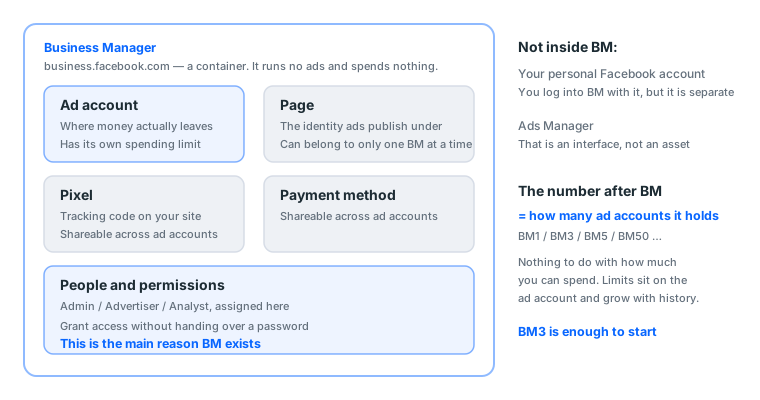
| Asset | What it is | Why it belongs in the BM |
|---|---|---|
| Ad account | Where money actually leaves | Central management, easy to delegate |
| Page | The identity ads publish under | Ads require a Page, and it must be in the same BM |
| Pixel | Tracking code on your site | Several ad accounts share one set of conversion data |
| People | You, colleagues, a freelancer | Grant access without handing over a password |
| Payment method | Cards and so on | Shareable across ad accounts |
The real value is in the last two. Without a BM, letting somebody run ads for you means giving them a password, which means giving them the whole account. With a BM you can grant "permission to operate this one ad account".
Two things that are not inside the BM
Both are commonly assumed to be, and clearing that up saves a lot of wasted effort:
Your personal Facebook account is not part of the BM. You log into the BM with it, but it is separate. If the personal account is disabled the BM still exists; you just cannot reach it, unless you added a second admin in advance.
Ads Manager is not part of the BM. It is an interface, not an asset. You can click into it from the BM, or type the URL directly. Both roads reach the same place.
Why the pixel living in the BM matters
Rarely discussed, and it will save you once, on the day you switch ad accounts.
The pixel belongs to the BM, not to any one ad account. So when an ad account gets disabled and you move to another, the pixel and every event it accumulated are still there, and the new ad account picks up where the old one stopped.
Run a personal-level ad account with no BM and losing the account loses the pixel too. You start accumulating conversion data from zero, and that costs far more than the account did.
2. What the number in BM3, BM50 and BM250 means
It is a cap on ad accounts, not a spending limit.
| Tier | Ad account cap | Suits |
|---|---|---|
| BM1 | 1 | Running a single account |
| BM3 | 3 | Almost everyone, including everyone starting out |
| BM5 | 5 | A few projects at once |
| BM50 | 50 | Volume, backups, or a handful of clients |
| BM250 / BM2500 | 250 / 2500 | Agency scale |
BM3 or BM50 for a beginner: buy BM3. As of October 2026, BM3 and BM50 are seller shorthand for a Facebook Business Manager that can hold up to 3 or up to 50 ad accounts. The number is a ceiling on ad accounts, not a spending limit, and it does not tell you how many accounts are already open inside. A beginner runs one or two ad accounts, so BM3 covers the first months with a slot to spare, while a BM50 leaves 47 slots unused. Spending limits sit on each ad account and grow with payment history, so a bigger BM does not let you spend more on day one and does not make the BM harder to ban. Move up to BM50 only when you need more than three ad accounts at the same time, for example several clients or separate backup accounts. When to upgrade is covered in BM3 vs BM50 vs BM250 and how allowances work.
What our catalogue actually charges
This is our own data. The catalogue currently has 145 display groups, 36 of them Facebook-related, of which 2 are BM groups:
| Type | Groups | Price band (USDT) | Median |
|---|---|---|---|
| BM | 2 | 10 | 10 |
| Page | 4 | 8 – 80 | 80 |
| Personal account | 15 | 4 – 50 | 10 |
| Aged account | 5 | 4 – 20 | 13 |
BM has exactly one price point: 10 USDT. Worth saying on its own, because plenty of people sit stuck at one ad account purely because they assumed BMs are expensive and put off buying one. Ten dollars solves "I cannot open a second account" outright.
Conversely, the Page median is 80 USDT, the highest of any type. That tells you something: the genuinely scarce thing on this route is the Page, not the BM and not the account.
3. So what does decide how much you can spend
Three things, none of them the BM tier:
- The ad account's spending limit, set at account level and loosened gradually based on your payment history
- The available limit on the payment method
- The account's credit standing
All three grow out of spending history. So the correct move is running a small budget to produce that history, not buying a bigger BM.
How the allowance grows
New ad accounts have low limits because the platform needs to confirm the money is collectable first. That is billing-risk assessment, not an opinion about you.
There is one way to loosen it: produce successful charges. The practical rhythm:
| Period | Daily budget | Purpose |
|---|---|---|
| Days 1–3 | Minimum viable (say $5) | Prove the charge works |
| Days 4–7 | Previous × 1.5 | Build history |
| Days 8–14 | × 1.5–2 again | Start getting volume |
| After | +20–50% each time, ≥48 hours apart | Normal scaling |
No single increase above 50%, at least two days between increases. Full detail in the gradual scaling curve.
4. BM vs Ads Manager vs Page vs Business Suite
Four names people mix up, four different things:
| What it is | URL | Who uses it | |
|---|---|---|---|
| BM | The cabinet assets live in | business.facebook.com |
Manager |
| Ads Manager | The workbench for building ads | facebook.com/adsmanager |
Media buyer |
| Page | The publishing identity | facebook.com/yourpage |
Social manager |
| Business Suite | The shopfront for running a Page | Business Suite in Meta's back end | Social manager |
The flow: the BM contains the Page and the ad account, you build the ad in Ads Manager, and the ad publishes as the Page.
A lot of people land in Business Suite by mistake, because the Page interface pushes it at you. What it manages is posts, messages and comments. That is a different job from advertising.
Full interface tour: what Ads Manager is.
5. The correct order once you have a BM
- Log in and build nothing. Look at the current state first: how many ad accounts, is there a Page
- Add your Page to the BM, if it is not there
- Open an ad account, or use an existing one
- Attach a payment method
- Share the BM with your second Facebook account as admin (skipped constantly, regretted later)
- Only then start building ads
Step 5 deserves emphasis. It is a collaboration feature the platform provides, used normally. If the original personal account hits a checkpoint, you can still get into the BM from the second identity, check status, and pull out your settings and audiences. It costs nothing and it only pays off on the bad day. See what to do at a checkpoint.
What each step looks like when it worked
Step 1: the BM name shows top left, and Business Settings lists your ad accounts and free slots. No Business Settings usually means you are not an admin.
Step 2: the Page appears under Accounts → Pages. The two usual reasons it will not: you are an Editor on that Page rather than an Admin, or the Page still belongs to another BM. A Page belongs to exactly one BM at a time.
Step 3: an act_-prefixed number appears in the ad account list. Check time zone and currency here; neither can be changed afterwards.
Step 4: the payment settings page shows the card verified, usually after a tiny pre-authorisation (most banks show a hold of about one unit of currency, later released). No hold means it is not actually attached.
Step 5: the second account appears in the People list with the role Admin. Expanded in the next section.
What this stretch costs in time
| Step | Once familiar | First time |
|---|---|---|
| 1 to 3 | About 5 minutes | About 15 minutes |
| Attaching payment | About 3 minutes | About 10 minutes, possibly a call to your bank |
| Adding a second admin | About 2 minutes | About 5 minutes |
Under half an hour in total, and step 5 is two minutes of it. Those two minutes are the most valuable part.
5b. Following along: from an empty BM to running ads
The order above, done once, with what you actually see. Assume you just received an empty BM3.
Step 1: log in and survey (about 3 minutes)
Open that very long login URL from your credentials. Once inside, build nothing. Survey first.
The BM name is top left. Click Business Settings; the left menu runs Accounts, Users, Data Sources, Brand Safety, Payment Methods.
Four things to look at:
- Accounts → Ad Accounts: how many exist and whether their status is normal. On an empty version this will be blank
- Accounts → Pages: whether a Page came with it. Many BM products do not include one
- Users → People: whether anyone besides you is there. An unfamiliar account means open a ticket immediately
- Payment Methods: usually empty; you attach one shortly
Item 3 is the one people skip and the one that matters most. On a second-hand BM, if the previous admin is still listed, they can remove you whenever they like.
Step 2: add the Page (about 3 minutes)
Accounts → Pages → Add. Understand the three options:
| Option | Means | When |
|---|---|---|
| Add a Page | Move a Page you own into this BM | You are an Admin on it |
| Request access to a Page | Ask for permission on somebody else's | Running ads for a client |
| Create a new Page | Open a fresh one directly under the BM | Starting from nothing |
The two usual reasons it will not add:
- You are an Editor on the Page, not an Admin. Editors can post; they cannot move a Page
- The Page still sits under another BM. One Page, one BM at a time, so remove it from the first
The second happens a lot with second-hand Pages, so ask "is this Page currently attached to any BM" before you buy.
Step 3: open the ad account (about 3 minutes)
Accounts → Ad Accounts → Add → Create a new ad account.
The fields:
| Field | Suggestion | Changeable |
|---|---|---|
| Account name | Name it after the product or client, not the default | Yes |
| Time zone | Your actual operating zone | ❌ No |
| Currency | Consistent across one business entity | ❌ No |
Getting time zone or currency wrong means opening a new account, and a BM3 has three slots. Two mistakes leaves you one. This is the most expensive error in the whole section, and it is worth two more seconds before clicking next.
Time zone decides when a day closes; currency decides what your bill looks like:
- Local currency: billed directly, no conversion, but minimum budgets are denominated locally
- USD: your bank adds a foreign transaction fee, typically about 1.5%, and reconciliation depends on the day's rate
There is no right answer, but keep one business entity consistent. Half in one currency and half in another makes a consolidated view painful later.
Step 4: attach payment (about 3 minutes, possibly longer)
Payment Methods → Add payment method.
Two common situations with locally issued cards:
- Some banks default to declining "overseas e-commerce". If the first attempt fails, call them before retrying
- Cardholder details should be broadly consistent with the region you actually operate in
What success looks like: payment settings shows the card verified, and most banks post a hold of about one unit of currency, released later. No hold means it did not actually attach.
Do not run anything the day you attach it. Run a minimum budget the next day and confirm the charge lands. A brand-new payment method plus immediate high spend is the most sensitive combination there is.
Step 5: add a second admin (about 2 minutes)
Users → People → Add, enter your second Facebook account's email, role Admin.
They receive an invitation and accept it while logged into that account. After accepting, they show in the People list with the Admin role.
These two minutes are the most valuable in the whole process. On the day the original account hits a checkpoint, you will be glad. See what to do at a checkpoint.
Time and cost of getting each step wrong
| Step | Time | Cost of getting it wrong |
|---|---|---|
| Survey | 3 min | Missing a stranger with admin rights; assets can be moved out |
| Add Page | 3 min | It will not add, and ads cannot publish |
| Open ad account | 3 min | Wrong time zone or currency, one slot wasted |
| Attach payment | 3–15 min | Nothing proceeds until it works |
| Second admin | 2 min | No access at all on the bad day |
Under half an hour total. And two of those errors, time zone/currency and the second admin, cannot be fixed after the fact.
6. Permissions: who can do what
This is the main reason BM exists, so it is worth understanding.
There are roles at BM level and at ad account level. The three you will use most are at ad account level:
| Role | Build ads | Change budget | See billing | Add people | Move assets |
|---|---|---|---|---|---|
| Admin | ✅ | ✅ | ✅ | ✅ | ✅ |
| Advertiser | ✅ | ✅ | ✅ | ❌ | ❌ |
| Analyst | ❌ | ❌ | ✅ | ❌ | ❌ |
Which role for the three common situations
Your backup identity gets Admin. Give it Advertiser and, when the original account is stuck, the backup cannot move assets out, which defeats the purpose of having one.
An outsourced media buyer gets Advertiser. They can do the full job but cannot move your assets or remove you. This is "exactly the permission the work needs, no more".
Someone who only reads reports, a boss or a client, gets Analyst. They see performance and billing and can change nothing. The safest option for showing a client results.
A risk people overlook
Do not give BM admin to somebody you do not fully trust. An admin can remove other admins, including you. What actually happens: a freelancer is hired, given admin, and at the end of the engagement either never removes themselves, or worse, removes the original owner.
The right approach is Advertiser, then remove them from the People list when the engagement ends.
7. Isolation: why not to put everything in one BM
Spreading assets is standard practice among experienced buyers. Not superstition. These layers are linked in the platform's records.
What a failure actually reaches
| What broke | Usually affected | Usually fine |
|---|---|---|
| One ad account disabled | Every ad in that account | Other ad accounts in the same BM, and the Page |
| BM disabled | Every ad account inside | The Page, an independent asset, usually survives |
| Page restricted after reports | Ads published under it | The BM and other Pages |
| Personal account at a checkpoint | Your access | The assets themselves, if you have a second admin |
Row two is the important one. When a BM is disabled the ad accounts inside it usually go with it, which is exactly why you do not put all your ad accounts in one BM.
Isolation in practice
- Never advertise from your brand Page; open a dedicated one
- A different ad account per project or client
- For client work, one BM per client, or at minimum one ad account per client
- Share the BM and ad account with a second Facebook account as admin in advance
- Keep audiences, pixel IDs, creative and copy stored outside the account too
Item 5 is skipped most often. If the account dies, none of that needs rebuilding. It is the only way to separate "lost an account" from "lost three months of accumulation".
7b. Business verification: what it is, whether you need it
Easy to overlook and consequential.
What it is
Meta asks you to submit company registration documents proving a real legal entity sits behind the BM. Once approved, the BM is marked verified.
When it is needed
| Your situation | Verification needed |
|---|---|
| Ordinary advertising, tens of dollars a day | ❌ No |
| Wanting a higher ad account allowance | 🟡 Possibly asked for |
| Running certain regulated categories | ✅ Usually |
| Using certain APIs or advanced features | ✅ Yes |
| Managing assets for another company | ✅ Usually |
Beginners should not rush this. Most people never encounter a scenario requiring it before their daily budget passes a hundred dollars.
What you need to prepare
Usually business registration documents plus evidence of the company's address and phone number.
This runs into your legal status and actual trading position, not a technical question. If you operate as an individual with no registered company, this route is currently closed to you, and you stay within the feature set that does not require it.
One other place a verified BM is required: step 2 of how to verify a WhatsApp Business account is business verification. Without it the badge application cannot start at all.
Business verification does not put a blue tick on anything, though. It changes the status of the BM, not how your Page or profile looks. The blue badge on Instagram and Facebook profiles is a separate paid subscription, Meta Verified, and the WhatsApp badge is a third mechanism again. How the three differ and what each one costs is in Meta Verified and the blue tick.
Be careful buying a "verified" second-hand BM
Verified BMs appear on the market at a premium. The thing to understand: that verification is bound to the original company's details, not to you.
The practical risks:
- If the original company withdraws verification or its details go bad, your BM loses verified status with it
- You cannot use it for anything that needs to be in your company's name
- If that company does not exist or the documents were falsified, you have a bigger problem
Ask whose name the verification was done under before buying. If nobody will tell you, the premium is not worth paying.
7c. A monthly BM health check
Once ads are running, the BM is the layer people most easily leave unattended, and by the time it has a problem it is usually too late.
Ten minutes a month on these five:
| Check | Where | What wrong looks like |
|---|---|---|
| People list | Users → People | An account you do not recognise |
| Is the second admin still there | Same | Only you left |
| Ad account status | Accounts → Ad Accounts | An account showing disabled or restricted |
| Page status | Accounts → Pages | The Page is gone or shows restricted |
| Payment method expiry | Payment Methods | Card about to expire |
Item two is the one people miss. If the backup account got restricted for long inactivity, or got removed, you find out on the day you actually needed it. Log into the backup account itself once a month too.
Item five stops your ads outright. An expired card that was never replaced means delivery halts one day with no warning, and you may not notice for half a day.
8. What to watch for when buying a BM
What you receive
BM credentials are usually two fields: a BM ID and a very long login URL. Quite different from personal account credentials, and slightly surprising the first time.
That URL is long, so make sure you copied all of it. Truncated, it will not open. If the fields are unclear, paste them into our credential parser and it labels each one.
Empty slots versus accounts included
| Spec | Means | Suits |
|---|---|---|
| BM3 empty | Three free slots, you open the ad accounts | Wanting to walk the whole process once |
| BM3 with accounts | 1–3 ad accounts already opened | Wanting to skip account creation |
The with-accounts version costs more, and what it saves is the part of account creation that sometimes stalls. If you are starting out, buy the empty one and open one yourself. You will need that skill eventually, and learning it on something cheap is better.
Four things to ask before buying
- Empty or with accounts, and if with, how many and what status
- Does it include a Page, because many BM products do not, and without one ads cannot publish
- Warranty scope and window; 82.8% of our catalogue items cover first login only
- Which fields the credentials contain; BM items are usually ID plus login URL
Warranty deserves attention. Across our 145 groups, 120 cover first login only (82.8%) and 9 have no after-sales at all (6.2%). That is the market standard line, because once you are logged in the seller cannot verify what happened. Full detail in six things to know before buying a Facebook account.
Acceptance on arrival
The warranty clock starts at delivery, so the first thing to do is inspect, not use:
- The login URL is complete and opens
- The BM name matches the description
- The number of free ad account slots matches
- No restriction or warning banners
- If a Page was included, it exists and you can manage it
Anything not matching: screenshot and open a ticket immediately, do not keep retrying. Full process in the acceptance SOP.
8b. Common error messages, decoded
BM error messages are vague. Here is what they usually mean:
| What you see | Usually means | What to do |
|---|---|---|
| You do not have permission to perform this action | Your role is Advertiser or Analyst, not Admin | Ask an admin to upgrade your role |
| Cannot add this Page | The Page belongs to another BM, or you are only an Editor | Remove it from the first BM, or ask its admin |
| Ad account limit reached | The BM tier's slots are used up | Change tier, or buy another BM |
| This ad account is unavailable | The account is disabled; not a BM problem | Check Account Quality on that ad account |
| Business verification required | The feature you reached needs company documents | See the section above, or work around it |
| Payment method verification failed | Bank blocking overseas transactions, or mismatched cardholder details | Call the bank to enable overseas transactions |
| Your Business Manager has been disabled | The BM itself was disabled | Find the appeal route, and confirm the Page is still there |
Row four causes the most misdiagnosis. When an ad account is disabled, plenty of people appeal the BM or appeal the personal account and lose hours. Working out which layer broke matters more than rushing to fix it. Symptom-by-layer comparison in what is an ad account.
9. Common misconceptions
"If the BM is disabled, my ad accounts are gone." Not necessarily. The ad accounts inside are usually affected, but the Page is an independent asset. That is exactly the value of one-Page-per-account isolation. Do not stake everything on one BM.
"A bigger BM is harder to ban." No such effect. Tier only affects how many ad accounts fit. Survival depends on your operation, environment isolation and creative, not container size.
"Can I manage every client from one BM?" Technically yes, in practice no. One client's problem reaches the other assets in the same BM. For client work, one BM per client, or at minimum one ad account per client.
"Buy a bigger BM and my limits go up." Limits sit at ad account level and are unrelated to BM tier. They grow with payment history, and no size of BM speeds that up.
"A Page can sit under two BMs." It cannot. One BM at a time. Moving it requires admin rights on the original BM, which matters when buying a second-hand Page, otherwise you receive a Page you cannot add to your own BM.
9b. When to move from BM3 to BM50
Three signals. Any one of them is worth considering:
- Your three ad accounts are full and all running normally
- You now need backup: when one account stops, you want another taking over immediately
- You have started running ads for others and need client and billing isolation
Before that, extra slots just sit empty.
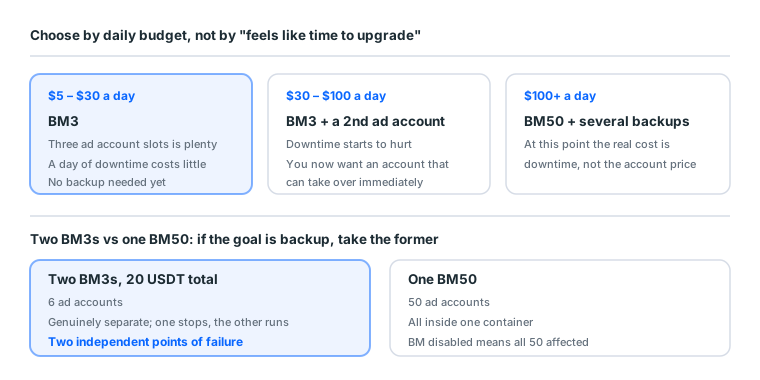
Use downtime cost to decide
More reliable than "it feels like time to upgrade":
revenue lost to one day of downtime vs the cost of the upgrade
| Your daily budget | Roughly what a day down costs | Buy more backup? |
|---|---|---|
| $5–30 | Limited | Not urgent, BM3 is fine |
| $30–100 | Noticeable | Prepare a second ad account |
| $100+ | Significant | BM50 with several backups |
When a day of downtime costs more than one more backup, upgrade. Somebody spending $10 a day buying BM50 is wasting money; somebody spending $200 a day saving that 10 USDT has their priorities inverted.
Since BM has one price point of 10 USDT in our catalogue, buying a second BM3 as backup costs less than upgrading to BM50 and isolates better, because two BMs are genuinely separate while 50 accounts in one BM are not.
Two BM3s versus one BM50
An arithmetic few people do:
| Two BM3s | One BM50 | |
|---|---|---|
| Total ad accounts | 6 | 50 |
| Isolation | Genuinely separate; one stops, the other is unaffected | All in one container |
| Management overhead | You switch between them | Centralised |
| Cost | 20 USDT | Market rate, clearly higher |
If your goal is backup rather than scale, two BM3s beat one BM50. A disabled BM takes its ad accounts with it, so 50 accounts in one BM is 50 accounts sharing a single point of failure.
9c. The pixel in the BM, covered properly
Mentioned above; this section finishes it, because it is BM's most underrated benefit.
What a pixel is
A piece of tracking code on your website. When somebody arrives from an ad, browses, adds to cart and checks out, those actions report back to Meta. The system uses that data to learn who buys and shows the ad to more people like them.
Without a pixel, conversion objectives essentially cannot run, because the system has no signal to optimise on.
Why living in the BM is good
The pixel belongs to the BM and can be shared with several ad accounts. Three practical benefits:
| Benefit | Detail |
|---|---|
| Switching ad accounts needs no reinstall | Account disabled, attach a new one to the same pixel, accumulated events intact |
| Multiple accounts share data | Three ad accounts on one site share one set of conversion data, so learning is faster |
| Data does not die with the account | The most important one |
The third deserves expanding. With a personal-level ad account and the pixel bound to it, losing the account loses two things at once: delivery capability, and months of accumulated conversion data. The first is replaced by another account. The second restarts from zero.
Accumulating enough conversion events takes both time and spend. That cost is usually far higher than the account itself.
The order for installing one
- Create the pixel in the BM under Data Sources → Datasets
- Share it with the ad accounts that need it
- Install the code on the site, or deploy it through a tag manager
- Confirm it fires using Meta's Pixel Helper extension
- Let it accumulate before switching to conversion objectives
Do not skip step 4. Installed-but-not-firing is very common, and without verifying, you find out a week into a campaign with no conversion data.
Your first ad does not need a pixel
If you are still verifying whether the route works, use the traffic objective and skip the pixel entirely. Once you know the charge lands, the creative passes and the landing page is fine, come back, install the pixel, accumulate events, and switch to a conversion objective.
Reverse that order and you are debugging three things at once with no way to tell which one broke.
9d. Five myths that cost money
"The BM is where you run ads." It is not. The BM is the container; Ads Manager is the interface. People who confuse the two hunt around the BM for a Create Ad button.
"BM50 is safer." Tier only affects how many ad accounts fit. At our catalogue's single price point of 10 USDT, two BM3s as backup beat one BM50 and isolate better: two BMs are genuinely separate, whereas 50 accounts in one BM share a single point of failure.
"Having a BM means you will not get banned." A BM offers no protection at all. What it offers is management and isolation, and isolation is worth having because it stops one failure taking everything with it. That is different from preventing failure.
"A Page can sit under two BMs." It cannot. One BM at a time. This matters most when buying a second-hand Page, or you end up with a Page you cannot add to your own BM.
"Giving a freelancer admin is easier." Easier, and dangerous. Admins can remove other admins, including you. It has happened that an engagement ended and the other party never removed themselves, or removed the original owner. Advertiser is enough for outsourced work.
9e. The four stages a BM goes through
This section ties everything above onto a timeline. You should finish it knowing which box you are in and what the next one needs.
Stage one: a single ad account (weeks 1 to 4)
What you are doing: verifying the route works. Small budget, few changes, accumulating payment history.
BM contents: one ad account, one Page, one card, two admins (you and your backup identity).
The classic mistake here: rushing to open a second ad account. The first has no history yet, so a second is just another account with no history.
Stage two: the first account is stable (weeks 5 to 12)
What you are doing: raising budget under the 50% and 48-hour rules, testing a second creative set.
What to add: install the pixel and start accumulating conversion events. Better now than at the start, because you have already confirmed the landing page works.
What to prepare: a second ad account. Not to use now, to have open and waiting. New accounts need time to grow their allowance, and opening one the day you need it is too late.
Stage three: you need backup (past $30 a day)
What you are doing: two ad accounts alternating, or one primary and one standby.
What to add: a second Page. When a Page gets restricted after reports you need an immediate substitute, and a brand-new Page has no trust.
The trigger: when a day of downtime costs more than one more backup set.
Stage four: separate books, or client work (multiple products or clients)
What you are doing: one asset set per product or per client.
What to add: a second BM. Not for the slots, for isolation. A disabled BM takes its ad accounts with it, so all clients in one BM is one shared point of failure.
The cost structure changes here: in the first three stages you cared about the unit price of an account. Now you care whether one client's problem reaches the others. That risk is priced far above a few BMs.
The four stages as a checklist
| Stage | Ad accounts | Pages | BMs | The thing you must do |
|---|---|---|---|---|
| One | 1 | 1 | 1 | Add a second admin |
| Two | 1 (+1 spare) | 1 | 1 | Install the pixel, open the spare account early |
| Three | 2 | 2 | 1 | Backup Page, assets stored separately |
| Four | 1 per client | 1 per client | 1 per client | Client isolation, billing isolation |
Every entry in the right-hand column only works if done beforehand. Done after the fact, all of them are too late.
10. Quick glossary
| Term | In plain terms |
|---|---|
| BM / Business Manager | The container assets live in |
| Business Settings | Where you manage assets and people inside a BM |
| Ad account | The unit money actually leaves from |
| BM3 / BM50 | How many ad accounts it holds |
| Admin | Full permission, including adding people and moving assets |
| Advertiser | Can run ads; cannot add people or move assets |
| Analyst | Read only; changes nothing |
| Pixel | Site tracking code, belongs to the BM, shareable across accounts |
| Business verification | Submitting registration documents to unlock certain features |
Sources (all official pages, checked 2026-09-08). Prices, catalogue distributions and warranty ratios in this article are our own catalogue and ticket data, not taken from these pages:
- Create and manage a business portfolio (Business Manager) — Meta Business Help Centre — facebook.com
- Business portfolio ownership and full control — Meta Business Help Centre — facebook.com
- Business verification — Meta Business Help Centre — facebook.com
- Documents required for business verification — Meta Business Help Centre — facebook.com
- Advertising Standards — Meta Transparency Center — transparency.meta.com
- Meta Pixel documentation — Meta for Developers — developers.facebook.com
FAQ
What does BM stand for?
Business Manager. It lives at business.facebook.com and some people call it the business management platform.
Are a BM and a Page the same thing?
No. A Page is the identity ads publish under. A BM is the container holding Pages, ad accounts, pixels and people. One BM can manage several Pages.
What does the 3 in BM3 mean?
That BM can own at most 3 ad accounts. It has nothing to do with how much you can spend. Spending limits sit on the ad account and grow with payment history.
Do I have to use a BM to run ads?
Technically a personal ad account can run ads. But the moment you need multiple ad accounts, want to collaborate, or want assets isolated, you need a BM. Start with one.
Is BM the same as Business Suite?
No. Business Suite is for running a Page, managing posts and messages. BM manages assets and permissions. Both live in Meta's back end but serve different purposes.
How many BMs can one person have?
Meta caps how many an individual can create, and a new account can usually only create one. When you need more, people usually buy an existing one or get added as an admin to somebody else's.
Can one Page belong to two BMs at once?
No. A Page belongs to exactly one BM at a time. Moving it means removing it from the first, which is worth asking about before buying a second-hand Page.
If a BM is disabled, what happens to the ad accounts inside?
They are usually affected, but the Page is an independent asset and normally survives. This is exactly why you should not put everything into one BM.
How do I share a BM with someone?
Assign them a role in Business Settings rather than giving them a password. Roles are Admin, Advertiser and Analyst, and the differences matter.
What do I actually receive when I buy a BM?
Usually a BM ID plus a very long login URL. Some come with ad accounts already opened, some are empty slots. Ask before buying.
What is the difference between an empty BM3 and one with accounts?
Empty means all three slots are free and you open the accounts yourself. The with-accounts version has one to three already opened. It costs more, and what you are buying is skipping a step that sometimes stalls.
Why can I not open a second ad account?
Usually the BM's ad account allowance is used up, or the BM does not yet have enough usage history. The first needs a different tier; the second needs time.
Is a bigger BM harder to ban?
No such effect. The tier only affects how many ad accounts fit. Survival depends on operation, environment isolation and creative, not container size.
Does a pixel belong to the BM or the ad account?
The BM, and it can be shared with several ad accounts underneath. This is one of BM's most practical benefits: switching ad accounts does not mean reinstalling the pixel.
Does a BM have to complete business verification?
Depends what you need. Ordinary advertising does not require it, but some advanced features and higher allowances do, and that needs company registration documents.
Want the parts this article talks about?
See the catalogRead next
Before You Buy a BM: Empty Slots vs Ad Account Included
The "3" in BM3 is a ceiling, not a gift of three ad accounts. Get that
Running Facebook Ads: the complete path from nothing to your first live ad
The whole route on one page. From "where is Ads Manager" to "how do I
What Is Facebook Ads Manager? Interface Tour and First Setup
Ads Manager is Meta's console for building, running and monitoring ads
BM3 vs BM50 vs BM250, and how allowances actually work
That number is not how much you can spend. It is how many ad accounts
What is an ad account? How personal accounts, ad accounts, BMs and Pages relate
Four things get talked about interchangeably, but they are four separa
Personal Account, Page, BM, Ad Account, Developer Account: One Map of What Hangs Off What
These terms get used interchangeably, but there is only one root. This
Meta Ads Library: How to Search It, Read It, and Reverse-Engineer a Competitor's Ads (2026)
Most guides stop at what the Ads Library is. This one covers what to d
How to Get Blue Tick on WhatsApp Business (and Why Most Fail)
Three things decide whether you get it, and only one of them is paperw