What is an ad account? How personal accounts, ad accounts, BMs and Pages relate
An ad account is the unit inside Meta where money actually leaves. It has its own ID, payment method and spending limit. It is one of four distinct layers: the personal account is your identity, the BM is the asset container, the Page is the publishing identity, and the ad account is the spending unit.
Four things get talked about interchangeably, but they are four separate layers. One diagram sorts the relationship out, plus what each one's failure looks like.
Advertising involves four things that get talked about interchangeably, but they are four separate layers:
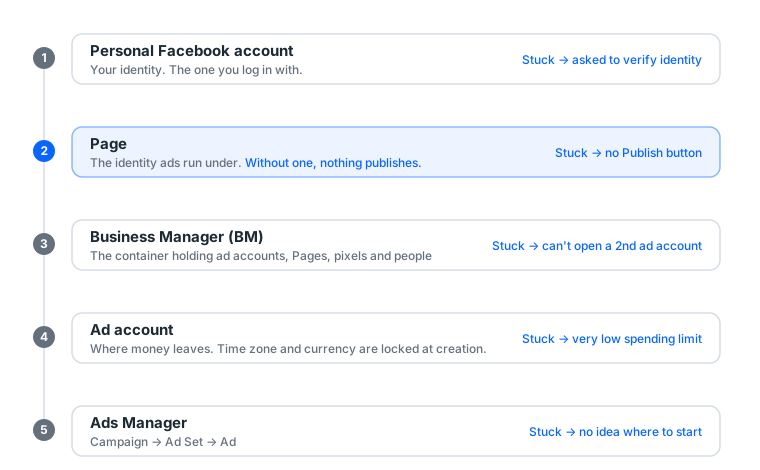
Get the four layers straight and most "what am I actually missing" and "where do I go to fix this" questions answer themselves.
1. What an ad account is
It is the unit money leaves from. Its characteristics:
- Its own ID, a string of digits prefixed
act_, shown at the top left of Ads Manager - Its own payment method
- Its own spending limit, which grows with payment history
- Its own Account Quality status, where violation records live
- Its own time zone and currency, and ⚠️ neither can be changed after creation
That last one catches people. Time zone decides how a day is counted; currency decides your bill. Wrong choice means opening a new account.
What each attribute actually affects
| Attribute | Affects | Cost of getting it wrong |
|---|---|---|
| Account ID | The unique identifier for support and reconciliation | Support cannot find you, everything takes longer |
| Payment method | Whether charges go through | An expired card stops every ad one day |
| Spending limit | Daily ceiling | You want to scale and cannot, and it cannot be rushed |
| Account Quality | Violation record and appeal basis | Appealing without reading it is usually wasted |
| Time zone | When a day closes | Reports and bills do not line up |
| Currency | What the bill looks like | Mixed currencies make a consolidated view impossible |
Time zone and currency: the only two fields you cannot undo
Worth their own section, because they are among the few places on this route where a mistake means starting over.
Time zone decides how the ad account slices a day. Pick UTC when you operate somewhere else and your "today's spend" resets at a time unrelated to your working day. You convert in your head every time you read a report, and reconciliation is worse.
Currency has no universally right answer, but one business entity should be consistent:
| Local currency | USD | |
|---|---|---|
| Billing | Direct | Bank adds a foreign transaction fee, typically about 1.5% |
| Reconciliation | Easy | Depends on the day's rate |
| Budget units | Minimum thresholds denominated locally | Familiar numbers if you compare in dollars |
Half your accounts in one currency and half in another makes a consolidated view painful. Pick one and stay with it.
2. What each layer's failure looks like
Working out which layer broke matters more than rushing to fix it. Plenty of people appeal the personal account when the ad account was disabled, or the reverse, and lose hours.
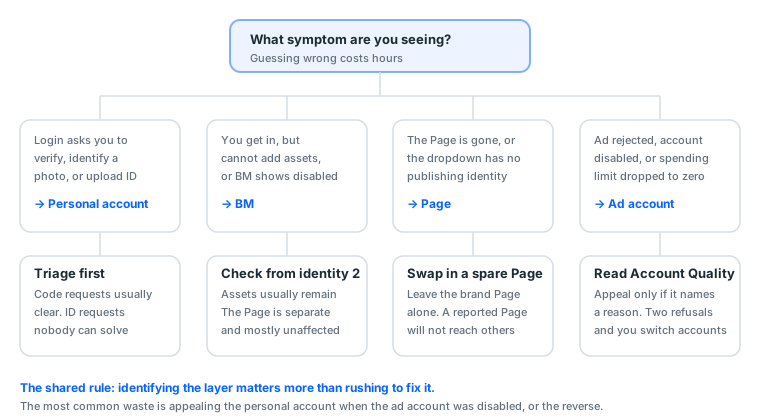
| Layer that broke | What you see | What to do |
|---|---|---|
| Personal account | Login asks for verification, photo identification, ID upload | Triage whether it can clear; see checkpoints |
| BM | BM disabled, cannot add assets | Assets are usually intact, but confirm from your second admin identity |
| Page | Page gone, cannot be selected as publishing identity | Swap in a dedicated spare, leave the brand Page alone |
| Ad account | Ads rejected, account disabled, spending limit zeroed | Read Account Quality before deciding to appeal or switch |
The thirty-second test
Try these in order. The first step that fails is the layer that broke:
- Can you log into Facebook? No → personal account
- Can you open
business.facebook.comand see the BM name? No → BM - Can you see your Page in Business Settings? No → Page
- Can you see the ad account in Ads Manager with a normal status? No → ad account
All four pass and the ad still will not run? That is usually a settings problem rather than a broken asset: audience too narrow, bid too low, or still in review.
A very common misdiagnosis
"My ad got rejected" is not the same as "my account is in trouble".
A single rejection is a creative or landing page problem. Fix that one thing and resubmit. But two or three consecutive rejections of creative that would previously have passed is an account-level signal, and that is when to open Account Quality.
How to tell them apart: submit the same creative on another ad account. Rejected on both means creative. Rejected on one means that account.
2b. What the other three layers are
This piece is about the ad account, but the four are a set. Without the other three, the relationship is only a diagram.
Personal account: your identity
The one you log in with. It is not an asset, it is an identity, and the difference matters:
- Assets (BM, Page, ad account) can be transferred and shared
- Identities cannot. A stuck personal account can only be cleared by that person
Its value is in what it can open. An account registered three days ago cannot open an ad account and will struggle with BM verification. An account registered five years ago with real friends and post history opens everything more smoothly. That is why an aged account costs more than a blank one. You are not buying the account, you are buying what it can produce.
To judge whether a personal account is healthy, check three things: does it log in normally, are there any restriction banners, and can it reach Ads Manager.
Page: the publishing identity
Meta ads must publish as a Page. Hard requirement, not an upsell. The name and avatar in the top left of an ad in the feed is that Page.
Three things follow:
- Page history affects ad performance. A three-day-old Page with no posts and no followers running an ad reads as a scam, so the report rate rises, and report rate feeds back into delivery
- A Page reported enough times gets restricted, which restricts the ads under it
- A Page is an asset that survives independently. When an ad account dies the Page usually lives and attaches to the next one
A Page belongs to exactly one BM at a time. Ask about this before buying a second-hand Page, or you receive one you cannot add to your own BM.
BM: the asset container
Where ad accounts, Pages, pixels, payment methods and people's permissions live. It does not run ads and does not spend money.
Its two most practical benefits:
- Permission assignment: let somebody run ads without giving them a password
- Pixel ownership: the pixel belongs to the BM rather than an ad account, so switching ad accounts keeps the accumulated conversion data
The number after BM is an ad account cap, unrelated to spending limits. Full detail in what is Business Manager.
Who owns which layer
| Owner | Transferable | After it dies | |
|---|---|---|---|
| Personal account | The registrant | ❌ | Get another |
| BM | Its creator, plus added admins | ✅ | Assets usually intact |
| Page | The BM or an individual | ✅ | Usually survives independently |
| Ad account | The BM or an individual | ✅ | Get another; the pixel survives |
Only the first row cannot be transferred, which explains why backup means "add a second admin" rather than "buy another account". Another identity that can get in is more useful than another asset.
3. Why one Page per ad account
The standard practice is one Page paired with one ad account, not shared across projects.
The reason is direct: these four layers are linked in the platform's records. An ad account disabled for a creative violation puts a mark against the linked Page. A heavily reported Page draws attention to the linked ad accounts. Isolation is not about hiding. It is about one failure not taking everything with it.
How far the blast radius actually reaches
| What broke | Usually affected | Usually fine |
|---|---|---|
| One ad account disabled | Every ad in that account | Other accounts in the same BM, and the Page |
| BM disabled | Every ad account inside | The Page, an independent asset, usually survives |
| Page restricted after reports | Ads published under it | The BM and other Pages |
| Personal account at a checkpoint | Your access | The assets, if you have a second admin |
The last row is the important one. When the personal account is stuck, the assets are all still there. You simply cannot reach them. With a second admin added in advance you can still get in that day, check status, pull out audiences and creative, and keep managing. Without it, you wait.
What to actually do
- Never advertise from your brand Page; open a dedicated one
- A different ad account per project or client
- Needing more ad accounts means upgrading the BM (BM tiers explained)
- Share the ad account with a second Facebook account as admin, in advance
- Keep audiences, pixel IDs, creative and copy stored outside the account
Item 5 is skipped most often and costs the most. If the account dies, none of that needs rebuilding. It is the only way to separate "lost an account" from "lost three months of accumulation".
4. Spending limits: the full mechanism
New ad accounts have low limits because the platform needs to confirm the money is collectable. Billing-risk assessment, not an opinion about you.
How it grows
There is one way to loosen it: produce successful charges.
| Period | Daily budget | Purpose |
|---|---|---|
| Days 1–3 | Minimum viable (say $5) | Prove the charge works |
| Days 4–7 | Previous × 1.5 | Build history |
| Days 8–14 | × 1.5–2 again | Start getting volume |
| After | +20–50% each time, at least 48 hours apart | Normal scaling |
Rushing gets you flagged as abnormal, which locks the limit rather than raising it. Full curve in the gradual scaling curve.
Why 50% and 48 hours
50% is a billing-risk threshold. An account that never spent suddenly wanting $500 a day has the same shape, in billing-risk terms, as a stolen card. A gradual curve looks like business expansion. A vertical one looks like somebody got hold of a payment method that is not theirs.
48 hours is the length of the learning phase. Every significant ad set change re-enters learning. Change again before it finishes and the system is permanently probing, so cost never settles.
What to do when the limit is stuck
First work out which kind of stuck:
| Symptom | Means | Action |
|---|---|---|
| A limit exists but is low | Normal new-account state | Follow the curve; it grows on its own |
| Limit shows as 0 | The account is restricted | Read Account Quality |
| Spend stops at a number | You hit the daily limit | Resets tomorrow, or wait for the limit to rise |
| Payment failing | Card problem | Change card or call the bank |
Do not open new accounts repeatedly to get around a limit. A burst of new accounts is itself a risk signal, and a new account's limit is only lower.
5. Which layer are you buying when you "buy an ad account"
What the market calls an ad account is usually a personal account with an ad account already opened. You receive layer one plus layer four.
To connect the whole route, you still need:
- A Page (layer three), which most ad account products do not include
- A BM (layer two), once you need a second ad account
Which is why our scenario bundles pair account, BM and Page rather than selling an account alone: missing any layer breaks the route.
The real distribution in our catalogue
Our current data, across 145 display groups:
| Platform | Groups | Price band (USDT) | Median |
|---|---|---|---|
| 67 | 2 – 200 | 13 | |
| 36 | 3 – 80 | 8 | |
| Threads | 18 | 4 – 85 | 10 |
| TikTok | 9 | 2 – 130 | 6 |
Breaking the 36 Facebook groups down:
| Type | Groups | Price band | Median |
|---|---|---|---|
| Personal account | 15 | 4 – 50 | 10 |
| Aged account | 5 | 4 – 20 | 13 |
| Page | 4 | 8 – 80 | 80 |
| Self-registered | 4 | 4 – 8 | 4 |
| Cloned | 3 | 4 – 10 | 8 |
| BM | 2 | 10 | 10 |
| Ad account | 2 | 4 | 4 |
Two conclusions you can use immediately.
First, a standalone ad account costs 4 USDT, the cheapest type there is. That tells you ad accounts are not scarce. What is scarce is a healthy personal account that can open one, and a Page that can publish.
Second, the Page median of 80 USDT is the highest, and it is the layer most people forget to buy. Price tells the truth: market pricing reflects scarcity.
Delivery and warranty distribution
Across those 145 groups:
| Delivery | Groups | Share |
|---|---|---|
| Automatic | 116 | 80.0% |
| Service (we perform it for you) | 29 | 20.0% |
| Warranty we commit to | Groups | Share |
|---|---|---|
| 1 hour (first login only) | 120 | 82.8% |
| 36 hours | 15 | 10.3% |
| 24 hours | 1 | 0.7% |
| No after-sales at all | 9 | 6.2% |
Over 80% cover first login only. The market standard line, because once you are logged in the seller cannot verify what happened. Watch the 6.2% with no after-sales: usually the cheapest batch, and they should be treated as consumables rather than assets.
Which account type suits which budget: account types and when to use them.
5b. How to read the Account Quality page
When an ad account has a problem, every answer is on this page. Most people do not know it exists, or look at it without knowing what they are reading.
What is on it
| Section | What it tells you |
|---|---|
| Account status | Active, restricted, disabled |
| Ad-level violations | Which ads were rejected, and the rejection category |
| Account-level violations | Accumulated policy violation records |
| Appeal status | Submitted, under review, or resolved |
Translating rejection reasons
The platform's wording is vague. Here is what it usually means:
| What the page says | Usually means |
|---|---|
| Does not comply with advertising policies | Landing page will not open, or the creative overclaims |
| Personal health and appearance | Copy targets the reader's body |
| Misleading claims | Earnings or efficacy promises, guarantee language |
| Intellectual property | Someone else's brand, logo or likeness |
| Low quality or disruptive content | Landing page heavy with ads, pop-ups, auto-downloads |
| Unapproved industry | Your category needs additional authorisation |
Appealing, in practice
Read which category it is first, then:
- A specific reason is stated: fix that, then appeal. Success rate is not bad
- Only "does not comply" with no clause named: appeal once. Rejected, switch ad accounts
- A policy enforcement wave (many people with the same symptom the same day): appealing rarely helps. Wait
How to write the appeal: short, specific, factual. State what you are promoting and what you changed. No long narratives, no repeat submissions.
When to give up: two refused appeals, or two hours already spent on this one account. An ad account is 4 USDT in our catalogue. Your two hours cost more.
One principle that saves time
Triage beats rescue. Most people's first move on the bad day is trying to save it. The correct first move is deciding whether it can be saved.
The kind that demands a government ID cannot be solved by anyone, because you do not hold the registrant's documents, and forging one is a criminal matter rather than a technical one. Identify that kind and switch immediately, saving your time for the ones that can still clear.
5c. From one account to many: four stages
This section puts everything above on a timeline. Find the box you are in.
Stage one: one ad account (weeks 1 to 4)
What you are doing: verifying the route works. Small budget, few changes, accumulating payment history.
What you should have: one ad account, one dedicated Page, one card, two admins (you and your backup identity).
The classic mistake: rushing to open a second account. The first has no history yet, so a second is just another account with no history.
Stage two: it is running stably (weeks 5 to 12)
What you are doing: raising budget under the 50% and 48-hour rules, testing a second creative set.
What to add: the pixel. Better now than at the start, because you have confirmed the landing page works.
What to prepare: a second ad account, opened and waiting. New accounts need time to grow their allowance, and opening one the day you need it is too late.
Stage three: you need backup (past $30 a day)
What you are doing: two accounts alternating, or one primary and one standby.
What to add: a second Page. When a Page is restricted you need an immediate substitute, and a new Page has no trust.
The trigger: when a day of downtime costs more than one more backup set.
Stage four: separate books, or client work
What you are doing: one asset set per product or per client.
What to add: a second BM. Not for the slots, for isolation. A disabled BM takes its ad accounts with it.
The comparison table
| Stage | Ad accounts | Pages | BMs | The thing you must do |
|---|---|---|---|---|
| One | 1 | 1 | 1 | Add a second admin |
| Two | 1 (+1 spare) | 1 | 1 | Install the pixel, open the spare early |
| Three | 2 | 2 | 1 | Backup Page, assets stored separately |
| Four | 1 per client | 1 per client | 1 per client | Client isolation, billing isolation |
Every entry in the right-hand column only works if done beforehand. After the fact, all of them are too late.
5d. Following along: opening a usable ad account
Concepts above, operation here. Assume you have a BM and a healthy personal account.
Step 1: open Business Settings (about 1 minute)
business.facebook.com → confirm the BM name top left → Business Settings → Accounts → Ad Accounts.
You see the existing list and free slots. No Business Settings usually means you are not an admin of this BM.
Step 2: create it (about 3 minutes, but fill it slowly)
Add → Create a new ad account. Three fields:
| Field | How to fill it | Changeable |
|---|---|---|
| Account name | Name it after the product or client, never the default | ✅ |
| Time zone | Your actual operating zone | ❌ |
| Currency | Consistent with your other accounts | ❌ |
These thirty seconds are the most expensive thirty seconds in the process. A wrong time zone or currency means opening a new account, and a BM3 has three slots. Two mistakes leaves you one.
After creating, the system asks what the account will be used for. Choose your own business.
Step 3: record the ID (about 30 seconds)
An act_-prefixed number appears in the list. Write it into your account tracking sheet, with columns like:
Account ID | Created | Time zone | Currency | Purpose | Page attached | Status
After three accounts you will not remember which is which, and that number is what support and freelancers ask for.
Step 4: attach payment (about 3 minutes, possibly longer)
Payment Methods → Add.
Two common situations with locally issued cards:
- Some banks default to declining overseas e-commerce. If the first attempt fails, call them first rather than retrying
- Cardholder details should be broadly consistent with the region you operate in
What success looks like: the payment settings page shows the card verified, and most banks post a hold of about one unit of currency, released later. No hold means it did not attach.
Do not run anything the day you attach it. Run a minimum budget tomorrow and confirm the charge lands.
Step 5: share it with your second identity (about 2 minutes)
Assign People → select your second Facebook account → role Admin.
These two minutes are the most valuable in the process. On the bad day you will be glad.
Step 6: attach the Page
Confirm the Page is in the BM's Pages list, then select it when building the ad. The two usual reasons a Page will not add: you are an Editor rather than an Admin, or it still belongs to another BM.
Time and cost of getting each step wrong
| Step | Time | Cost of getting it wrong |
|---|---|---|
| Create account | 3 min | Wrong time zone or currency, one slot wasted |
| Record the ID | 30 sec | Re-looking it up every time you communicate |
| Attach payment | 3–15 min | Nothing proceeds until it works |
| Share second identity | 2 min | No access at all on the bad day |
| Attach the Page | 2 min | Ads cannot publish |
Under half an hour total, and two of those errors cannot be fixed afterwards.
5e. Common error messages, decoded
Error messages are vague. What they usually mean:
| What you see | Usually means | What to do |
|---|---|---|
| You do not have permission to perform this action | Your role is Advertiser or Analyst | Ask an admin to upgrade your role |
| Ad account limit reached | The BM tier's slots are used up | Change tier, or buy another BM |
| This ad account is unavailable | The account is disabled | Read Account Quality for the reason |
| Payment method verification failed | Bank blocking overseas transactions, or mismatched cardholder details | Call the bank to enable overseas transactions |
| Cannot create an ad account | Personal account too new, or insufficient usage history | An account-level problem; warm it up and retry |
| Ad account has reached its spending limit | You hit the daily limit | Resets tomorrow, or grow the limit along the curve |
| No available Page found | The Page is not in this BM, or you are only an Editor | Go back to the BM and fix permissions |
Row three causes the most misdiagnosis. When an ad account is disabled, plenty of people appeal the BM or the personal account and lose hours. Identifying the layer beats rushing to fix it.
6. A monthly ad account health check
Once ads are running, the account is the easiest thing to leave unattended, and by the time it has a problem it is usually too late.
Ten minutes a month on these six:
| Check | Where | What wrong looks like |
|---|---|---|
| Account Quality | The Account Quality page | Warnings or violation records |
| Spending limit | Billing or payment settings | Not growing with spend, or lowered |
| Payment method expiry | Payment settings | Card about to expire |
| Is the second admin still there | The BM's People list | Only you left |
| Any unfamiliar users | Same | An account you do not recognise |
| Backup account status | Ad account list | Frozen from long disuse |
Item three stops your ads outright. An expired card that was never replaced means delivery halts one day with no warning, and you may not notice for half a day.
Item six is the one people miss. A backup account untouched for three months may already need re-verification, at which point you no longer have a backup. Run a small budget through the backup monthly to keep it active.
7. Sharing permissions: how backup works
The biggest gap between experienced and beginner buyers, and it costs nothing.
What the three roles can do
| Role | Build ads | Change budget | See billing | Add people | Move assets |
|---|---|---|---|---|---|
| Admin | ✅ | ✅ | ✅ | ✅ | ✅ |
| Advertiser | ✅ | ✅ | ✅ | ❌ | ❌ |
| Analyst | ❌ | ❌ | ✅ | ❌ | ❌ |
Your backup identity needs Admin. Give it Advertiser and, when the original account is stuck, the backup cannot move assets out, which defeats the point.
Outsourced work gets Advertiser. They can do the full job but cannot move your assets or remove you.
Someone who only reads reports, a boss or a client, gets Analyst.
Why this has to be done beforehand
Once the account is stuck at a checkpoint you cannot share permissions, because you can no longer get in.
The step costs two minutes and only pays off on the day something breaks. Experienced buyers all do it; beginners mostly do not know about it. See what to do at a checkpoint.
8. Three things that only bite non-US advertisers
① Set the time zone to where you actually operate. Locked after creation; this is your one chance.
② Keep currency consistent with your other accounts. Also locked after creation.
③ Enable overseas transactions first. Locally issued cards mostly attach, but some banks default to declining overseas e-commerce. If the first attempt fails, call the bank rather than retrying. Too many retries can get the account flagged.
The smoother order is: call the bank, confirm overseas transactions are enabled, then attach the card. It saves more time than you would expect.
9. Five myths that cost money
"More ad accounts is safer." Count is not safety. Five accounts under one BM all go down when the BM does. Real safety is spreading across containers, not stuffing more into one.
"A low limit means a bad account; buy a more expensive one." Limits are unrelated to account price. They grow with this ad account's payment history. Buy a pricier account and the new ad account it opens starts with the same low limit.
"A rejected ad means I have been flagged." A single rejection is a creative or landing page problem. Two or three consecutive rejections is an account signal. The test is in §2.
"If the account is disabled, the money is gone." Whether a balance is recoverable depends on the reason and the platform's determination; it is not automatic. Which is a reason not to prepay a large balance into one account.
"Having a BM means you will not be disabled." A BM offers no protection. It offers management and isolation, and isolation's value is that one failure does not take everything with it. That is different from preventing failure.
9b. Shared accounts: something to be careful with
There is a product called a shared account, and it deserves its own section, because it is not the same thing as buying an ad account.
What it is
Somebody granting you operating access to their ad account. You can build ads inside it, spend, and read the data, but ownership is not yours.
The differences
| Your own ad account | Shared account | |
|---|---|---|
| Ownership | You | Them |
| Can they revoke it | No | Any time |
| Whose Account Quality record | Yours | Theirs, affecting their other accounts |
| Can they see your data | No | Yes |
| When something breaks | You handle it | It has to go through them |
| Price | Higher | Lower |
When it is fine
Short, small, and you do not mind the data being visible. Testing how a creative performs in a region for three days, then stopping.
When not to use it
- Long-term running. They can revoke at any time, and your audiences and pixel data live in their container
- Anything commercially sensitive. They see your audience settings and your results
- When you need to accumulate account history. The record accumulates for them, not you
The low price has a reason. A shared account is cheap because you are buying use rather than ownership, and use can be terminated unilaterally. Practical advice: treat shared accounts as consumables, not infrastructure.
9c. When to give up on an ad account
The section that saves the most money, because a beginner's biggest cost is not the price of accounts. It is time spent on accounts that were never coming back.
Four situations where you stop immediately
- It demands a government ID. You do not hold the registrant's documents, and forging one is a criminal matter rather than a technical one
- Two or more refused appeals. Especially during a policy enforcement wave, further appeals rarely help
- It says permanently disabled. Stop
- You have already spent two hours on this one
The arithmetic
A standalone ad account is 4 USDT in our catalogue; an aged account's median is 13 USDT.
Say your time is worth about 15 USDT an hour:
| Situation | Cost |
|---|---|
| Two hours trying to save an account | About 30 USDT of your time |
| Just buying another ad account | 4 USDT |
| Just buying another aged account | 13 USDT |
Two hours of rescue costs as much as seven ad accounts. And rescue has an uncertain success rate, while buying has a certain one.
This is not an argument against valuing accounts. It is an argument for making "when do I stop" a calculated decision rather than an emotional one.
The one thing to do before giving up
Pull the data out. Audience settings, pixel ID, the creative and copy that performed, the results. None of that disappears with the account, provided you saved it.
If you already separate assets from accounts, storing audiences, pixel and creative elsewhere, this takes thirty seconds. If you did not, what you lost is not a 4 USDT account. It is three months of accumulation.
10. Quick glossary
| Term | Which layer | In one line |
|---|---|---|
| Personal / aged / blank account | Personal account | The identity you log in with |
| Once / twice cleared | Personal account | Previously restricted, since released |
| BM3 / BM50 | BM | How many ad accounts it holds |
| Page | Page | The publishing identity |
| Ad account | Ad account | The unit money leaves from |
| Shared account | Ad account | Somebody granting you access to theirs |
| Account Quality | Ad account | The violation record and appeal basis page |
| Spending limit | Ad account | The daily ceiling |
| act_ | Ad account | The account ID prefix |
10b. Price and scarcity across the four layers
Look at the data once more, this time for what the pricing says rather than what to do.
| Layer | Our catalogue median | Scarcity | Why |
|---|---|---|---|
| Ad account | 4 USDT | Lowest | Any healthy personal account can open one |
| BM | 10 USDT | Low | Same, and one person can create one |
| Personal account | 10 USDT | Medium | Takes time to grow; if you cannot, you buy |
| Aged account | 13 USDT | Medium-high | Registration year cannot be accelerated |
| Page | 80 USDT | Highest | Trust accrues only through real history |
Three inferences
One: what you are missing is usually the Page, not an account. The Page median is twenty times the ad account median, and it is the layer most people forget. Market pricing reflects scarcity.
Two: ad accounts are not worth stockpiling. Four dollars each, and you can open your own with a BM. Rather than hoarding accounts, put the money into personal accounts that can open good ones.
Three: time cannot be bought, but trust can. The premium on an aged account over a blank one is registration year and usage history, which is time, and time cannot be accelerated. So when your budget makes a day of downtime cost more than the price gap on a better account, buying is correct. You are buying time somebody else already spent.
What budget calls for what
| Daily budget | Suggested set | Reason |
|---|---|---|
| Not started yet | 2 aged accounts + BM3 + new Page | Connect the route first, do not buy expensive |
| $5–30 | Aged account + BM3 + aged Page | This volume needs nothing pricier |
| $30–100 | High-trust aged account + BM3 + aged Page + backup | Downtime now costs more than the price gap |
| $100+ | Cleared accounts + several BMs + several backups | The real cost is downtime |
The trigger is simple: when a day of downtime costs more than the price gap to a better account, upgrade. Somebody spending $10 a day buying the most expensive account is wasting money; somebody spending $200 a day saving 10 USDT has their priorities inverted.
11. Checklist before you start
- I know which layer I am missing
- The ad account's time zone is right (locked after creation)
- The ad account's currency matches my other accounts (locked after creation)
- My bank has overseas transactions enabled
- Payment method attached, and one small charge has succeeded
- The ad account is shared with a second Facebook account as Admin
- I have a dedicated Page and I am its Admin
- The account ID is in my tracking sheet
- Audiences, pixel ID and creative are stored separately
The last three decide how much you lose on the bad day. Two minutes beforehand; impossible afterwards.
With the four layers straight, most "what am I actually missing" questions answer themselves. Still unsure? The minimum viable set is an aged account, a BM3, and an aged Page.
Sources (all official pages, checked 2026-09-08). Prices, catalogue distributions and warranty ratios in this article are our own catalogue and ticket data, not taken from these pages:
- Create and manage a business portfolio (Business Manager) — Meta Business Help Centre — facebook.com
- Ads Manager — Meta for Business — facebook.com
- How much it costs to advertise on Meta — Meta Business Help Centre — facebook.com
- Advertising Standards — Meta Transparency Center — transparency.meta.com
- Meta Pixel documentation — Meta for Developers — developers.facebook.com
FAQ
Is an ad account the same as a personal account?
No. The personal account is your identity on Facebook. An ad account is a separate object with its own ID (a string of digits), payment method and spending limit. One person can manage several ad accounts.
Where do I find the ad account ID?
Next to the account selector at the top left of Ads Manager. The format is usually act_ followed by digits. This is the number support or a freelancer will ask you for.
If the ad account is disabled, is my personal account disabled too?
Not necessarily, but the two are linked in the platform's records. That is exactly why you should not run high-risk creative from your main personal account.
How many ad accounts can one person have?
Usually one at personal level. More requires a BM: BM3 allows 3, BM50 allows 50.
Can I change the ad account's time zone or currency?
No. Both are set at creation and locked afterwards. Getting it wrong means opening a new account, and a BM3 only has three slots.
Why is the spending limit so low at the start?
The platform needs to confirm the money is collectable. The only way to loosen it is producing successful charges. Pushing hard instead trips risk controls.
Can I transfer an ad account to someone else?
Yes, but through BM role assignment or ownership transfer, not by handing over a password.
Where is the Account Quality page?
There is a link inside Ads Manager, or search for Account Quality. The reason an ad account was disabled is written there, and you should always read it before appealing.
How many Pages can one ad account advertise for?
Technically several, but one Page per account is the practical standard. All four layers are linked in the platform's records.
Does a purchased ad account come with a Page?
Mostly not. What the market calls an ad account is usually a personal account plus an already-opened ad account. The Page is bought separately, and without one nothing publishes.
What is a shared account?
Somebody granting you operating access to their ad account. You can run ads, but ownership is not yours and they can revoke it at any time.
If an account is disabled, do I get the remaining balance back?
It depends on the reason and the platform's determination; it is not automatic. Which is a reason not to prepay a large balance into one account.
Why can I not create an ad account?
Common causes are a personal account that is too new, insufficient usage history, or tightened account-opening policy in your region. That is an account-level problem, not a settings problem.
Is the pixel tied to the ad account?
No. Pixels belong to the BM and can be shared with several ad accounts. So switching ad accounts needs no reinstall and the data survives.
How do I set up a backup?
Share the ad account with a second Facebook account as admin, in advance. It is a built-in collaboration feature, it costs nothing, and it is worth a great deal on the day something breaks.
Want the parts this article talks about?
Browse the full catalogueRead next
Running Facebook Ads: the complete path from nothing to your first live ad
The whole route on one page. From "where is Ads Manager" to "how do I
What Is BM in Facebook Ads? Business Manager, BM3 and BM50
BM is the container your ad assets live in, not the place you run ads
What Is Facebook Ads Manager? Interface Tour and First Setup
Ads Manager is Meta's console for building, running and monitoring ads
Account types and when to use each one
Blank, aged, once-cleared, twice-cleared, cloned, ad account. Plenty o
Personal Account, Page, BM, Ad Account, Developer Account: One Map of What Hangs Off What
These terms get used interchangeably, but there is only one root. This
Meta Ads Library: How to Search It, Read It, and Reverse-Engineer a Competitor's Ads (2026)
Most guides stop at what the Ads Library is. This one covers what to d
What to do when an account hits a checkpoint
Work out which kind you are looking at first. Some clear once you veri
Facebook Ad Account Disabled? Work Out Which Ban You Actually Have
"Disabled" is at least five different states inside Meta's system, and
Advertiser and Payer Verification for Taiwan Ads (September 2026)
The Page-level entry point is gone, and a verification no longer carri