Personal Account, Page, BM, Ad Account, Developer Account: One Map of What Hangs Off What
The personal account is the only root. The Page is the ad's identity, the BM holds the ad account, and a developer account is a role on that login, not a new layer.
These terms get used interchangeably, but there is only one root. This lays them out on a single map and answers the question that keeps coming up: can you buy an API token?
These words blur together because two different vocabularies get mixed: the objects that actually exist in Meta's back end, and the names the resale market uses. Sort out the objects first and the product names fall into place on their own.
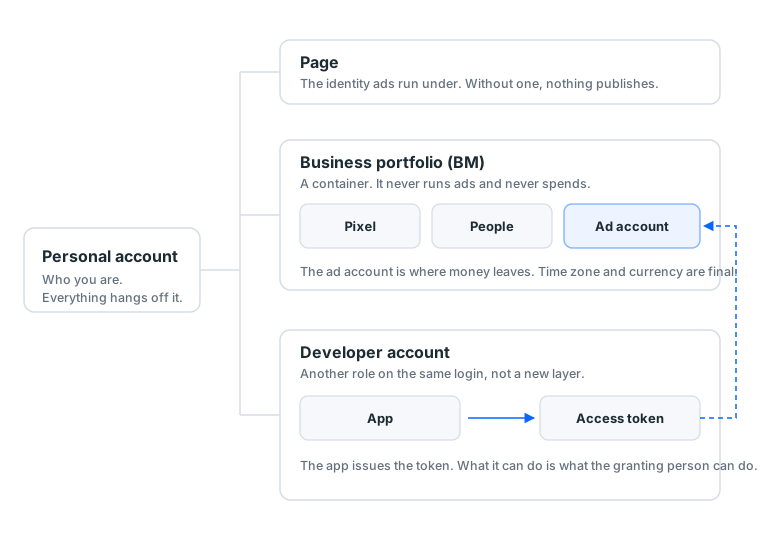
There is exactly one root on that map: the personal Facebook account. Everything else hangs off it, without exception.
This guide grew out of a support conversation on 11 September 2026. A customer new to advertising asked three questions in a row: can API tokens be bought, is a bought token part of a BM, and does a purchased developer account still need a Facebook account attached to it. Three questions, one misconception: they were treating the developer account as a fifth kind of account sitting alongside the personal account, the Page and the BM.
That misconception costs money rather than marks. People who treat the developer account as a standalone product usually spend in one of two ways. They buy one and still cannot publish an ad, because what they were missing was a Page. Or they pay extra "for the API" when the job they described is three clicks inside Ads Manager. Both pay first and find out afterwards that the missing piece was something else.
1. Five terms, one line each
| Term | What the interface calls it | One line | What breaks without it |
|---|---|---|---|
| Personal account | Personal account | Who you are, the thing you log in with | Nothing works at all |
| Fan page | Page | Whose name the ad runs under | Ads will not publish |
| BM | Business portfolio | The container for ad accounts, pixels and people | One ad account only, and no way to delegate |
| Ad account | Ad account | Where money leaves | Nothing to charge |
| Developer account | Developer account | Another role on the same login, used to build apps | No API access, but Ads Manager still works fine |
The last column is what the table is actually for. Each missing layer has its own symptom, so you do not need to memorise the definitions. You need to recognise the symptom.
What about an "ad account for sale"
That phrase is not on the table above, because it is not a Meta object. It is a product name.
What the market calls an ad account is a personal account that already has an ad account opened on it, which is the first layer plus the ad account layer. Several other terms work the same way:
| Market term | What it actually is |
|---|---|
| Ad account / ad-ready account | A personal account plus an ad account already opened |
| Shared account | Someone else's ad account with operating access shared to you; ownership stays theirs |
| BM3 / BM50 | A BM spec, where the number is how many ad accounts fit |
| Developer account | A set of personal Facebook credentials already registered as a developer |
| Once-appealed / twice-appealed | A history state of a personal account, not a different object |
Read that table once and "what did I actually buy" stops being a guess. Every product name decomposes into a layer plus a state.
Turn it around and it gets more useful still: every payment buys time on one specific layer. An aged account buys the two years since it was registered. A Page buys its posting history and its followers. An ad account buys the few days of opening and clearing checks. A developer account buys one verification you no longer have to pass. Long time costs more, anything you can do yourself costs less, and that single rule explains most of the price spread in any catalogue. The reverse holds too: any layer you have the time to build yourself is a layer you should not be paying for.
Which grade of account suits which budget is in account types and when each one fits.
2. Three lines off the personal account
Back to the map. Only three lines leave the personal account, and they are not alike.
One: the Page. Ads have to run under a Page, which is a hard requirement. A Page can sit inside a BM or stand on its own.
Two: the BM. A container. It holds ad accounts, pixels, people and payment methods, and it never runs ads or spends money itself. Details in what a BM is.
Three: the developer account. This line is different from the other two. It produces no advertising assets at all, only a second way to operate the ones you already have. Next section covers it.
Why "only one root" matters
Because it decides how far the damage travels:
| What breaks | What happens to the rest |
|---|---|
| Personal account disabled | All three lines become unreachable, unless you added a second admin in advance |
| Page reported | The linked ad account gets a closer look |
| BM disabled | Ad accounts under it usually suffer; Pages usually survive |
| Ad account disabled | Other ad accounts are not automatically affected, but it is on the record |
| App disabled | Only the programmatic route stops; Ads Manager keeps running |
The first row is the expensive one. The personal account is the single root, and when it goes, everything you own on Meta goes out of reach at the same moment. Adding a second Facebook account as an admin on the BM and the ad account costs nothing and pays for itself the day it is needed.
3. What a developer account actually is
It is an extra role on your personal Facebook account, not a new account.
You sign in to developers.facebook.com with the same credentials, create an app there, the app issues an access token, and your program calls Meta's API with that token. The whole chain:
personal account → developer role → app → access token → API call
Meta documents the verification requirement plainly: a developer account needs a payment method on file, or two-factor authentication set up. That is the documented bar.
The field reporting is a separate thing. Through 2026, practitioners have consistently said new developer accounts clear verification less easily than before, which is exactly why ready-made developer accounts started showing up for sale that year. That sentence is community reporting rather than an announcement, and it is flagged because the two carry different weight.
There are five token types; two of them matter here
Meta's documentation lists five: app tokens, client tokens, Page tokens, system user tokens and user tokens.
For advertising, only two come up:
| Token | Represents | Good for |
|---|---|---|
| User token | One person | Manual testing, one-off scripts |
| System user token | A system, not a person | Long-running automation, with nobody re-authorising it |
If something has to keep running, the answer is a system user token, and it is created inside the BM. Plenty of people never learn this and go shopping for a developer account instead, when their own BM already issues what they need.
A token is never bigger than the person
The most common misunderstanding: a token can do exactly what the person who authorised it can do inside the BM.
So a token is not a shortcut around permissions. Someone with analyst access on an ad account issues a token that reads data and changes nothing. Read that in reverse and you see why a leaked token is as serious as a leaked password: it carries that person's whole permission set.
4. "Can I just buy a token?"
You can buy something. It is not what most people think they are buying.
What is sold is an account, not a token. You generate the token yourself, from an app, after you have the account, and it expires. Nobody can sell you a permanently valid token, because that is not how the system works.
What you get is a set of personal Facebook credentials that happen to be registered as a developer already. It is a first-layer product with one extra role attached.
Check whether you need one at all
Most people do not. The test is one question: does a program need to operate your ads?
| What you want to do | Developer account needed |
|---|---|
| Build ads and read results in Ads Manager | No |
| Export reports from the interface | No |
| Install a pixel, send conversions API events | Pixel no; conversions API needs a token |
| Create hundreds of ads programmatically | Yes |
| Build a tool your clients will use | Yes, and it needs App Review |
The first two rows cover nine advertisers out of ten. If you run your own ads, this whole line on the map can stay untouched.
The review rule is documented and simple
In one line: an app used only by people who hold a role on that app needs no App Review; an app used by third parties who hold no role does.
Running your own ads is the first case, so no review. Review exists for the case where you build a tool for other people.
Separately, the Marketing API access tiers were renamed on 4 May 2026: what used to be Ads Management Standard Access is now the Marketing API Access Tier, the lower tier went from Standard Access to Limited Access, and the upper one from Advanced Access to Full Access. The upper tier requires 500+ API calls in the past 15 days with an error rate under 15% across the last 500.
Which is to say the gate is usage and quality, not owning the right account. No purchase moves you up a tier, and no seller can move you up one either.
What the risk in a bought developer account looks like
| Risk | Why |
|---|---|
| The identity is not yours | The original holder keeps the appeal channel and can reclaim it |
| Verification comes back | When the platform asks for ID, you do not have theirs |
| The app lives on that account | Lose the account and the app and every token die with it |
| Collateral damage | If that account is used for anything else, one problem hits everything |
The third row gets underestimated most. You write the automation, wire it into production, and the whole thing now depends on an account you do not control. The day it asks for identity verification, your pipeline stops.
Our own catalogue does not carry this category
Pulled live from our catalogue on 11 September 2026: the Facebook category holds 50 display groups priced between 10 and 80 USDT. The spread is 15 groups of accounts, 13 aged accounts, 12 Pages, then 3 personal accounts and 3 self-registered ones, 2 ad accounts, and one each of SMS verification and live-selling assets.
Not one of those 50 groups is a token or a developer account. That is not a stock-out. We do not carry the category, for the four reasons in the table above: it looks fine on the day it is delivered, none of the conditions that break it sit with either party, and the complaint comes back three months later.
The same numbers carry a second lesson: 12 groups of Pages against 2 ad accounts. The market stocks six times as deep on Pages, because an ad account is something you can open yourself while a Page's trust has to be accumulated over time. When you are not sure which layer you are short of, the depth of the market is a decent first hint.
If you really do need the programmatic route
Say you are certain a program has to run your ads, because you build hundreds of them a day or you are sending conversions API events. You do not have to buy anything. The order is:
Sign in to the developer site with your own personal account, create an app, and add the Marketing API product to it. Then go back to your own BM, create a system user, assign it access to the target ad account, and generate the token from there. Your program calls the API with that token. No third-party account, no App Review, because the only person using the app is you.
There is one place this route gets stuck: your own role in that BM is not high enough. When permissions are short, the API error usually reads like a configuration mistake, so people go back and edit the app for a day. Check the role first. It is faster than anything else you could try.
5. Work back from the symptom, not forward from the term
What actually helps is being able to point at a layer when something breaks:
| What you see | Which layer | Where to go |
|---|---|---|
| Login asks you to verify your identity | Personal account | stuck at a checkpoint |
| No Page to select when building an ad | Page | Create or acquire a Page first |
| Cannot open a second ad account | BM capacity | BM3 vs BM50 |
| Ad builds but will not publish | Ad account | what an ad account is |
| No idea which button starts anything | Ads Manager | the Ads Manager tour |
| API returns a permission error | Permissions or the app | Check what role the authorising person holds in the BM |
The debugging order in the last row is worth keeping: when the API returns a permission error, nine times out of ten the app is configured correctly and the person who authorised it simply never had that permission. Checking the role in the BM is faster than editing app settings.
6. What a first run actually needs
Starting from zero, three things, and a developer account is not one of them:
- A personal Facebook account (a bought one gets warmed up first: the first 7 days)
- A Page, because ads run under one and will not publish without it
- A BM with an ad account in it (BM3 is plenty to start)
Those three only work as a set; miss one and the others sit idle. The first-run bundle is worth it less for the discount than because it removes the "which layer am I missing" problem entirely.
The full path to a first live ad is in the complete Facebook ads guide.
The short version
One root, three lines. The personal account is the root, the Page gives ads an identity, the BM holds the ad account, and the developer account is just another role on the same person used to open the programmatic route. Nine advertisers in ten never need that third line, and the ones who do usually need a system user token from their own BM rather than somebody else's developer account.
Sources (official pages checked 2026-09-11). Anything marked as field reporting comes from public practitioner discussion and our own tickets, not from these pages:
- Access Tokens for Meta Technologies, Meta for Developers, developers.facebook.com
- App Development, Meta for Developers, developers.facebook.com
- App Review introduction, Meta for Developers, developers.facebook.com
- Update to Ads Management Standard Access: New Name, Revised Requirements, and More Transparency (4 May 2026), Meta for Developers, developers.meta.com
- Create and manage a business portfolio, Meta Business Help Centre, facebook.com
FAQ
Are the personal account, Page, BM and ad account the same thing?
No, they are four separate objects. The personal account is who you are, the Page is the identity ads run under, the BM is a container for assets, and the ad account is where money leaves. What the market calls an "ad account for sale" is a personal account that already has an ad account opened on it.
Is a developer account a fifth kind of account?
No. A developer account is a role your existing personal account picks up when you sign in at developers.facebook.com. It is not a separate login and it does not replace the personal account.
Can you buy an API token?
People do sell something, but it is a personal Facebook account that has already registered as a developer and passed verification, not a token. You generate the token yourself from an app after you have the account, and tokens expire.
Do I need a Facebook account before a developer account?
Yes. The developer account is a role on a personal account, so there has to be one underneath. "Buying a developer account" means buying a set of Facebook credentials.
What does developer account verification require?
Meta documents it as adding a payment method or setting up two-factor authentication. Practitioners report that new accounts clear that bar less easily than they used to, which is why ready-made developer accounts started appearing for sale during 2026.
Do I need a developer account to run ads?
No. Running ads through Ads Manager never touches the developer side. You only need it when a program has to create or read ad data for you.
Can a token have more permission than the person behind it?
No. A token can do exactly what the person who authorised it can do inside the BM, never more. It is not a way around permissions.
Does my app need App Review?
Meta's rule is that an app used only by people who hold a role on that app does not need review; an app used by third parties without a role does. Running your own ads falls into the first case.
What is a system user token?
A token created inside the BM that represents a system rather than a person. It is the right choice for long-running automation because nobody has to keep re-authorising it.
What are the Marketing API access tiers?
On 4 May 2026 Meta renamed Ads Management Standard Access to the Marketing API Access Tier, with the lower tier now called Limited Access and the upper one Full Access. The upper tier requires 500+ API calls in the past 15 days and an error rate under 15% across the last 500 calls.
Do tokens expire?
Yes. Short-lived tokens last hours, long-lived ones days or months, and a system user token can be set not to expire but still breaks when the underlying permissions change. Design for tokens breaking.
What is the risk in a bought developer account?
You are operating under someone else's identity. The original holder keeps the appeal channel, and if the platform asks for ID you cannot produce it. Everything built on that account, the app and every token, dies with it.
Is a "fan page" the same as a Page?
Yes. Fan page, FB page and Page all refer to the same object, which the interface simply calls a Page.
How does a BM differ from an ad account?
The BM is a container that never runs ads and never spends. The ad account is the thing with a payment method, a spending limit and an account quality status. The 3 in BM3 is how many ad accounts fit, not how much you can spend.
How do I tell which layer I am missing?
Work back from the symptom. No Page to select means you are missing a Page, no second ad account means the BM is full, and ads that build but will not publish point at the ad account.
Want the parts this article talks about?
See the catalogRead next
Running Facebook Ads: the complete path from nothing to your first live ad
The whole route on one page. From "where is Ads Manager" to "how do I
What is an ad account? How personal accounts, ad accounts, BMs and Pages relate
Four things get talked about interchangeably, but they are four separa
What Is BM in Facebook Ads? Business Manager, BM3 and BM50
BM is the container your ad assets live in, not the place you run ads
Account types and when to use each one
Blank, aged, once-cleared, twice-cleared, cloned, ad account. Plenty o
What Is Facebook Ads Manager? Interface Tour and First Setup
Ads Manager is Meta's console for building, running and monitoring ads
Six things to know before buying a Facebook account
This market runs on serious information asymmetry. Here are the questi