Cookie Login for Bought Accounts: AdsPower or No Software
A cookie login pastes an existing session into your browser, so the platform sees a session it knows rather than a password login from a device it does not.
"The seller says \"use the cookies to log in\" and stops there. This covers the whole thing: what a cookie login actually does, what has to be ready first, which AdsPower field takes what, how to do it with nothing but Chrome, and how to read the screen when it fails."
This guide grew out of a support conversation. A customer bought an account, the seller said "there are cookies, remember to log in with the cookies", the customer replied "how", and then "can you teach me". That exchange turns up about once a week, and the problem is not that the customer is slow. Nobody ever explains this from the beginning: what a cookie login does, what has to be ready first, which field takes what.
The short version:
A cookie login moves the logged-in state, not the password. It lowers the chance of being stopped at a first login from a strange device. It does not make the account safe. Three preconditions, and missing any one of them breaks it: a separate browser profile, a network whose region matches, and cookies that have not expired.
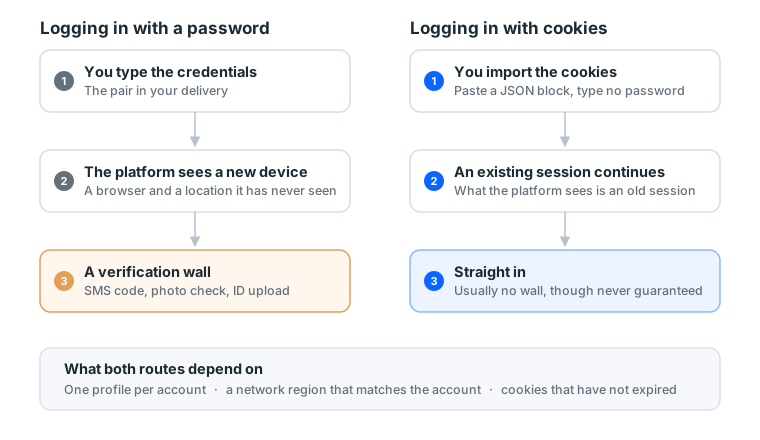
1. What a cookie login actually does
When you press "log in" anywhere, the site hands your browser a credential to keep. Every page you open afterwards sends it back, and the site knows you are the person who just logged in. That credential is the cookie.
So a cookie login is not a bypass. It is that credential, moved across as it is. What the platform receives is an existing session rather than a password login from a device it does not recognise.
On Facebook two of them carry the weight: c_user holds the user id and xs holds the session secret, and together they decide whether the platform treats you as logged in. The JSON block in your credentials usually carries a dozen more. Paste all of it and do not pick.
Why the seller would rather you skipped the password
Meta's own documentation says it plainly: when someone signs in from a browser or mobile device it does not recognise, the system asks for a login code. So a password login presents the platform with this set of facts: a device never seen before, a location never seen before, and the correct password.
Those three together are the standard shape of a stolen account. Risk systems cannot tell a legitimate buyer apart, so they stop you, and you land on SMS codes, photo recognition or an ID upload. The phone number in your credentials is usually not one you can receive SMS on, and the ID certainly is not yours, so getting stuck there tends to be terminal.
A cookie login skips that gate. It does not skip the platform's safety systems. An account with a problem, creative that breaks policy, budget raised too fast: cookies do nothing for any of those.
2. Three things to have ready first
Order matters. All three have to be in place before you paste anything, and fixing them afterwards means starting over.
| What you need | Why | The cheap version |
|---|---|---|
| A separate browser environment | Cookies and login states see each other, so sharing a profile ties two accounts together | Chrome's built-in "Add profile" is enough |
| A connection that does not jump | A distant region, or a new exit every session, reports you as anomalous by itself | A fixed home line, or the same SIM's hotspot |
| The cookie block in your credentials | Without it the password route is the only route | Listings without cookies take the password plus 2FA route |
The second row is the one people misread. They assume the goal is a clean IP, when the goal is not changing it. A stable home line is safer than a datacentre line that picks a new exit on every connection. The full test is in get your device and network right before buying.
Confirm the third one before you start: open your credentials and look for a block starting with [ and full of name and value pairs. That is JSON cookies. If it is not there, the listing does not include them and no amount of searching will produce them. Whether cookies ship is a property of the listing rather than the seller's mood, and every item in the catalogue states its delivery format before you buy.
Why this has to happen the moment credentials arrive
Pulled live from our catalogue on 15 September 2026: of the 50 display groups in the Facebook category, 88% carry a one-hour warranty window and the remaining 12% run to a day. Which means the time you have to report "I pasted it and cannot get in" with no argument is, in most cases, the hour after delivery.
That number rearranges the order of work: the environment gets built before you order. What eats the hour is never the pasting, which takes thirty seconds. It is "I have not installed the extension", "I do not know where profiles live", "my proxy is not bought yet". Start researching those after the credentials land and the window closes while you read.
3. Route A: AdsPower, for people running many accounts
The value of a tool like this is not disguise, it is management. Ten accounts means ten separate environments, hand-rolled profiles get messy, and AdsPower binds the environment, the proxy, the cookies and your notes into one card. With one or two accounts you do not need it. Skip to section 4.
Every screenshot below was taken in our own AdsPower, with fake values in the fields. The interface is in Chinese here; the English build uses the same layout with translated labels.
Step 1: new profile, name and cookies
The blue "new profile" button on the left opens the form, which has five sections: basic settings, proxy, account platform, fingerprint and advanced. The first section looks like this:
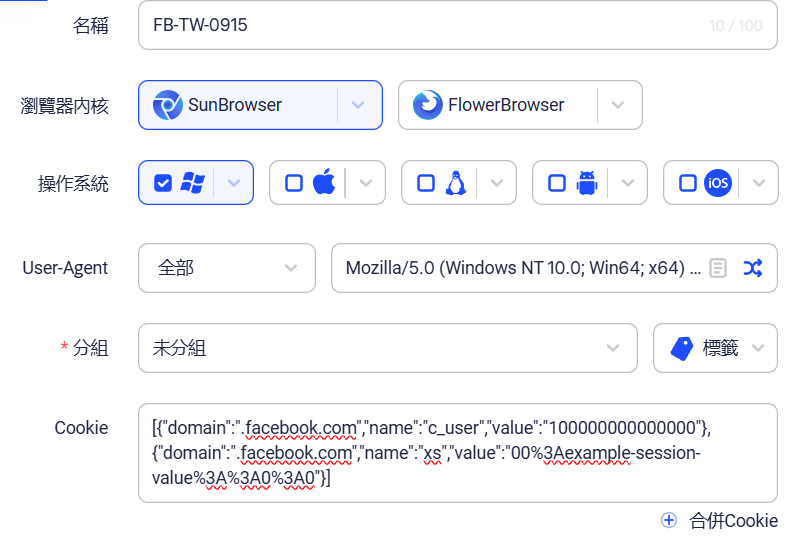
- Name it something you will recognise, such as platform, region and purchase date:
FB-TW-0915. Ten accounts from now you will be glad. - Leave the browser kernel, operating system and user agent alone. The defaults are correct.
- The Cookie field sits at the bottom, and its own hint lists the three formats it accepts: JSON, Netscape and Name=Value. Credentials usually arrive as JSON, the long block starting with
[. Paste all of it.
Step 2: the proxy section
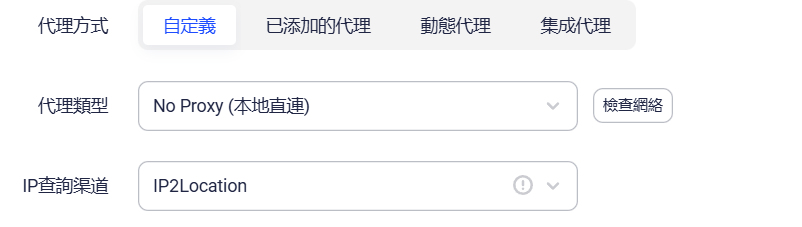
Choose the custom mode, pick the type you bought (HTTP, HTTPS, SOCKS5 or SSH), and fill in host, port, username and password. Running on your own home line means leaving it on No Proxy, which is not laziness. When the account's region is close to yours, a fixed home line beats a datacentre line.
The button beside it checks whether the line actually works. That check is what saves you from opening the browser and discovering the proxy is dead.
Step 3: the account platform section, where people get stuck
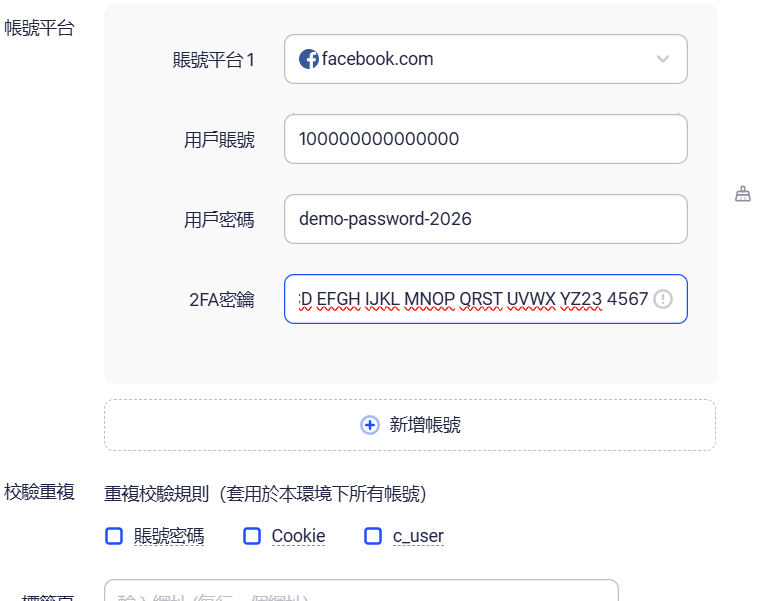
This section is the answer to "where do the Facebook credentials go". Click add account, pick facebook.com from the dropdown, and three fields appear:
| Field | What goes in | The usual mistake |
|---|---|---|
| Username | The account from your credentials, usually a numeric user id, sometimes an email | No @ prefix, and not a URL |
| Password | The password from your credentials, pasted as is | Do not change it right after pasting |
| 2FA secret | The long string of A–Z and 2–7, not the six-digit code | The most commonly mis-filled box. See how to use a 2FA secret |
Fill this in and AdsPower opens the login page with the credentials already typed, which is why it does not conflict with cookies. Live cookies take you straight in; dead ones leave you a password to fall back on. Filling both is the complete setup, and filling only one throws away the fallback.
The duplicate-check row underneath can be set to c_user, which stops you building the same account into two environments. Past ten accounts, turn it on. Duplicated environments are the first step towards losing track.
Step 4: what that red error means
If your cookies are not JSON but the name=value kind (looking like c_user=...; xs=...; fr=...), saving produces this red line:

We tested both cases on 15 September 2026: JSON with the platform left empty saves fine; name=value with the platform left empty produces the error above. The reason is not mysterious. Each JSON cookie carries its own domain, so AdsPower knows which site to write it to. A name=value string carries only names and values, with no domain, so it asks you to name the platform before it can place them.
So the fix is not pasting again. It is going back and filling in the account platform section, or asking the seller for the JSON version.
Step 5: save and open
Save, go back to the profile list, and press open. Once the browser is up, type facebook.com.
The proxy has to be set before you press open. This is the most common ordering mistake: the browser gets opened, a few pages get loaded, and only then does the proxy come up. By that point the first requests have already left from your own connection. Settings apply at the moment the profile opens, so changing them afterwards means closing and reopening.
What success looks like
The browser opens straight into the feed with the account's name in the corner. That is it.
If you land on the login page instead, do not reach for the password. Read the symptom table in section 5 first.
4. Route B: no software, which is the right answer for one or two accounts
Chrome plus one extension does the job at zero cost.
- Create a separate profile. Chrome, avatar at top right, Add, name it. Each profile keeps its own cookies and login state and cannot see the others.
- Install a cookie import extension inside that new profile (Cookie Editor or similar). Inside the new one, not the profile you use every day.
- Open
facebook.comonce and stop at the login page. Cookies need their domain present before they can be written. - Extension icon, Import, paste the JSON block, Import.
- Reload the page.
Step 5 is the one people skip. Nothing on screen changes when you paste, because that page was fetched with the old state. Reload and the browser asks again with the new cookies. Plenty of people conclude the paste failed, paste again, clear everything, and end up more confused than when they started.
Choosing between the two
| Chrome profile | A tool like AdsPower | |
|---|---|---|
| Cost | Zero | Free tier has a cap, past that you pay |
| Comfortable up to | 1 to 3 accounts | 10 and beyond |
| Environment isolation | Yes | Yes |
| Proxy binding | Needs another extension | Built in, one line per account |
| Notes and grouping | None, you track it yourself | Built in |
| Fingerprint parameters | Not adjustable | Adjustable, and beginners should not |
The deciding factor is count, not safety. Isolation works the same way in both. What differs is whether you still know which account is which after the tenth one.
5. When it fails, read the symptom instead of pasting again
One screen can have three different causes, and pasting again only fixes one of them.
| What you see | Usually means | What to do |
|---|---|---|
| Still the login page | Cookies never landed, or the format is wrong | Check the domain is facebook.com, that the whole block went in, reload |
| In for a second, then back to login | The session has expired | Use the password and 2FA instead, see how to use a 2FA secret |
| Asked for a login code | The platform is confirming it is you | Generate it from the 2FA secret in your credentials |
| Asked to upload ID | The account is under identity review | Nobody can solve this for you. Screenshot, open a ticket, see stuck at a checkpoint |
| In, but a restriction banner | The account's own condition | Screenshot and open a ticket rather than appealing yourself |
| Someone else's account loads | The profile was not clean | Start again in a brand new profile |
Rows two and three get confused constantly, and they need opposite responses. Being bounced to the login page means the session is dead and pasting it a hundred times changes nothing. Being asked for a code means the platform recognises you and wants proof, which the 2FA secret provides. The tell is simple: does the screen know your name, or show a masked email? If it does, you are on row three.
One more distinction worth having in advance: "the cookies expired" and "the account is gone" look almost identical on screen, but they sit on different sides of the warranty. An expired session is normal wear, and the password route still works, so the product is fine. A disabled account fails on the password route too, and usually says so. Try the password login before reporting anything. That attempt is also your evidence: both routes failing is the case that belongs in a ticket.
6. The first hour after you are in
Getting in is not the finish line. The next hour can still kill the account.
Three things not to do that day: change the password, change the email, change the profile photo. That sequence is precisely what someone who has stolen an account does, and the system cannot tell you apart. Leave it alone, start regular use the next day, and take the full rhythm from the first hour with a new account and the first 7 days.
One warranty note as well. The window starts at delivery, and most listings cover the first login only. So cookies that will not paste, a session that bounces you, or a restriction banner on arrival all need a screenshot and a ticket right then, not after an evening of research. What to check on arrival is in the acceptance SOP.
7. Four things people believe about cookies
"Cookies mean it will not get banned." No. Cookies affect the login and nothing else. Whether the account survives afterwards comes down to isolation, budget pacing and whether the creative stays inside policy.
"Cookies last." They do not. A session has a lifetime and also dies early when the other side logs out, changes the password, or the platform flags something. Cookies are consumable; the 2FA secret is the asset.
"Cookies are safer than a password." Smoother for you, but it cuts both ways: anyone who gets that block has the account, with no password and no 2FA required. Guard it the way you guard a password. Not in a group chat, not pasted into an online JSON formatter.
"You need serious tooling for this." You need a browser profile and a free extension. Tooling solves a volume problem, not a capability one.
The short version
A cookie login moves state, not a password. Build the separate profile and the stable connection first, then paste, then reload. When it fails, classify the symptom instead of pasting again: back to login means the session died, a code request means prove it is you, an ID request means open a ticket.
What happens after the login decides how long the account lives. Next is the first hour with a new account.
Sources (official pages checked 2026-09-15). The support conversation and the operating judgements come from our own tickets, not from these pages:
- Manage Chrome with multiple profiles, Google Chrome Help, support.google.com
- How to import and export cookies (the Import button and the accepted formats), Cookie Editor, cookieeditor.org
- Create a profile (form fields and the supported cookie formats), AdsPower Help Center, help.adspower.com
- Cookie export, AdsPower Help Center, help.adspower.com
- How two-factor authentication works (an unrecognised browser or device is asked for a login code), Facebook Help Centre, facebook.com
- Cookie Policy (how the platform uses cookies for authentication), Meta, facebook.com
FAQ
What does logging in with cookies mean?
The seller exports the "already logged in" state as a block of text and you paste it into your browser. The platform sees an existing session rather than a password login from a device it has never seen, so the verification wall usually does not appear.
Why does the seller want cookies instead of the password?
A password login tells the platform that a device it has never seen just produced the right password, which is exactly what account theft looks like. That is what triggers the checkpoint. Cookies continue a session that already exists.
Do I have to buy an antidetect browser?
No. For one or two accounts, a separate Chrome profile plus a cookie import extension is enough. Tools like AdsPower start paying for themselves at around ten accounts, and what they save is management time.
Where do the cookies go?
AdsPower has a cookie field right in the new profile form and accepts JSON, Netscape and Name=Value. In Chrome you open the separate profile first, then use the Import button in an extension such as Cookie Editor.
Do I have to refresh after pasting?
Yes. The page you are looking at was fetched with the old state, so nothing changes until you reload facebook.com and the browser sends the new cookies.
Do cookies expire?
They do. A session has a lifetime, and it also dies early if the other side logs out, changes the password, or the platform flags something. The symptom is being returned to the login page.
What do I do when the cookies stop working?
Log in with the username, password and 2FA secret instead, which is why credentials ship with all three. Then follow the first-hour routine and change nothing else that day.
Which Facebook cookies actually matter?
c_user holds the user id and xs holds the session secret. Together they decide whether the platform treats you as logged in, and missing either one puts you back on the login page.
Should the proxy be set before pasting cookies?
Yes. Set the network first, then open the browser. Otherwise the first requests leave from your own connection and the point of the exercise is gone.
Can one profile hold two accounts?
No. Cookies, local storage and any signed-in third-party sessions are all visible to each other, so one problem reaches both. One account per profile is the floor, not the ideal.
Does AdsPower cost money?
It has free and paid plans. Reports of how many profiles the free plan allows disagree with each other, so check the current pricing page. Everything in this guide uses basic features; paying buys team access, bulk operations and automation.
Do I need to buy a proxy?
It depends on the account's region. A large gap between the account's region and your connection calls for one; a small gap does not, and a stable home line is usually safer. The point was never to change IP, it is to stop changing it.
What do I do first after a successful login?
Nothing. Leave it for thirty minutes, and do not change the password, the email or the profile photo that day. That sequence is exactly what a hijacker does.
The account is in but shows a restriction banner. Now what?
Screenshot it and open a ticket. That is the account's own condition rather than a login problem, and the warranty window starts at delivery, so earlier is better.
Can I save the cookies and reuse them?
Keep them as a backup, but they lapse with time or with anything the other side does. Treat cookies as consumable and the 2FA secret as the asset, because losing the secret leaves no third route.
Want the parts this article talks about?
Next: the first hour with a new accountRead next
Get your device and network right before buying
Nine times out of ten, an account that dies on first login is an envir
The first hour with a new account
Get the order wrong and a healthy account dies anyway. This hour is al
Instagram Accounts for Organic Growth: the SOP Before You Change the Username or Post Anything
One account per browser profile, one IP, and a first week where you pu
How to use a 2FA key
What you received is not a code. It is the seed that produces codes. U
Acceptance SOP: what to do in the first 30 minutes
One checklist. Finishing it is what counts as taking delivery. Miss th
What to do when an account hits a checkpoint
Work out which kind you are looking at first. Some clear once you veri
Running Facebook Ads: the complete path from nothing to your first live ad
The whole route on one page. From "where is Ads Manager" to "how do I