Get your device and network right before buying
Three things to prepare before buying an ad account: one separate browser profile per account, a stable network matching the account's region, and a tracking sheet. Preparation costs nothing. Skipping it costs the whole batch.
Nine times out of ten, an account that dies on first login is an environment problem rather than a faulty product. Read this before you order.
Conclusion first: whose hands an account is in matters far less than where it is used from, on what device, and at what rhythm. Put a healthy account into a dirty environment and it dies within 24 hours. Put the same account into a clean environment and warm it properly and it lasts a long time.
This covers no detection-avoidance whatsoever. What it covers is operational hygiene, the same category of work as running a server or managing a mail domain.
1. One account, one environment
The most important rule here, and the most overlooked.
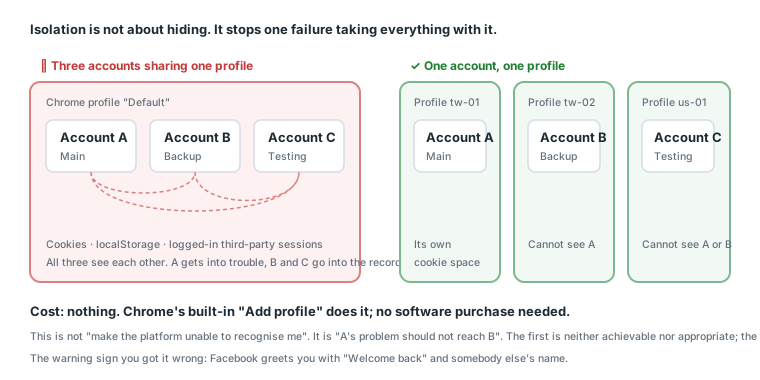
- Do not log two accounts into the same browser profile. Cookies, localStorage and logged-in third-party sessions are all mutually visible.
- Do not log a newly bought account into the browser you just used for your personal account. This is the textbook cause of "one account gets into trouble and the whole string goes with it".
- The cheapest fix: one separate browser profile per account (Chrome's "Add profile" is enough; no software purchase needed). When the credentials include cookies, the cookie login guide walks through building the profile and where the cookies go.
This site does not provide or teach the configuration of fingerprint-spoofing tools. That is working against a platform's security mechanisms rather than using the platform correctly. What is described here is isolation: the goal is "A's problem should not reach B", not "make the platform unable to recognise me".
How to create a separate profile
Chrome, about thirty seconds:
- The avatar icon at the top right → Add
- Choose "Continue without an account" (do not sign into a Google account)
- Give it a memorable name, such as
tw-01orus-02 - Pick a distinct colour so you can tell them apart at a glance
Each profile opens its own window, with its own cookies, its own login state and its own extensions. None of them can see the others.
Edge and Firefox have the same feature (Firefox calls it container tabs; the mechanism differs slightly but the effect is similar).
An incognito window is not a substitute
A lot of people assume incognito is enough. It is actually worse:
| Separate profile | Incognito | |
|---|---|---|
| Cookie isolation | ✅ | ✅ |
| Persists after closing | ✅ | ❌ Everything cleared |
| Next login looks like | The same device | A brand-new device |
| Suitable for warming up | ✅ | ❌ |
"Treated as a brand-new device every time" is precisely what you are trying to avoid. Warming up an account is about accumulating a continuous behavioural record, and incognito wipes that record every session.
Naming conventions
Past three accounts you will lose track of which window is which, so naming needs a rule:
region-number      e.g. tw-01, us-02, jp-01
purpose-number     e.g. main-01, backup-01, test-01
Region and number is the better default, because the region decides which connection you log in from, and that is information you use daily.
2. Network: stability matters more than "clean"
Beginners love asking which kind of IP to use. The more useful question is whether your IP jumps around.
| Situation | Risk |
|---|---|
| Fixed home broadband or a fixed office IP | 🟢 Most stable |
| Phone hotspot (same SIM, not constantly changing towers) | 🟢 Usable |
| A different country's connection every session | 🔴 Constant verification requests |
| A shared public exit used by dozens of strangers | 🔴 Their behaviour counts against you |
The account's region and your network's region need to line up. Buy a US account and do not log in from Asia, and vice versa. Not because you will be caught, but because "registered in New York, logging in from Taipei, and from Frankfurt ten minutes later" is a trajectory that triggers ordinary security verification, and then you are stuck on a verification page.
Why "stable" beats "which kind"
The platform is not judging whether an IP is good. It is judging whether an account's login trajectory is plausible.
| Trajectory | Looks like |
|---|---|
| The same connection every day | Somebody who lives there |
| An occasional change, such as a trip | A normal person |
| Three countries in one day | A shared or stolen account |
| A different country every login | Automation |
You want the first or second. The third and fourth leave you permanently on verification pages, and every verification is another risk.
Buying accounts from a different region
The practical dilemma: you bought a US account and you are not in the US.
Three real options:
| Approach | Viability | Note |
|---|---|---|
| Log into a US account from your own connection | 🟡 May get stopped | Plenty of people do it and clear |
| Buy an account from your own region | ✅ Simplest | Our catalogue has regional items |
| Buy a "random country" account | 🟡 | Which country is uncertain |
The least troublesome approach is buying accounts matching where you are. Our catalogue's regional distribution is 65 groups overseas, 34 US, 9 TW and 6 JP, so local options exist even if they are limited.
If you genuinely need a specific region's account, how you will handle that region's network is something to settle before buying rather than after.
3. The pre-order checklist
Complete these before credentials arrive, or you will be scrambling:
- Create a separate browser profile (one per account, named, e.g.
us-01). - Confirm the network is stable and matches the region of the account you are buying.
- Prepare a 2FA tool (see how to use a 2FA key). Most accounts come with a key string, not an SMS code.
- Prepare a tracking sheet: account, purchase date, region, purpose, status. Past three accounts you will not remember.
- Confirm you have time. The first hour is the most critical part of the warranty window, so do not buy right before going out.
What the tracking sheet should look like
One spreadsheet is enough. Suggested columns:
Account | Purchase date | Type | Region | Profile name | Warranty hours
        | Inspection completed | Purpose | Status | Notes
"Profile name" and "warranty hours" are the two most commonly omitted and the two most useful.
The first tells you three months later which window to open this account in. The second is your basis in a dispute.
When this sheet saves you
| Situation | Without a sheet | With one |
|---|---|---|
| Needing an account three months later | No idea which profile | One lookup |
| Opening a ticket when something breaks | Cannot find the order number | One lookup |
| Wanting to know your replacement rate | By feel | Calculable |
| How long the backup has gone unused | Unknown | Visible |
The third is the most valuable. "How many accounts did I replace this month" decides whether you should be examining account quality or your own operation, and without records you can only guess.
4. What not to do, known before you buy
- Do not change the password, email or phone on arrival. The most common way to lose an account; see the first hour with a new account.
- Do not immediately upload an avatar, change the name or post. A brand-new session performing a run of profile changes is the most stolen-account-shaped behaviour there is.
- Do not log into five accounts at once. One at a time, finishing each before the next.
- Do not operate through automation scripts. You bought an account, not a bot.
Why "five at once" is particularly bad
Three independent problems happen simultaneously:
- Environment contamination: if you used one profile for convenience, all five see each other
- Trajectory anomaly: one connection logging into five different accounts within minutes is an unambiguous signal
- You will not finish: five acceptances at thirty minutes each is two and a half hours, and most people rush
The third is the most practical. Buying five and inspecting one means four warranty windows expire untouched.
5. The cost is low, so do not skip it
| Item | Suggestion | Rough cost |
|---|---|---|
| Separate browser profile | Built into Chrome or Edge | 0 |
| Stable network | Your home broadband | 0 |
| 2FA tool | Any TOTP app, or our generator | 0 |
| Tracking sheet | One spreadsheet | 0 |
Preparation costs nothing. Skipping it costs the whole batch. The highest-return thirty minutes in this business.
The cost of skipping it, in numbers
At our catalogue's median of 10 USDT:
| Environment isolated | Replacements per month | Monthly asset cost | Annual |
|---|---|---|---|
| No | 8 | 80 USDT | 960 USDT |
| Yes | 0.5 | 5 USDT | 60 USDT |
900 USDT a year apart. And the preparation is thirty minutes, once.
That still excludes downtime: each replacement means seven days warming up and three days of learning phase, and those ten days earn close to nothing.
5b. What the platform is actually looking at
Understand the mechanism and every rule above becomes common sense rather than a directive.
Two layers of identification
The platform identifies "who is using this" on two layers:
| Layer | Contains | What you control |
|---|---|---|
| Device and browser | Cookies, localStorage, logged-in sessions, browser settings | Isolate with separate profiles |
| Network and location | IP, approximate geography, connection stability | Use a fixed connection |
Those two layers are separate, so think about isolation separately:
- Two accounts on one network but different profiles → 🟡 acceptable
- Two accounts on different networks but one profile → 🔴 dangerous
- Two accounts sharing both → 🔴 the worst case
Profile isolation matters more than network isolation, because cookies and sessions are direct evidence of association, while a shared network is weak evidence (households share networks all the time).
Why sharing a profile is so dangerous
One browser profile contains:
| Item | Why it associates accounts |
|---|---|
| Cookies | The previous account's login traces are still there |
| localStorage | Identifying data sites keep locally |
| Logged-in third-party sessions | For instance signing into the same Google account |
| Extensions and settings | Distinctive in combination |
The last is the most overlooked. Your extensions, time zone, language and screen resolution are quite distinctive in combination, and every account logged in through one profile shares them exactly.
What "done right" looks like
One test: open Facebook inside a newly created profile. If it says "Welcome back" with a name, the isolation is not clean.
Correct looks like a completely blank login page with no pre-filled account and no "people you may know".
5c. Daily habits
Once the environment exists, how you use it daily also affects the result.
Five habits
| Habit | Why |
|---|---|
| Always open the same account in the same profile | Accumulates a continuous device record |
| Always log in from the same connection | Accumulates a continuous location record |
| Only one profile open at a time | Avoids operating several accounts simultaneously |
| Close it when finished rather than leaving it open | Reduces unexpected background activity |
| Do not browse other sites in that profile | Avoids accumulating unrelated traces |
Most people have not considered the last one. Using your warming-up profile to shop, watch videos and sign into other services accumulates all those traces in the same cookie space.
Suggestion: the warming-up profile does that one thing only. Use a different profile for your own browsing.
Travel and changing locations
Real people travel, so an occasional change of location is not itself a problem. What matters is:
| Approach | Risk |
|---|---|
| A week away, using the local connection throughout | 🟢 Low; it looks like a trip |
| Jumping between two cities within one day | 🟡 Medium |
| A different country every day | 🔴 High |
If you are genuinely travelling, the safest approach is not touching those accounts while away. Resuming afterwards is safer than logging in from unfamiliar networks.
6. Three failures isolation does not prevent
Isolation is not a cure-all. This is its boundary.
| Cause of failure | Does isolation help |
|---|---|
| Checkpoints triggered by an unfamiliar device | ✅ Yes |
| One account's failure reaching others | ✅ Yes |
| Creative rejected for policy violations | ❌ No |
| Risk controls tripped by scaling too fast | ❌ No |
| A platform-wide rule adjustment | ❌ No |
Isolation solves problems at the device and trajectory layer. It does not prevent creative violations (see ad setup) or scaling too fast (see the gradual scaling curve).
Three independent things. Doing one well does not make the other two safe.
7. Five common environment mistakes
① Logging a newly bought account into your main account's browser. The textbook failure. Your main account becomes associated with the bought account, and the bought account is far more likely to get into trouble.
② Using incognito as isolation. Treated as a brand-new device every time, which is exactly what you were avoiding.
③ Constantly changing networks. Home today, office tomorrow, a café the day after. If those three exits differ substantially, the account will be asked to verify repeatedly.
④ Buying a different region's account without a plan for logging in. Nobody thinks about "how do I log in from here" until after the purchase, then wonders why it keeps getting stopped.
⑤ No tracking sheet. Three months later you do not know which profile, when you bought it, or how long the warranty was.
What the five share
All of them are avoidable before you order.
Which is why this piece opens the series: everything in it happens before you spend money, and only afterwards does what you buy, how you warm it and how you scale start to mean anything.
7b. Six environment symptoms and what causes them
Environment problems rarely announce themselves. This maps symptoms back to causes.
| Symptom | Usually | The fix |
|---|---|---|
| Verification demanded at first login | Unfamiliar device (normal) or a dirty environment | Complete it; confirm the profile is newly created |
| After logging in it says "Welcome back, [name]" | The profile is not cleanly isolated | Use a brand-new profile |
| Verification demanded every login | The network keeps jumping | Fix on one connection |
| Stopped on day two of warming up | The two logins used inconsistent environments | Confirm both profile and network are fixed |
| One account fails and the others follow | A shared profile | One separate profile per account |
| Desktop gets stopped after a mobile login | The two networks differ too much | Connect the phone to your home Wi-Fi first |
The two bold entries share one root cause: the profile is not isolated. It is also the easiest to fix, at zero cost.
A quick self-check
Open the profile you are using and do three things:
- New tab, go to
facebook.com. It should be a completely blank login page. - Check the profile name at the top right. It should be the one you created for this account.
- Look at the extension bar. Only what you deliberately installed, none of your everyday tools.
Any one of the three failing means that profile is not clean.
7c. When to rebuild a profile
Profiles accumulate things over time, but not every situation calls for a rebuild.
Three situations that do
| Situation | Why |
|---|---|
| That account died and you are replacing it | The old account's traces would associate with the new one |
| You accidentally logged another account into it | Already cross-contaminated |
| You accidentally browsed a lot of other sites in it | Accumulated unrelated traces |
Situations that do not
| Situation | Why |
|---|---|
| You only changed networks | Network and profile are two separate things |
| The account was stopped but recovered | The environment was fine |
| It has been three months | Age is not a problem; continuity is an advantage |
"It gets old so replace it" is a misconception. One profile used for one account over three months accumulates a continuous device record, which is a good thing.
How to rebuild properly
Not "clear browsing data". Delete the entire profile and create a new one.
Clearing browsing data only removes cookies and cache; the profile's other characteristics (extensions, settings, the fingerprint combination) remain. And clearing is itself a signal: a device that suddenly wipes every cookie looks semi-unfamiliar at the next login.
The correct sequence: the old account dies → delete that profile → create a new one with a new name → log the new account in.
8. This guide as one card
Complete before ordering (one-off, about 30 minutes):
  □ Separate Chrome profile created, named region-number
  □ Network stable and matching the region of the account you are buying
  □ TOTP tool ready
  □ Tracking spreadsheet open

For each additional account (about 2 minutes):
  □ One more profile
  □ One more row in the sheet

Things to know before the account arrives:
  Do not change the password, email, avatar or name
  Do not log into several accounts at once
  Do not use incognito
  Do not use automation scripts

Confirm at the moment of ordering:
  □ I have 30 free minutes to inspect right now
Next: what to do in the first hour with a new account, which keeps first-login mortality very low.
Sources (all official pages, checked 2026-09-08). Prices, catalogue distributions and warranty ratios in this article are our own catalogue and ticket data, not taken from these pages:
- How two-factor authentication works on Facebook — Facebook Help Centre — facebook.com
- Get verification codes with Google Authenticator — Google Account Help — support.google.com
- Community Standards — Meta Transparency Center — transparency.meta.com
- Meta Terms of Service — facebook.com
FAQ
What kind of IP should I use for a Facebook account?
The question is not which kind, it is not jumping around. A fixed home connection or a phone hotspot on one SIM both work. The account's region and your network's region need to line up, or you will be asked to verify constantly.
Do I need an anti-detect browser?
Not necessarily. What genuinely matters is one account per separate environment, and Chrome's built-in "Add profile" achieves that. Past about ten accounts a tool like AdsPower saves management time, and the cookie login guide walks through it. This site covers isolation and multi-account management, not tuning a fingerprint to fool detection.
How many accounts can I warm up at once?
In practice, past three at once people start cutting corners, and the corners they cut die first. Better to work in batches.
How do I create a browser profile?
Chrome's avatar icon at the top right, then Add, then give it a memorable name. Each profile has its own cookies and login state, invisible to the others.
Can an incognito window replace a profile?
No. An incognito window clears on close, so every login looks like a brand-new device, which triggers verification more often rather than less.
Can I log into a US account from a non-US connection?
Not recommended. A large gap between registration region and login region triggers ordinary security verification and you end up stuck on a verification page.
Can I use a phone hotspot?
Yes, as long as it is the same SIM and not constantly changing cell towers. What matters is stability, not the type.
Can I use an office network?
Yes, as long as it is a fixed exit. But if many people there are doing similar things through the same exit, that carries over.
Can several accounts share one network?
Yes; the network is not the main isolation mechanism, the browser profile is. But do not share both the network and the profile.
Do I need phone verification?
Depends what the account includes. Most bought accounts come with a phone number you cannot receive SMS on, so the 2FA key matters more than the phone.
What goes in the tracking sheet?
Account, purchase date, product type, region, warranty hours, inspection completed, purpose, status. Past three accounts you will not remember.
How long does preparation take?
About thirty minutes, once. After that each new account is one more profile, about two minutes.
Why is this the highest-return thirty minutes?
Preparation costs nothing and skipping it costs the whole batch. It is also the only risk control you can complete before spending money.
What else should I confirm before ordering?
That you have 30 free minutes to inspect. The warranty clock starts at delivery, so do not buy right before going out.
Does getting the environment right mean I will not get banned?
No. Isolation reduces "one failure reaching everything" and "being stopped because the device is unfamiliar". It does not prevent creative violations or scaling too fast.
Want the parts this article talks about?
Next: the first hour with a new accountRead next
Running Facebook Ads: the complete path from nothing to your first live ad
The whole route on one page. From "where is Ads Manager" to "how do I
What is an ad account? How personal accounts, ad accounts, BMs and Pages relate
Four things get talked about interchangeably, but they are four separa
The first hour with a new account
Get the order wrong and a healthy account dies anyway. This hour is al
Cookie Login for Bought Accounts: AdsPower or No Software
"The seller says \"use the cookies to log in\" and stops there. This c
Acceptance SOP: what to do in the first 30 minutes
One checklist. Finishing it is what counts as taking delivery. Miss th