BM3 vs BM50 vs BM250, and how allowances actually work
The number after BM is how many ad accounts that BM can own. It has nothing to do with how much you can spend. Spending is set by the ad account's limit, which grows out of payment history. A beginner buying BM50 gains almost nothing.
That number is not how much you can spend. It is how many ad accounts you can open. Confusing the two makes you buy the wrong thing.
The terminology, first
BM stands for Business Manager. It is a container holding your ad accounts, Pages, pixels and people's permissions. It does not run ads and it does not spend money.
The number after BM is how many ad accounts that BM can own.
| Tier | Ad account cap | Suits |
|---|---|---|
| BM1 | 1 | Running a single account |
| BM3 | 3 | Almost everyone, including everyone starting out |
| BM5 | 5 | A few projects at once |
| BM50 | 50 | Volume, backups, or a handful of clients |
| BM250 / BM2500 | 250 / 2500 | Agency scale |
Again: that number has nothing to do with how much you can spend. A single ad account under a BM3 can spend ten thousand dollars a day just as easily.
1. What are the ad spend limits for BM1, BM3, BM5 and BM50?
There is no spend limit attached to a BM tier. BM1, BM3, BM5 and BM50 differ only in how many ad accounts the Business Manager can hold (1, 3, 5 and 50). How much you can spend is decided separately, by three things that each grow with payment history:
- The ad account's spending limit (account level, loosened by the platform based on your payment history)
- The payment method's available limit
- The account's credit standing
All three grow out of spending history, not out of buying a large BM. Which means:
A beginner buying BM50 gains almost nothing. You will not use 50 ad accounts, and your limits do not rise because the container is larger.
A representative chain of reasoning that goes wrong
This misconception is worth taking apart:
"My ads will not spend"
  → "must be a limit problem"
  → "limits are probably tied to the BM"
  → "so I will buy a bigger BM"
  → money spent, limit completely unchanged
It breaks at step three. Limits sit at ad account level and are unrelated to BM tier.
The correct path:
"My ads will not spend"
  → confirm whether it is a limit problem or an audience problem
  → limit problem means running the curve and accumulating payment history
  → audience problem means adjusting audience size
Telling a limit problem from an audience problem
| Symptom | It is the limit | It is the audience |
|---|---|---|
| Spend stops at a fixed number | ✅ | ❌ |
| Spend far below budget with no fixed ceiling | ❌ | ✅ |
| Audience size estimate under 500,000 | ❌ | ✅ |
| Payment settings shows a limit figure | ✅ | ❌ |
"Spend stops at a fixed number" is the signature of a limit, because a limit is a fixed ceiling. A too-narrow audience produces randomly low spend that does not stop on a round number.
2. What our catalogue actually charges
Our own data. The catalogue currently has 145 display groups, 36 of them Facebook:
| Type | Groups | Price band (USDT) | Median |
|---|---|---|---|
| BM | 2 | 10 | 10 |
| Page | 4 | 8 – 80 | 80 |
| Personal account | 15 | 4 – 50 | 10 |
| Aged account | 5 | 4 – 20 | 13 |
| Ad account | 2 | 4 | 4 |
BM has exactly one price point: 10 USDT. Worth saying on its own, because plenty of people sit stuck at one ad account purely because they assumed BMs are expensive.
Ten dollars solves "I cannot open a second ad account" outright.
One conclusion that follows from this price
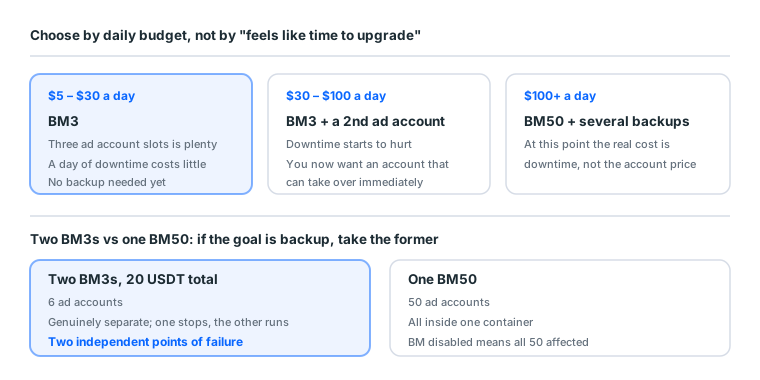
Since a BM costs 10 USDT, two BM3s cost 20 USDT, and their isolation is far better than one BM50's. Next section.
3. When to move from BM3 to BM50
Three signals. Any one of them is worth considering:
- Your three ad accounts are full and all running normally.
- You now need backup: when one account stops, you want another taking over immediately.
- You have started running ads for others and need client and billing isolation.
Before that, extra slots just sit empty.
Judge by downtime cost
More reliable than "it feels like time to upgrade":
| Your daily budget | Roughly what a day down costs | Buy more backup? |
|---|---|---|
| $5–30 | Limited | Not urgent, BM3 is fine |
| $30–100 | Noticeable | Prepare a second ad account |
| $100+ | Significant | Several backups |
When a day of downtime costs more than one more backup, upgrade.
Two BM3s versus one BM50
An arithmetic few people do:
| Two BM3s | One BM50 | |
|---|---|---|
| Total ad accounts | 6 | 50 |
| Cost (our catalogue) | 20 USDT | Market rate, clearly higher |
| Isolation | Genuinely separate | All in one container |
| Effect of one being disabled | The other is entirely unaffected | Every account inside goes with it |
| Management overhead | You switch between them | Centralised |
If your goal is backup rather than scale, two BM3s beat one BM50.
A disabled BM takes its ad accounts with it, so 50 accounts in one BM is 50 accounts sharing a single point of failure.
When BM50 is the right answer
When you genuinely need that many accounts and they belong to one management unit.
Say you run ten product lines yourself, all your own business, with no need to separate the books. Then BM50's centralisation is an advantage, and switching between ten BMs is the annoyance.
But if those ten are ten clients, it should be one BM per client. One client's problem reaching the others is a cost you cannot absorb.
4. The two BM3 specifications
Buying a BM3 you will see two descriptions, and the difference is large:
| Spec | Means | Suits |
|---|---|---|
| BM3 empty | Three free slots, you open the ad accounts | Wanting to walk the whole process once |
| BM3 with accounts | 1–3 ad accounts already opened | Wanting to skip account creation |
The with-accounts version costs more, and what it saves is the part of account creation that sometimes stalls. Starting out, buy the empty one and open one yourself. You will need that skill eventually, and learning it on something cheap is better.
With-accounts versions need one extra check
Those accounts' histories are not necessarily clean.
During acceptance, open each ad account's Account Quality page and look for existing violation records. An account with records sits at a lower threshold, and those records still count once you take it over.
| What to check | Where | Normal |
|---|---|---|
| Account status | Top left of Ads Manager | Active |
| Violation records | The Account Quality page | None |
| Time zone and currency | Account settings | Matches your needs (unchangeable) |
| Spending limit | Payment settings | A number exists |
"Time zone and currency are unchangeable" is the most overlooked. If the ad account you bought is set to UTC and USD while you need your local zone and currency, neither can be changed, so that slot is a compromise from the start.
Other descriptions you will see
| Description | Means | What to ask |
|---|---|---|
| Partner resources included | The BM has linked partner assets | Specifically what |
| Page included | The BM already contains a Page | The Page's age and follower count |
| Verified | Business verification completed | In whose name |
"Verified" needs particular care. That verification is bound to the original company's details, not to you. If the original company withdraws verification or its details go bad, your BM loses verified status with it. If nobody will tell you whose name it was done in, the premium is not worth paying.
5. The order of operations
Once you have a BM:
- Log in and build nothing. Look at its current state first: how many accounts, is there a Page, is there an unfamiliar admin
- Add the Page to the BM (if the BM does not have one)
- Open an ad account, or use an existing one
- Attach a payment method
- Share the BM with your second Facebook account as admin ← skipped constantly, regretted later
- Only then start building ads
Step 1's "is there an unfamiliar admin"
The most important step when buying a second-hand BM, and the most skipped.
Look at Business Settings → Users → People. If anyone besides you is listed, that person can remove you at any time, and your money is gone.
An unfamiliar account means open a ticket immediately, do not try to remove them yourself. Doing it yourself may notify them, and their permissions may outrank yours.
Step 5 deserves emphasis
It is a collaboration feature the platform provides. If the original personal account hits a checkpoint, you can still get into the BM from the second identity, check status, and extract settings and audiences. It costs nothing and only pays off on the bad day.
The role must be Admin, not Advertiser:
| Role | Build ads | Change budget | Add people | Move assets |
|---|---|---|---|---|
| Admin | ✅ | ✅ | ✅ | ✅ |
| Advertiser | ✅ | ✅ | ❌ | ❌ |
| Analyst | ❌ | ❌ | ❌ | ❌ |
With Advertiser, the second identity cannot move assets out when the original is stuck, which defeats the purpose.
6. When ad account slots will not open
Bought a BM3 and can only open one account: a common confusion.
Two possible causes
| Cause | How to tell | What to do |
|---|---|---|
| The tier cap is full | Business Settings shows how many are used | Change tier, or buy another BM |
| The BM is still too new | Slots are free but will not open | Accumulate usage history and wait |
The second is more common. A new BM usually needs some real usage history (ads running, successful charges) before the platform opens more slots. A timing issue, not a settings issue.
There is only one way to speed it up
Get the existing account running properly. Spend history, successful charges and no violations all accumulate into the BM's usage record.
Do not: repeatedly attempt to open new accounts. Repeated failures are themselves a signal, and it will not make slots open sooner.
6b. Four stages of a BM's growth
A BM goes through four periods from new to volume. Knowing which one you are in tells you what to prepare next.
Stage one: one ad account (weeks 1 to 4)
BM contents: one ad account, one Page, one card, two admins.
What matters here: getting that one account to produce payment history. The BM itself needs nothing.
The classic mistake: rushing to open a second account. The first has no history yet, so a second is just an empty account, and opening several new accounts is itself a risk signal.
Stage two: running stably (weeks 5 to 12)
What to add: the pixel. Installed at BM level, so accumulated conversion data survives an ad account change.
What to prepare: a second ad account, opened and waiting. New accounts need time to grow their allowance, and opening one the day you need it is too late.
The BM's value starts showing here: because the pixel belongs to the BM, the second ad account shares everything the first accumulated.
Stage three: you need backup (past $30 a day)
What to add: a second Page. When a Page is restricted you need an immediate substitute.
What to consider: a second BM. At our pricing that is 10 USDT, and it isolates better than opening more accounts inside the same BM.
Stage four: separate books, or client work
What to add: one BM per client.
The cost structure changes here: in the first three stages you cared about unit price. Now you care whether one client's problem reaches the others. That risk is priced far above a few BMs.
The four stages compared
| Stage | Ad accounts | Pages | BMs | The thing you must do |
|---|---|---|---|---|
| One | 1 | 1 | 1 | Add a second admin |
| Two | 1 (+1 spare) | 1 | 1 | Install the pixel, open the spare early |
| Three | 2 | 2 | 1–2 | Backup Page, assets stored separately |
| Four | 1 per client | 1 per client | 1 per client | Client isolation, billing isolation |
Every entry in the right-hand column only works if done beforehand.
6c. The pixel: BM's most underrated feature
Mentioned above, expanded here, because it determines what switching accounts costs you.
The pixel belongs to the BM, not the ad account
Three practical benefits:
| Benefit | Detail |
|---|---|
| Switching accounts needs no reinstall | Account disabled, attach a new one to the same pixel |
| Multiple accounts share data | Several accounts on one site share conversion data, so learning is faster |
| Data does not die with the account | The important one |
What the third actually saves
With a personal-level ad account and the pixel bound to it, losing the account loses two things at once:
- Delivery capability, replaced by another account at 4 USDT
- Accumulated conversion data, which restarts from zero
The second is the expensive one. Accumulating enough conversion events takes both time and spend, and that cost is usually far higher than the account itself.
Put differently: a 10 USDT BM protects data that cost you hundreds of dollars to accumulate.
When to install the pixel
After your traffic ad is running steadily. Handling ad, pixel and landing page simultaneously means you cannot tell which one broke.
Once installed, always verify it fires with Meta's Pixel Helper extension. Installed-but-not-firing is very common, and without verifying you find out a week into a campaign with no conversion data.
7. Four myths that cost money
"A bigger BM is harder to ban." Tier only affects how many ad accounts fit. Survival depends on your operation, environment isolation and creative, not container size.
"BM50 gets a higher allowance." Limits sit at ad account level and are unrelated to BM tier. They grow with payment history, and no size of BM speeds that up.
"One BM for all clients is more convenient." Technically yes, in practice no. One client's problem reaches the other assets in the same BM. For client work, one BM per client, or at minimum one ad account per client.
"A verified BM is safer." That verification is bound to the original company, not to you. And if the company does not exist or the documents were falsified, that is a bigger problem rather than a bonus.
8. Quick glossary
| Term | Meaning |
|---|---|
| BM / Business Manager | The container assets live in |
| Business Settings | Where you manage assets and people inside a BM |
| BM3 / BM50 | How many ad accounts it holds |
| Empty version | All slots free, you open the accounts |
| With-accounts version | One to three ad accounts already opened |
| Business verification | Submitting registration documents to unlock features |
| Admin | Full permission, including adding people and moving assets |
| Advertiser | Can run ads; cannot add people or move assets |
| Analyst | Read-only reporting |
9. Checklist before buying a BM
About the product
- Empty version or with accounts
- If with accounts, how many and what status
- Whether a Page is included
- Which fields the credentials contain (BM is usually ID plus login URL)
- How long the warranty window is
During acceptance
- The login URL is complete and opens
- The ad account slot count matches the description
- No unfamiliar accounts in the People list
- If a Page was included, it exists and you can manage it
- If accounts were included, every Account Quality page is clean
- If accounts were included, time zone and currency match your needs
Immediately after receiving it
- Share the BM with a second Facebook account as Admin
- Put the BM ID in your tracking sheet
- Save the login URL to your password manager (it is too long to remember)
The last is genuinely practical. A BM login URL is usually long enough that nobody remembers it, and it is your only route into that BM. Save it.
9b. Judgement calls you will actually face
Rules above; real situations here.
One: I only have one ad account, should I buy a BM
Yes, and sooner rather than later. Not for the slots, for three things:
- Permission assignment: it lets you add a second admin as backup
- Pixel ownership: the pixel sits at BM level, so data survives an account change
- The future second account: a new BM needs usage history before more slots open, so starting early helps
At 10 USDT, any one of the three pays for it.
Two: my three slots are full
First confirm all three are genuinely in use. The common situation is one running, one empty, one already disabled.
| Situation | What to do |
|---|---|
| All three running normally | Buy a second BM or upgrade |
| One is empty | Use that one; no purchase needed |
| One is disabled | That slot is usually still occupied; consider a second BM |
"A disabled account still occupies its slot" confuses a lot of people. Disabled is not deleted, so the slot does not free itself.
Three: I am running ads for two clients
One BM per client. Two BM3s is 20 USDT, and what it buys is "client A's problem does not reach client B".
Put both clients in one BM and, when that BM is disabled, you have two clients to answer to at once. That cost is far beyond 10 USDT.
Four: the BM I bought only opens one account
Check whether it is the tier cap or insufficient usage history (§6). If the latter, get the existing account running; it is a timing issue.
Do not: repeatedly attempt new accounts, or buy another BM to work around it. The first is a risk signal and the second does not solve the problem.
Five: I want to hand the BM to a freelancer
Give Advertiser, not Admin.
Admins can remove other admins, including you. It has happened that an engagement ended and the other party never removed themselves, or removed the original owner.
And the assets should sit under your BM, not the agency's. When the engagement ends, you want to remove a person and keep running, not negotiate to get your assets back.
In one sentence
Buy a BM3 and revisit it when the slots are full. Putting the difference into a backup aged account beats a large BM you will not use.
And at our pricing (BM is always 10 USDT), a second BM3 as backup costs 10 USDT and isolates better than upgrading to BM50.
Next: what to do when an account hits a checkpoint.
Sources (all official pages, checked 2026-09-08). Prices, catalogue distributions and warranty ratios in this article are our own catalogue and ticket data, not taken from these pages:
- Create and manage a business portfolio (Business Manager) — Meta Business Help Centre — facebook.com
- Business portfolio ownership and full control — Meta Business Help Centre — facebook.com
- Business verification — Meta Business Help Centre — facebook.com
- Advertising Standards — Meta Transparency Center — transparency.meta.com
- Meta Pixel documentation — Meta for Developers — developers.facebook.com
FAQ
What is the difference between BM3 and BM50?
The cap on ad accounts (3 versus 50), not a spending allowance. Limits sit at account level and are loosened by the platform based on payment history.
When should I move to BM50?
Any one of three signals: your three ad accounts are full and all running, you now need backup, or you have started running ads for others and need billing isolation.
Empty BM3 or one with accounts included?
Starting out, buy the empty one and open an account yourself. You will need that skill eventually, and learning it on something cheap is better.
Two BM3s or one BM50?
If the goal is backup, two BM3s. Two BMs are genuinely separate, whereas 50 accounts in one BM share a single point of failure.
How much does a BM cost?
Ours has one price point, 10 USDT. Plenty of people sit stuck at one ad account because they assumed BMs are expensive and put off buying one.
How many BMs can one person create?
Meta caps it, and a new account can usually only create one. Needing more usually means buying an existing one.
If the BM is disabled, what happens to the ad accounts?
They are usually affected. The Page is an independent asset and mostly survives. That is the reason not to put every account in one BM.
Can I expand the ad account slots?
No, the tier is fixed. More means a larger tier, or a second BM.
Why does my BM3 only let me open one ad account?
Besides the tier cap, a new BM usually needs some usage history before more slots open. That takes time; it is not a settings problem.
Who uses BM250?
Agency scale. Ordinary sellers and media buyers never reach it, and buying one just leaves slots idle.
Does the BM tier affect survival?
No. The tier only affects how many ad accounts fit. Survival depends on operation, environment isolation and creative.
Are the accounts in a with-accounts BM clean?
Not necessarily. Check every account's Account Quality page during acceptance. Accounts with existing violation records sit at a lower threshold.
Can BM ownership be transferred?
You can hand over by assigning admin, but note that an admin can remove other admins, including you.
Can one Page sit under two BMs?
No. One BM at a time, and moving it means removing it from the first.
What do I receive when I buy a BM?
Usually a BM ID plus a very long login URL, which is quite different from personal account credentials.
Want the parts this article talks about?
See the catalogRead next
Before You Buy a BM: Empty Slots vs Ad Account Included
The "3" in BM3 is a ceiling, not a gift of three ad accounts. Get that
What Is BM in Facebook Ads? Business Manager, BM3 and BM50
BM is the container your ad assets live in, not the place you run ads
Running Facebook Ads: the complete path from nothing to your first live ad
The whole route on one page. From "where is Ads Manager" to "how do I
Account types and when to use each one
Blank, aged, once-cleared, twice-cleared, cloned, ad account. Plenty o
What is an ad account? How personal accounts, ad accounts, BMs and Pages relate
Four things get talked about interchangeably, but they are four separa
Advertiser and Payer Verification for Taiwan Ads (September 2026)
The Page-level entry point is gone, and a verification no longer carri