Six things to know before buying a Facebook account
Confirm six things before buying: which layer you are missing (personal account, BM, Page or ad account), warranty scope and window, which fields the credentials contain, stock depth, whether after-sales runs through tickets or private messages, and whether your environment is ready. Note that "first login only" is the market standard warranty, not an outlier.
This market runs on serious information asymmetry. Here are the questions to ask, the specs to check, and the things not to touch.
Buying Facebook accounts happens in a market with severe information asymmetry. The phrase "aged Facebook account" can mean an account registered three days ago or a genuine ten-year-old profile, a tenfold price difference. This lists the questions worth asking.
0. The risk, up front
Account trading breaches Meta's terms of service. The platform can disable the accounts involved, and the buyer carries that risk. How it relates to local law varies by jurisdiction, and we do not give legal advice.
You can decide whether to accept that risk, but do not buy without knowing it exists. Price it in: accounts die, without exception.
Turn the risk into a number
Rather than vaguely saying "there is risk", make it estimable:
Monthly asset cost = price per account × accounts replaced per month
Asset cost share   = monthly asset cost ÷ monthly ad spend
Using our catalogue median of 10 USDT:
| Your daily budget | Monthly ad spend | 2 per month | 2 per week |
|---|---|---|---|
| 10 USDT | 300 USDT | 6.7% | 26.7% |
| 30 USDT | 900 USDT | 2.2% | 8.9% |
| 100 USDT | 3,000 USDT | 0.7% | 2.7% |
Two conclusions.
First, the smaller your daily budget, the higher the asset cost share. Somebody spending 10 USDT a day and replacing two accounts a week has over a quarter of their money going into accounts. That model is not sustainable, and the problem is usually operation rather than account quality.
Second, reducing replacement frequency beats negotiating the unit price. Moving from two a week to two a month saves far more than pushing the price from 10 USDT down to 8. And replacement frequency comes down through environment isolation and operating rhythm, not through buying pricier accounts.
Where do people buy aged Facebook accounts and Business Managers?
Aged Facebook accounts and Business Managers are bought through four kinds of channel: account marketplaces that hold payment in escrow, automated storefronts that deliver credentials once payment clears, Telegram resellers, and agencies that rent you an ad account instead of selling one. Meta endorses none of them, and the terms-of-service risk above applies to all four. What actually separates them is how you pay, what the written warranty covers, and where you go when an account fails.
| Channel | How you pay | Warranty you can expect | When an account fails | Main risk |
|---|---|---|---|---|
| Marketplace with escrow | Card, crypto or site balance | Set by each listing | Open a dispute with the marketplace | Quality varies from listing to listing |
| Automated storefront | Usually USDT or other crypto | First login on most items, longer on pricier ones | Ticket or order page | The shop can vanish; read the written terms first |
| Telegram reseller | USDT to a personal wallet | Usually verbal only | Private messages | No record and no recourse |
| Agency ad account (rental) | Top-ups plus a 3–10% fee | Account swapped if it dies | Your account manager | You never own the account |
AdPitStop is an automated storefront. On 2026-10-14 its Facebook catalogue listed 73 product groups priced from 3 to 206 USDT (median 13 USDT), covering aged and new personal accounts, Pages and Business Managers. Payment is USDT on TRC20 only, and most items deliver to the order page within minutes of the on-chain confirmation. Of those 73 groups, 63 (86%) carry a one-hour first-login warranty, 9 carry 12 to 24 hours and 1 has none, each stated on the product page before you pay. After-sales runs through numbered tickets, not private messages.
1. First, work out which layer you are missing
Advertising needs four layers, and you buy whichever is missing. Most people buy the wrong thing because they do not know which layer they lack:
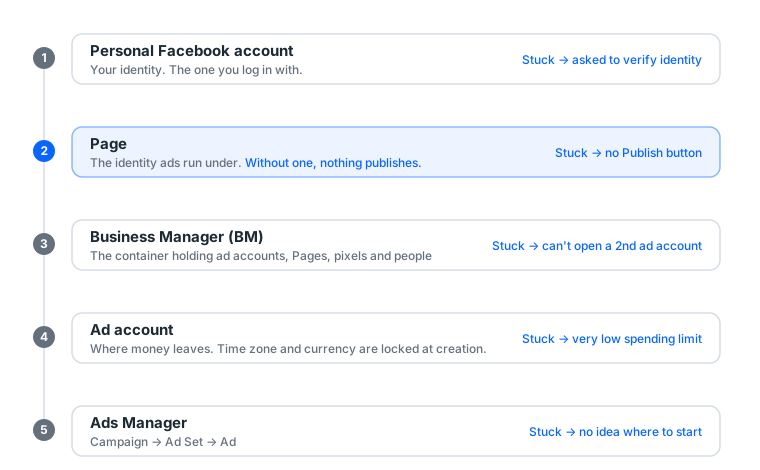
| Layer | Symptom | What to buy |
|---|---|---|
| Personal account | Yours is restricted, or you want to spare your main one | Aged / once-cleared / twice-cleared |
| BM | Cannot open a second ad account | BM3 / BM50 |
| Page | No Publish button | New or aged Page |
| Ad account | Account creation keeps failing | Ad account |
Full relationship diagram in what is an ad account.
The most overlooked one is the Page. Meta ads must publish as a Page; hard requirement. Which is why our scenario bundles always include one, and not to pad the price.
Read scarcity off the prices
Our catalogue currently has 145 display groups, 36 of them Facebook:
| Type | Groups | Price band (USDT) | Median |
|---|---|---|---|
| Personal account | 15 | 4 – 50 | 10 |
| Aged account | 5 | 4 – 20 | 13 |
| Page | 4 | 8 – 80 | 80 |
| Self-registered | 4 | 4 – 8 | 4 |
| Cloned | 3 | 4 – 10 | 8 |
| BM | 2 | 10 | 10 |
| Ad account | 2 | 4 | 4 |
The Page median is twenty times the ad account median. Market pricing reflects scarcity: you can open an ad account yourself, but a Page's trust accrues through real history, and time cannot be bought.
The platform-level distribution is worth a glance too:
| Platform | Groups | Price band | Median |
|---|---|---|---|
| 67 | 2 – 200 | 13 | |
| 36 | 3 – 80 | 8 | |
| Threads | 18 | 4 – 85 | 10 |
| TikTok | 9 | 2 – 130 | 6 |
1b. Buying vs renting an ad account: what you actually get
The same product name covers three different arrangements, and the price gap between them is mostly a difference in who holds the keys afterwards.
| Arrangement | Who owns it | What you receive | How you pay | When it dies |
|---|---|---|---|---|
| Buy an ad account | You, after handover | Credentials for the personal account (or BM) that holds it; the ad account inside | One-off, warranty window from delivery | It is yours to appeal or write off; the seller's obligation ended at the warranty window |
| Rent an ad account | The seller | Access granted to your BM or personal account; the account stays in theirs | Monthly, or a percentage of spend | Seller swaps you onto another one; your unspent balance is the thing to argue about |
| Agency ad account | The agency, under a Meta agency partnership | An account with no daily limit or a very high one, opened under an agency BM | Top-up in advance plus a 3-10% fee on every top-up | Agency replaces it, usually within a day; balance is normally carried over |
Three things people get wrong:
- "Agency account" is not a tier of quality. It is an account that lives under an agency's BM, which is why it skips the 250-a-day ramp that a fresh account starts with. It is never sold outright; if someone offers to sell you an agency account, what you are buying is an ordinary account with a label.
- Renting is cheaper per month and more expensive per year. At $5-30 a day the maths favours buying; past a few hundred a day the top-up fee on an agency account is still cheaper than the downtime of a bought account dying mid-campaign. Section 9d has the year-cost table.
- What you rent, you cannot verify. Acceptance SOP, 2FA, environment isolation: all of that assumes the credentials are in your hands. A rented account is a relationship, not a product, so judge the seller (section 7b) rather than the account.
Every arrangement in the table above is sold or brokered somewhere; what the catalog lists is the first two columns, with the warranty window stated per item.
Buying a BM is the same decision one layer up. A BM3 or BM50 is a container with slots for ad accounts, and whether those slots are empty or already hold an opened account is the whole price difference: empty slots vs ad account included walks through it.
1c. What "aged" means, and what it does not guarantee
"Aged" is the most sold and the least defined word in this market. Here is what it does and does not mean.
What it means: the personal account was registered a long time ago, typically two years or more, and has some baseline of activity. Age is the one signal a seller cannot fake after the fact; you can check it yourself once you log in (Settings, then Accounts Center, then Personal details shows the creation date, and a Page's Transparency panel shows when the Page was created).
What it does not mean:
- Not an advertising history. Most aged accounts have never opened an ad account. The first ad account you open inside one still starts at the entry-level spend limit and still goes through the first-week ramp.
- Not a trust score. Meta's internal signals weigh recent behaviour heavily. An aged account that logs in from a new device, a new country and immediately opens an ad account looks exactly like a stolen one, and gets the same checkpoint.
- Not immunity. Age lowers the chance of a creation-time restriction. It does nothing about policy violations in the creative, and nothing about a budget ramp that is too steep.
Where age genuinely helps: opening ad accounts and Pages without an immediate identity check, and passing the first appeal if one is needed. That is worth paying for if you run at $30 a day or more. Below that, a once-cleared account at the same price is usually the better buy, because it carries a record of having already passed a review.
2. How to read a warranty
The market standard is first login only, for a practical reason: once you are logged in, the seller cannot verify what happened.
| Problem type | Industry norm | Why |
|---|---|---|
| Wrong password, wrong 2FA | ✅ Almost always covered | The credentials themselves are faulty; seller's responsibility |
| Already disabled before shipping | ✅ Should be covered | The disable date precedes the ship date, which is verifiable |
| ID upload demanded at first login | ✅ Should be covered | The buyer cannot possibly pass it |
| Dies after you started using it | ❌ Mostly not covered | Nobody can verify whose action caused it |
| Dies after you changed details | ❌ Not covered | Clearly the buyer's action |
Ask two things: how long the window is (measured from the moment of delivery), and what evidence is needed (screenshot or screen recording).
Reasonable tiering: under 20 USDT covers first login only, 20–60 USDT about 24 hours, above 60 USDT about 72 hours.
Our catalogue's actual warranty distribution
Our own data across 145 display groups:
| Warranty we commit to | Groups | Share |
|---|---|---|
| 1 hour (first login only) | 120 | 82.8% |
| 36 hours | 15 | 10.3% |
| 24 hours | 1 | 0.7% |
| No after-sales at all | 9 | 6.2% |
Over 80% cover first login only. Not one vendor being stingy. That is the market's line.
What actually deserves attention is the 6.2% with no after-sales. Those are usually the cheapest batch, and they should be treated as consumables rather than assets. Our own rule: an item with no after-sales priced above 30 USDT does not get listed automatically, because that combination is a bad deal for the buyer.
Why a seller's window is always shorter than upstream's
Few sellers explain this, and it is why warranty windows are so tight.
The window the seller gives you is necessarily shorter than the one upstream gives the seller. Upstream offers 2 hours, the seller offers you 1. Upstream offers 24, the seller offers 12.
That buffer is the seller's time to claim upstream. An hour late reporting can mean the seller absorbs it. So a tight window is not obstruction; it is how this supply chain is shaped.
What it means for you: the first thing to do with credentials is inspect, not use. Full process in the acceptance SOP.
What is always refundable
| Situation | Why |
|---|---|
| Wrong password | First-login category, handled unconditionally |
| Disabled, with a disable date before the ship date | It died before shipping |
| ID upload demanded at first login | You cannot pass it |
| 2FA key still invalid after time sync | Faulty credentials |
| The description says X and there is no X | Description mismatch |
What is not
| Situation | Why |
|---|---|
| Disabled after you started using it | Post-login death, judged by the warranty hours for that price tier |
| You changed the password, email or name and then it broke | Your action |
| Reported after the window closed | The window is hard; upstream applies the same to the seller |
| It broke after you used shared IPs or several accounts in one environment | Environment problem |
3. Which fields the credentials contain
Field sets vary a lot by product, so ask before buying. The shapes you will actually meet:
| Product type | Typical fields |
|---|---|
| Email only | email|password |
| Aged Facebook account | id|password|phone|2FA key |
| BM | id|login URL (very long) |
| Ad account | email|password|…|… |
| Threads / IG | handle|password|2FA key |
There is more than one delimiter. We have measured pipe, colon, semicolon and tab, and it varies item by item. When credentials look like one undifferentiated string, work out the delimiter first.
If you cannot tell which field is which, paste them into our credential parser and it labels each one.
A 2FA key is not a code, it is the seed that generates codes. This is the highest-volume support question; see how to use a 2FA key, or use the 2FA generator to confirm the key is valid.
Identifying each field yourself
No need to ask anyone; format tells you:
| Field | Format signature |
|---|---|
| 2FA key | Only A–Z and 2–7, and long. No 0, 1, 8 or 9 |
Contains @ |
|
| Facebook or BM ID | Eight or more digits, nothing else |
| Login URL | Starts with http, usually very long |
| Phone | Contains + or a separated digit string |
| What is left | Username and password, order varies by product |
The 2FA key is the most reliable to identify, because Base32 uses only A–Z and 2–7, which is unique among credential fields. If the string you took for a key contains a 0 or a 1, it is something else.
Three questions about credentials to ask before buying
- Which fields are included, particularly the 2FA key and the email
- Whether the email can receive mail; some products supply an email you cannot log into
- Whether the phone number can receive SMS; most cannot, which affects changing verification methods later
Item 2 catches people. An email in the credentials does not mean you can log into it, and Facebook's verification mail may go there.
4. Stock depth equals price credibility
The most useful and least discussed test.
We measured the cost distribution across every upstream self-operated item:
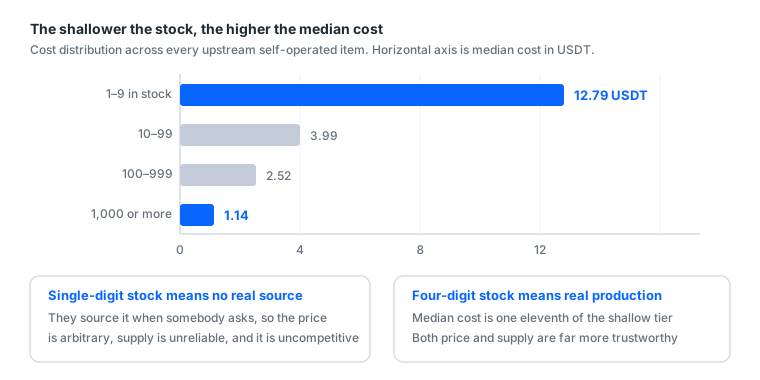
| Stock tier | Median cost |
|---|---|
| 1–9 (not a real source) | 12.79 USDT |
| 10–99 | 3.99 USDT |
| 100–999 | 2.52 USDT |
| 1,000+ (a real source) | 1.14 USDT |
An eleven-fold difference in median cost. Single-digit stock usually means "we source it when somebody asks", so pricing is arbitrary and uncompetitive. Four-digit stock is what is genuinely being produced at volume.
How to use this test
For a buyer: shallow-stock items are usually poor value and their supply is unreliable.
The three situations you will meet:
| What you see | Means | Advice |
|---|---|---|
| Single-digit stock shown | The seller is probably not the source | Price is usually high and cannot be restocked |
| Hundreds shown | Steady supply | Fine to buy |
| No stock shown at all | You have no way to judge | Ask; if they will not say, go elsewhere |
"No stock displayed" deserves suspicion. Information asymmetry is normal in this market, and stock is one of the few quantifiable quality signals. Hiding it is usually not for your benefit.
Our catalogue only auto-lists items with 100 or more in stock, and the "stock depth A/B" label on product pages is that grading. Currently 89 groups are graded A and 56 graded B.
5. After-sales through tickets, not private messages
It sounds like a seller's rule; it matters more to the buyer:
- Private messages leave no record, so afterwards nobody can check who said what
- Private messages have no traceable response time, so you have no idea when a reply comes
- Somebody else picking it up starts from scratch
Insist on tickets, order numbers and timestamps. On the day something goes wrong, those decide whether you get your money back.
What a good ticket looks like
Everything attached at once, resolvable in one round:
- Order number
- Screenshot: the full screen, including the address bar and the error message
- One sentence: what you did and what you saw
The screenshot needs the address bar. With only the error message, the seller cannot confirm which page you were on or which account you used, and the exchange stretches over several rounds.
High-value items (generally above 60 USDT) usually require a screen recording: continuous, from opening the browser to the problem appearing, uncut. An edited video carries no weight in a dispute.
Three things not to do
One: do not keep retrying the login. Repeated wrong passwords push the account into lockout faster, and they make "was it the credentials or your handling" much harder to determine.
Two: do not change details before reporting. Once you change the password or email, the issue moves from "faulty credentials" to "buyer's action", which is a completely different warranty scope.
Three: do not miss the window. As above, the seller's window is shorter than upstream's, and an hour late can mean nobody can claim.
6. Have your environment ready first
Preparing the environment after credentials arrive is usually too late; the warranty clock is running.
Complete before ordering:
- One separate browser profile per account
- A stable network matching the account's region
- A TOTP app installed
- A tracking sheet (account, purchase date, region, purpose, status)
- Confirmation that you have 30 free minutes to inspect
Details in get your device and network right before buying; inspection in the acceptance SOP.
Why environment matters more than account quality
That sounds like a seller deflecting, but there is a specific mechanism.
A healthy account placed into a dirty environment dies within 24 hours. Dirty means: one browser profile that has held several accounts, a network region that does not match the account's region, or logging in from three different countries' connections inside one day.
Those traces trigger ordinary security verification, and you end up stuck on a verification page assuming the account was faulty.
The same account in a clean environment, warmed up properly, lasts a long time. Which is why people replacing accounts frequently usually have an environment and operation problem rather than an account problem.
The minimum-cost preparation
| Item | Suggestion | Cost |
|---|---|---|
| Separate browser profile | Chrome's built-in "Add profile" | 0 |
| Stable network | Your home broadband | 0 |
| TOTP tool | Any authenticator app, or our generator | 0 |
| Tracking sheet | One spreadsheet | 0 |
Preparation costs nothing. Skipping it costs the whole batch. The highest-return thirty minutes in this business.
7. What not to touch
| Item | Why |
|---|---|
| "Real-person accounts" bundled with genuine ID and selfies | That is trading identity documents, a completely different risk category |
| Anything claiming a guarantee against bans | Nobody can guarantee that |
| Any service claiming to bypass verification | Working against platform security, which cannot be done and should not be attempted |
| Any seller with no written warranty terms | You have nothing to stand on when something breaks |
| Any service wanting your password to "check" an account | The moment you hand it over, they have the whole account |
The last one deserves expanding
There is a whole menu of "account checker" tools in this market. One kind queries a UID's public profile picture, which needs no credentials and is safe. We built one ourselves: Facebook UID lookup.
But the kind that wants you to paste a username and password works by logging in as you. The moment you hand those over, they hold the complete account, and you have no way to verify whether it was retained.
These tools are common in this market, but the convenience is theirs and the risk is yours.
The only reliable way to confirm an account is good is logging into it yourself, which is exactly what the warranty window exists for.
7b. How to judge whether a seller is worth buying from
Products above, sellers here. The same account bought from two places can be a very different experience, and the difference is rarely price.
Five quantifiable signals
| Signal | Good | Bad |
|---|---|---|
| Warranty terms | Written on the page, with a window and evidence requirements | Verbally "just message me if there's a problem" |
| After-sales channel | Tickets, with numbers and timestamps | Private messages only |
| Stock information | Depth or grading visible | Not shown at all |
| Product description | States which fields are included | Just says "aged Facebook account" |
| Price stability | The same item holds its price | A different price every time you ask |
The last one is another expression of stock depth. A different price each time usually means the seller obtains items on request, so their cost varies and so does the quote.
Three claims to be wary of
"Guaranteed not to get banned." Nobody can guarantee that. Sellers who say it usually have a second explanation ready for why this particular case does not count.
"We have inside channels." If that were true, the channel would be worth far more than the margin on selling you an account. In practice this is usually sales talk.
"This account is definitely fine, don't worry." The question is not whether the account has a problem. It is whether you have anything to stand on when it does. You want terms, not reassurance.
A useful test
Ask one specific after-sales question before ordering, such as: "If I am asked to upload ID on first login, what happens? What is the window? What evidence do you need?"
A good seller gives a specific answer: "First-login category, handled unconditionally, one-hour window, a screenshot including the address bar is enough."
Anyone who cannot answer, or answers vaguely, will be equally vague on the bad day. The question costs you a minute, and what it tests is whether that shop ever wrote its rules down.
8. Bundles versus separate: do the arithmetic
Ignore "save 30%" claims. Compare parts total against bundle price:
| Bundle | Bundle price | Parts total | Saved | Discount |
|---|---|---|---|---|
| First run | 39 USDT | 48 USDT | 9 USDT | 18.8% |
| Account died again | 49 USDT | 62 USDT | 13 USDT | 21.0% |
| Local market | 89 USDT | 108 USDT | 19 USDT | 17.6% |
| Steady running | 129 USDT | 143 USDT | 14 USDT | 9.8% |
A low discount percentage does not mean poor value. The steady-running bundle has the smallest discount (9.8%) but contains the most expensive items, so the absolute saving is not small.
The test: if you only need two of the items in a bundle, separate is cheaper. A bundle's value is that somebody already worked out the combination, which saves research time rather than only offering a discount.
8b. A glossary of account types
The terminology is a mess, and the same thing has different names at different sellers. This aligns the common ones.
| Common name | What it actually is | Rough price band | Suits |
|---|---|---|---|
| Blank / new | Just registered, no history | Very low | Disposable, testing |
| Self-registered | Batch-registered | Very low | Same |
| Aged / durable | Registered 2+ years with basic activity | Low to medium | Main use, opening ad accounts |
| High-trust aged | Aged plus friend count plus post history | Medium | When approval rate matters |
| Once-cleared | Restricted once, since released | Medium | Proven to pass an appeal |
| Twice-cleared | Released twice or more | Medium to high | Most resilient, and most expensive |
| Cloned | Batch-generated from existing data | Very low | Organic reach, volume |
| Ad account | An account with an ad account already opened | Medium to high | Skipping account creation |
| Shared account | Somebody else's ad account shared with you | Low | Short tests; ownership is not yours |
| Page | A Facebook Page, not a personal account | Low to high | Mandatory for advertising |
| BM | A Business Manager account | Low | Managing ad accounts and assets |
Are once-cleared and twice-cleared worth it
An account restricted by the platform and then restored through appeal is called "cleared". Once through is once-cleared, twice is twice-cleared.
Why they cost more: they have already been reviewed by a human or a system and passed, which amounts to carrying a record saying "this account is real". In practice their resilience genuinely beats an ordinary account of the same age.
But note: a clearance record is not immunity. An account that has been restricted usually sits at a lower threshold, so doing the same thing may get it restricted again faster than an ordinary account.
Who they suit: people who operate carefully but need a high approval rate. Not suitable as test consumables.
The trigger: at $5 to $30 a day an ordinary aged account is enough. Past $100 a day the downtime cost finally exceeds the price gap.
Shared accounts need particular care
Not the same thing as buying an ad account:
| Your own ad account | Shared account | |
|---|---|---|
| Ownership | You | Them |
| Can they revoke it | No | Any time |
| Can they see your data | No | Yes |
| Price | Higher | Lower |
The low price has a reason: you are buying use rather than ownership, and use can be terminated unilaterally. Fine for short small tests, not for long-term running.
9. What to buy the first time
If you have not started at all, the minimum viable set is:
1 aged account + 1 BM3 + 1 aged Page
At our catalogue's median prices that is roughly 33 USDT, or the first-run bundle at 39 USDT, which includes more.
Do not buy expensive the first time. Not to save money, but because you do not yet know which layer you get stuck on. After one full run you will know whether your problem is Page approval rate, account lifespan, or how fast limits grow, and upgrading that specific thing is what makes sense.
What budget calls for what
| Your daily budget | Suggestion | Reason |
|---|---|---|
| Not started yet | Aged account + BM3 + aged Page | Connect the route first |
| $5–30 | Same | This volume needs nothing pricier |
| $30–100 | High-trust aged account + backup | Downtime now costs more than the price gap |
| $100+ | Cleared accounts + several backups | The real cost is downtime |
The trigger: when a day of downtime costs more than the price gap to a better account, upgrade.
Differences between types are in account types and when to use them.
9b. The first thirty minutes after delivery
Buying is only half of it; inspection completes the transaction. This is the compressed version; full process in the acceptance SOP.
Minutes 1 to 5: the credentials themselves
- The number of fields matches the description (it says 2FA, so that field must exist)
- No obvious truncation (BM login URLs are long; confirm you have all of it)
- The 2FA key produces six digits (ten seconds with the 2FA generator)
Anything not matching: screenshot and open a ticket immediately. That is a description mismatch, which falls under first login.
Minutes 5 to 15: does it log in
- Log in using the browser profile you prepared in advance
- Password correct
- 2FA passes (if not, check device time first)
- You reach the account home page
Stuck at any step, screenshot and open a ticket. Do not keep retrying. Repeated wrong passwords push the account into lockout faster and complicate the determination.
Minutes 15 to 25: account status
- No restriction or warning banners
- Registration year and region match the description
- Friend or follower counts are roughly right (if the product stated them)
- For ad accounts: Ads Manager opens and the account status is normal
- For BMs: it opens and the free ad account slots match the description
- For Pages: it exists, status is normal, and you can manage it
Minutes 25 to 30: closing out
- Record it in your sheet (account, purchase date, region, purpose, status)
- Back the 2FA key up to a second location
- Close the tab, leave it for 30 minutes, and do nothing else with it today
The last is the most counter-intuitive. Logging in and immediately changing the password, changing the email and uploading an avatar is the exact behavioural sequence somebody who stole an account produces. See the first hour with a new account.
9c. Five common buyer mistakes
① Not confirming which layer you are missing. The usual result is a pile of accounts with no Page, then getting stuck on "there is no Publish button".
② Comparing unit price without comparing stock depth. Single-digit-stock items are usually priced high and cannot be restocked. That eleven-fold cost table is the evidence.
③ Changing the password as soon as credentials arrive. That converts "faulty credentials" into "buyer's action", a completely different warranty scope. Password changes belong after three to seven days of stable use.
④ Retrying repeatedly instead of opening a ticket. The clock is running, and repeated attempts lock the account faster. A screenshot and a ticket take one minute.
⑤ Ordering before the environment is ready. The warranty clock starts at delivery. The half hour you spend working out how to create a browser profile is counting down.
What these five share
All of them happen between paying and actually using. That short window is where the risk in this transaction concentrates, and it is entirely under your control.
Everything above about stock, warranties and seller quality decides what you bought. This short window decides whether what you bought is usable.
9d. What a year actually costs
Putting everything together. This calculation decides more than anything whether this business works for you.
Annual cost at three levels of operation
Assume 30 USDT a day in all three (900 USDT a month), differing only in replacement frequency:
| No isolation | Typical | Environment and rhythm both right | |
|---|---|---|---|
| Accounts replaced monthly | 8 | 2 | 0.5 |
| Monthly asset cost (10 USDT median) | 80 USDT | 20 USDT | 5 USDT |
| Annual asset cost | 960 USDT | 240 USDT | 60 USDT |
| Annual ad spend | 10,800 USDT | 10,800 USDT | 10,800 USDT |
| Asset cost share | 8.9% | 2.2% | 0.6% |
Left and right differ by 900 USDT. And the gap is not closed by buying better accounts. It is closed by environment isolation and operating rhythm.
Two more costs not counted above
Downtime. Every replacement carries a gap: seven days warming up, three days of learning phase. At ROAS 2 that is about ten days of revenue per replacement. Somebody replacing eight a month spends a substantial share of their time down.
Your time. Each replacement means 30 minutes of inspection, ten minutes a day for seven days warming up, and 30 minutes rebuilding ads. About two hours. Eight a month is 16 hours.
Add those two and the left-hand column's real cost is several times its asset cost.
What this calculation concludes
Lowering replacement frequency is the highest-return action in this business. And it comes from:
- Environment isolation (one browser profile per account)
- Scaling rhythm (never above 50%, 48 hours apart)
- Creative that stops crossing policy lines
None of the three costs money. The first two are fully covered in preparation before buying and the gradual scaling curve.
If you find yourself buying new accounts every month, the problem is not account quality. It is the operating model. A pricier account solves none of those three, and with those three solved, cheap accounts last a long time.
10. Complete checklist before buying
About the product
- I know which layer I am missing
- How long the warranty window is, and when it starts
- What evidence is required (screenshot or recording)
- Which fields the credentials contain
- Whether a Page is included
- Stock depth looks reasonable
About the seller
- After-sales runs through tickets with order numbers
- Warranty terms are written down, not just spoken
- No claims of "guaranteed against bans" or "bypasses verification"
About me
- A separate browser profile is created
- The network is stable and matches the account's region
- A TOTP app is installed
- A tracking sheet is ready
- I have 30 free minutes right now to inspect
The last is the most overlooked. The warranty window starts at delivery. Do not buy right before going out.
11. How to actually handle the common problems
This section applies every rule above to real situations.
Situation one: login says the password is wrong
First-login category, handled unconditionally.
Do: screenshot (address bar and error message included), open a ticket with the order number, one sentence of explanation.
Do not: retry repeatedly. Three or more attempts pushes the account into lockout, and then it becomes an argument about whether the credentials were wrong or you locked it.
Situation two: the 2FA code keeps being rejected
Nine times out of ten the device clock is off. TOTP depends entirely on time, and more than about 30 seconds out means every code fails.
Do: enable automatic time sync and retry once. The 2FA generator quickly confirms whether the key itself is valid, computing in your browser without uploading the key.
Only open a ticket if it still fails after syncing. Also first-login category.
Situation three: login succeeds but demands an ID upload
This one cannot pass, and nobody can help, because you do not hold the registrant's documents.
Do: screenshot and open a ticket. This is first-login category and should be covered.
Do not: attempt it with your own documents. That binds the account to your identity, a completely different risk category.
Situation four: login worked, then it was disabled three days later
Post-login death, judged by the warranty hours for that price tier.
Items under 20 USDT cover first login only, so this usually falls outside. Above 20 USDT, check the window.
Do: read the stated warranty hours, open a ticket if you are inside the window, and absorb it if you are not.
Which is why the warming-up guides matter more than warranty terms: a warranty compensates you, whereas warming up means you never need to claim.
Situation five: credential fields do not match the description
For example the description says 2FA is included and that field is absent.
Description mismatch, first-login category. Do: screenshot both the credentials page and the product description page, and open one ticket with both.
Situation six: the BM login URL will not open
Check whether the URL was truncated first. BM login URLs are long and the tail is easy to miss when copying.
Pasting into the credential parser shows whether the field is complete. Only open a ticket if it is complete and still will not open.
What all six share
| Principle | Why |
|---|---|
| Screenshot before anything else | The screen changes; evidence does not |
| Do not retry repeatedly | It complicates determination and accelerates lockout |
| Do not change details first | That converts a credentials problem into your action |
| Report inside the window | The seller's window is shorter than upstream's |
In one sentence: confirm which layer you are missing, ask about the warranty window and evidence, pick deep stock, and prepare your environment first. With those four done, buying accounts moves from gambling to a controllable cost.
Unsure which combination to start with, start at the smallest: the first-run bundle is an aged account, a BM3 and a Page, which is everything one full run needs.
Sources (all official pages, checked 2026-09-08). Prices, catalogue distributions and warranty ratios in this article are our own catalogue and ticket data, not taken from these pages:
- How two-factor authentication works on Facebook — Facebook Help Centre — facebook.com
- Get verification codes with Google Authenticator — Google Account Help — support.google.com
- Create and manage a business portfolio (Business Manager) — Meta Business Help Centre — facebook.com
- Community Standards — Meta Transparency Center — transparency.meta.com
- Advertising Standards — Meta Transparency Center — transparency.meta.com
FAQ
Is buying a Facebook account legal?
Account trading breaches Meta's terms of service, and the platform can disable the accounts involved. The buyer carries that risk. How it relates to local law varies by jurisdiction and we do not give legal advice. Price that risk in before deciding.
How long is the warranty usually?
The market standard is first login only. Items under about $20 are almost all on that line; $20 to $60 is around 24 hours, above $60 around 72 hours. Once you are logged in, the seller cannot verify what happened.
Why are some accounts so cheap?
They are usually freshly registered blanks with no history and no trust, and their mortality is high. Treat cheap accounts as consumables, not assets.
Why does stock depth matter?
Single-digit stock usually means the seller is not the source and only obtains items on request, so pricing is arbitrary and supply is unreliable. Deep-stock items have far more credible prices and supply.
What is the first thing to do when an account arrives?
Inspect it. Confirm within the warranty window that it logs in. If it does not, screenshot and open a ticket. Do not keep retrying; that only locks the account faster.
Why does every seller use a different delimiter?
Upstream is several suppliers each shipping their own way, with no unified format. We have seen pipe, colon, semicolon and tab, and it varies item by item.
What is the difference between a 2FA key and a code?
The key is a long string of capitals and digits that never changes. The code is six digits that changes every 30 seconds. Credentials give you the key, and you use it to generate codes.
What if the account will not log in?
Screenshot including the address bar and the error message, then open a ticket immediately. Do not keep entering the password; that only pushes the account into a lockout faster.
How many should I buy?
One, the first time, to walk the route. Once you have volume, keep one half-warmed spare on hand at all times; that is basic equipment in this business.
What is the difference between aged and blank accounts?
Registration year and usage history. Aged accounts have a higher expected lifespan, but that is not immunity. How you operate decides the outcome.
Are once-cleared and twice-cleared accounts worth it?
Depends on your daily budget. At $5 to $30 a day an ordinary aged account is enough. Past $100 a day the downtime cost finally exceeds the price gap.
What should I avoid entirely?
So-called real-person accounts bundled with genuine ID documents and selfies, anything claiming a guarantee against bans, any service claiming to bypass verification, and any seller with no written warranty terms.
Are bundles better value than buying separately?
It depends which pieces you needed anyway. Our bundle discounts run from 9.8% to 21.0%, and if you only need two of the items, separate is cheaper.
What do I need to prepare beforehand?
A separate browser profile, a stable network matching the account's region, a TOTP app, a tracking sheet, and 30 free minutes to inspect on arrival.
Why use tickets rather than private messages?
Private messages leave no record, have no traceable response time, and start from scratch if somebody else picks it up. On the day something goes wrong, the record decides whether you get your money back.
Can I rent a Facebook ad account instead of buying one?
Yes. Renting means the account stays in the seller's Business Manager and you are granted access; you pay monthly or a percentage of spend, and the seller swaps the account if it dies. Buying means the credentials are handed over and the account is yours after the warranty window. Renting is cheaper per month and more expensive per year.
What is a Facebook agency ad account?
An ad account opened under an agency's Business Manager through Meta's agency partnership. It has no daily spend limit or a very high one, which is why it skips the ramp a fresh account goes through. Agency accounts are rented with a 3-10% fee on top-ups, never sold outright.
Does an aged Facebook account mean it can run ads?
No. Aged means the personal account was registered long ago, usually two or more years. It says nothing about advertising history: the first ad account opened inside it still starts at the entry-level spend limit and still needs the first-week ramp.
Want the parts this article talks about?
See the catalogRead next
Running Facebook Ads: the complete path from nothing to your first live ad
The whole route on one page. From "where is Ads Manager" to "how do I
Account types and when to use each one
Blank, aged, once-cleared, twice-cleared, cloned, ad account. Plenty o
Acceptance SOP: what to do in the first 30 minutes
One checklist. Finishing it is what counts as taking delivery. Miss th
Get your device and network right before buying
Nine times out of ten, an account that dies on first login is an envir
What is an ad account? How personal accounts, ad accounts, BMs and Pages relate
Four things get talked about interchangeably, but they are four separa
Paying with USDT for the first time
This site takes USDT. If you have never touched crypto, here is the wh