What Is Facebook Ads Manager? Interface Tour and First Setup
Ads Manager is Meta's advertising interface, at facebook.com/adsmanager. It has three levels: campaign decides the result you want, ad set decides who sees it and how much you spend, and ad is the actual creative. Budget goes on the ad set, not the ad, which is the single most common first-time confusion.
Ads Manager is Meta's console for building, running and monitoring ads. This covers its three levels, what every field does, and where to click the first time you open it.
Ads Manager is Meta's advertising console. It lives at facebook.com/adsmanager, is reachable from Facebook's left menu, and has a separate mobile app.
Most people searching this term are about to run their first ad and want to know where it is and what it looks like. So that is the order here: where it sits on the route, what each region of the screen does, and which screens you pass through building your first ad.
1. First, confirm this is what you need
Two things get confused: Ads Manager is the back end where you run ads, behind a login; the Ads Library is the public page where you look at other people's ads, no login. To see what a competitor runs, use the latter.
Ads Manager is only the last layer of the route. Missing any layer above it and you can get in without being able to do anything.
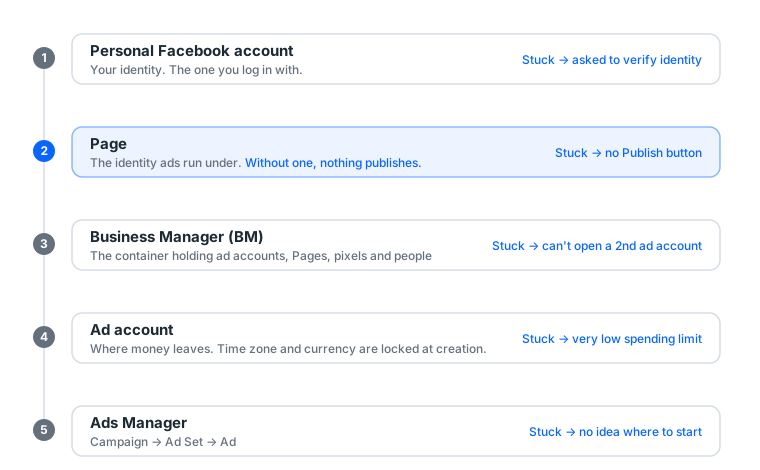
If your situation is "I can get in but cannot build an ad", the problem is usually not on this page. It is one of the layers above. Full layer relationship in the complete guide to running Facebook ads.
Ads Manager, Business Manager and Business Suite are three different things
The names get used interchangeably and the purposes are completely different:
| Ads Manager | Business Manager | Business Suite | |
|---|---|---|---|
| URL | facebook.com/adsmanager |
business.facebook.com |
Business Suite in Meta's back end |
| Manages | How this ad runs | Which assets you own | Day-to-day Page work |
| Contains | Campaigns, ad sets, ads | Ad accounts, Pages, pixels, people | Posts, messages, comments, organic reach |
| When you use it | Daily, while running ads | Setup and permissions | Running a Page |
| Who uses it | Media buyer | Manager | Social manager |
One line to remember it: BM is the cabinet, Ads Manager is the workbench, Business Suite is the shopfront.
A lot of people land in Business Suite by mistake, because the Page interface pushes it at you. Business Suite has a simplified ad feature (the Boost button under a post), but its capability gap versus Ads Manager is large. Next section.
Full BM detail in what is Business Manager.
How far behind is "boost post"
Worth clearing up early, because plenty of people boost a post, conclude advertising does not work, and give up.
| Boost post | Ads Manager | |
|---|---|---|
| Entry point | The button under a post | facebook.com/adsmanager |
| Objectives | Very few | Six categories, with specific conversion events |
| Audience | Coarse (region, age, gender, a few interests) | Full, including custom and lookalike audiences |
| Placements | System-chosen, no fine control | Controllable |
| Creative | Whatever that post is | Designed separately, several tested at once |
| A/B testing | None | Yes |
| Reporting | A short table | Full columns and breakdowns |
Boosting's problem is not that it is bad. It is that it cannot access conversion optimisation. For the same money, if your goal is selling something, boosting is usually more expensive, because the system only knows to find people who engage rather than people who buy.
It suits exactly one situation: pushing a post that is already performing organically to more people, without caring about precision.
2. The three levels: the skeleton of the whole interface
Understand this section and the entire interface makes sense.
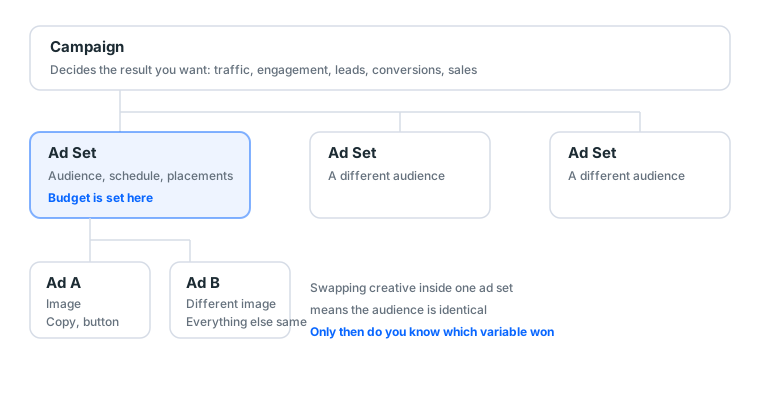
| Level | What you decide here |
|---|---|
| Campaign | What result you want: traffic, engagement, leads, conversions, sales |
| Ad Set | Who sees it, how much, where: audience, budget, schedule, placements |
| Ad | What they see: image or video, headline, body copy, button, link |
One campaign can hold several ad sets; one ad set can hold several ads.
🔴 Budget goes on the ad set, not the ad. The single most common beginner confusion.
This structure decides what you can test
The three levels are not only categories. They decide which variable you are testing, which is why a lot of people test for days and reach no conclusion.
| What you want to know | Where to create the variant | Why |
|---|---|---|
| Which of two images works | Two ads inside one ad set | Identical audience, creative is the only difference |
| Which of two audiences responds | Two ad sets inside one campaign | Identical creative, audience is the only difference |
| Whether traffic or engagement is cheaper | Two campaigns | Different objectives mean different optimisation logic |
The classic error: running a creative test at ad set level. Now creative differs and the audience sample differs, and when it finishes you cannot say which one won. It looks like a test. Nothing was learned.
Campaign Budget Optimisation
There is a switch at campaign level called Campaign Budget Optimisation. Turn it on, set one budget at campaign level, and the system distributes it to whichever ad set is performing.
Leave it off for your first run. Not because it is bad, but because it removes a variable you can reason about: when one ad set spends very little, you cannot tell whether it performed badly or was never given a chance.
Once you have two or three stable ads, turn it on and let the system save you work. By then you know each set's baseline and can tell whether the allocation makes sense.
3. The six regions of the main screen
The first screen carries a lot of information, but only six regions need learning.
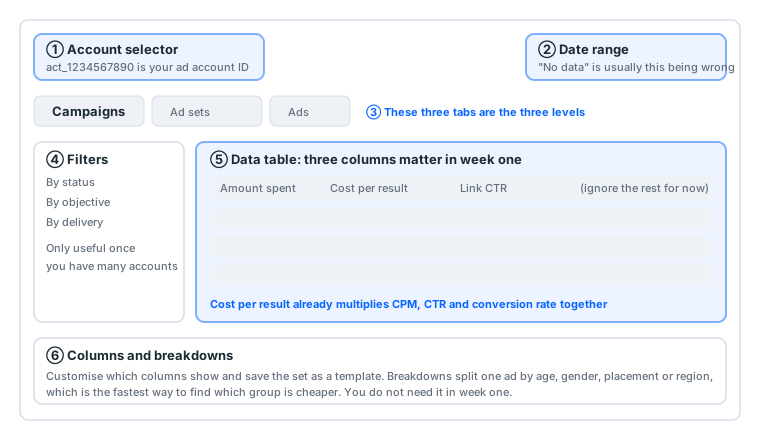
① Account selector (top left)
Switch between ad accounts here if you have several. The string of digits beside it is your ad account ID, usually prefixed act_.
You will use that ID constantly: support asks for it, a freelancer needs it to be granted permissions, and you check it when reconciling bills. Keep it in your account tracking sheet.
If there is only one account here and you need more, that is a BM-level problem. See BM3 vs BM50 vs BM250.
② Date range (top right)
The most overlooked control, and the most common cause of "there is no data".
It usually defaults to today or the last few days. The ad you ran yesterday showing no numbers today is, eight times out of ten, the wrong date range rather than a broken ad.
Practical advice:
- Use "Last 7 days" for the daily check; single-day data swings too hard
- Use a custom range for judging a creative, covering the full period since it went live
- Use "This month" when reconciling, aligned to the billing cycle
③ The three tabs (Campaigns / Ad sets / Ads)
Those three tabs are the three levels. It opens on Campaigns.
A useful habit: select a campaign on the Campaigns tab, then switch to Ad sets, and it shows only that campaign's ad sets. That is the correct way to drill down, and it is faster than filtering.
④ Filters (left)
Filter by status, objective and delivery. You only need these once you have several accounts; ignore it entirely in month one.
One exception: the delivery filter is genuinely useful for spotting in one pass which ads are rejected or in an error state.
⑤ Data table (centre)
The main work area. A dozen or so columns by default; you only need three in week one. Next section expands.
⑥ Columns and breakdowns (above the table)
Columns lets you choose what to display and save the set as a report template.
Breakdowns splits one ad's data by dimension: age, gender, placement, region, time of day. It is the fastest way to find which group is cheaper.
But do not use breakdowns in week one. With too little data, the finer you split, the smaller each cell's sample, and you end up deciding on noise. Wait until you have enough results to split.
4. How to read the columns
The most practical section here. Ads Manager gives you a dozen columns by default, and watching all of them only produces premature judgements.
The three to check daily
| Column | What it answers | What wrong looks like |
|---|---|---|
| Amount spent | Is money going out | Far below budget → audience too narrow, bid too low, or still in review |
| Cost per result | What one result costs | Three consecutive days well above your break-even |
| Link CTR | Is the creative landing | Below 0.3% → change the creative |
Cost per result is the fastest single judgement of an ad, because it already multiplies CPM, CTR and conversion rate together. Every other column is explaining why that number is high or low.
The three to check weekly
| Column | What it answers |
|---|---|
| CPM | Whether the auction environment moved. Against your own last week, not somebody else's |
| Reach vs impressions | The ratio is frequency. Clearly elevated usually means the audience is wearing out |
| Ad relevance rankings | Whether the system thinks your creative fits this audience |
What to ignore in month one
Brand awareness lift, video view percentages, engagement breakdowns, cost per engagement. They matter once delivery is stable. In month one they generate anxiety and over-adjustment.
When cost rises, check in this order
Do not skip around. These three steps eliminate most blind fiddling:
- Did CPM move? Yes → auction environment or account quality, not your creative. Observe three days.
- CPM flat but CTR dropped? → Creative fatigue. Change the creative.
- CPM flat, CTR flat, cost per result high? → The problem is the landing page or the product, not the ad.
The most common error is swapping creative when CPM went up. It achieves nothing, because the problem was never there.
Full breakdown of every cost metric in how Facebook ad costs work.
5. Which screens you pass through building your first ad
Hitting Create takes you through three setup screens, matching the three levels.
Screen one: pick the objective
| Objective | When | Beginner |
|---|---|---|
| Traffic | Sending people to a site | ✅ Use this first |
| Engagement | Post likes, comments, shares | ✅ Fine for creative tests |
| Leads | Collecting contact details | Needs a form or a pixel |
| Sales | E-commerce purchases | Requires an installed pixel with accumulated events |
| Awareness | Brand exposure | Not for beginners; hard to evaluate |
| App promotion | App installs | Needs an app and SDK |
Why traffic first: no pixel required, an unambiguous result unit (clicks), low cost, and it confirms within 24 hours whether the route connects.
Why sales cannot be your first objective: the system learns who buys from purchase events the pixel reports. A freshly installed pixel with no events hands the system a blank sheet, so it guesses, and you pay for the guessing.
Screen two: ad set (how much, and to whom)
Budget and schedule
- Daily budget: $5 or the local equivalent for a first run
- Schedule: no end date at first; manual control is easier to judge
- 🔴 Budget goes on this level, not on the ad
Audience
| Field | Beginner setting |
|---|---|
| Location | The one you actually sell to; never worldwide |
| Age | Start 25–45, narrow later based on data |
| Gender | All, unless the product is inherently gendered |
| Detailed targeting | Two or three interests only; stacking makes it narrow and expensive |
| Languages | Leave empty unless you serve only one |
The right side shows a live audience size estimate. The practical floor is 500,000. Smaller and the learning phase never finishes, so cost stays elevated.
Placements
Choose Advantage+ placements and let the system decide. Restricting placements manually shrinks what it can learn from, and you should not do that on a first run.
Watch your aspect ratio: Advantage+ puts your image everywhere. 1080×1350 portrait works in both feed and Stories; 1080×1080 is the most universal. Upload only landscape and Stories crops it badly.
Screen three: ad (what they see)
Select the Page ← where most people get stuck
No Page in the dropdown means either the Page is not in this BM, or you lack Admin permission on it (Editor is not enough). Go back to business.facebook.com.
Meta ads must publish as a Page. Hard requirement, not an upsell.
Creative
- Image: 1080×1080 square or 1080×1350 portrait are the most versatile
- Video: under 15 seconds, with something in the first 3
- Keep image text light. The hard 20% rule is gone, but heavy text still affects delivery
Copy
| Field | Suggestion |
|---|---|
| Primary text | Make the point in the first two lines (phones truncate) |
| Headline | Under about 25 characters |
| Description | Can be empty |
| Call to action | "Learn More" is the safest |
| URL | Paste it, then open it on your own phone |
Field-by-field values and a full walkthrough in setting up a Facebook ad from zero to live.
5b. Following along: from Create to your first spend
Field definitions above, an actual run here, with what to see at each step. Assume you have a Page, a BM and an ad account with a card attached.
Step 1: hit Create (about 30 seconds)
The Create button at the top left. The objective menu appears; pick Traffic and continue.
If no menu appears: the ad account is probably disabled. Check Account Quality for the reason.
Step 2: name the campaign (about 1 minute)
The system suggests something like "Traffic - 3 Aug 2026". Change it.
Suggested format: date_product_objective, for example 2026-08_bottle_traffic.
In three months you will have twenty or thirty campaigns, all with identical default names, and finding one will hurt. This is one of the highest-return minutes in the process.
The CBO switch is lower on the same screen. Leave it off for a first run.
Step 3: ad set settings (about 5 minutes)
The field-heaviest screen. Fill it in this order and you will not miss anything:
- Conversion location: Website
- Daily budget: $5 or the local equivalent
- Schedule: start tomorrow, leave the end date empty
- Location: delete the default, enter the one you sell to
- Age: 25 to 45
- Gender: All
- Detailed targeting: add two or three interests
- Placements: confirm Advantage+
Then look at the audience size estimate on the right. Under 500,000, remove an interest. Over 20 million, add one. That number matters more than you would think, because it decides whether learning ever finishes.
Step 4: ad settings (about 5 minutes)
- Select the Page: pick your dedicated Page from the dropdown
- Ad setup: Single image or video
- Upload creative: 1080×1350 or 1080×1080
- Primary text: the point in the first two lines
- Headline: under about 25 characters
- Call to action: Learn More
- URL: paste it, then open it on your phone
There is a live preview on the right. Switch it to Stories and check what your image gets cropped to.
Step 5: publish, then wait
Hit Publish. Status becomes "In review".
What to do now: record the campaign name, ad account ID and launch time in your sheet. Reconciliation, troubleshooting and talking to support all need it.
Step 6: check three numbers 24 hours later
Open it the next morning, set the date range to yesterday, and look at:
| Column | Normal | Abnormal means |
|---|---|---|
| Amount spent | Close to $5 | Only $0.30 → audience too narrow or bid too low |
| Impressions | Thousands | Only dozens → same |
| Link CTR | Above 0.5% | Below 0.3% → the creative missed |
This day has one purpose: confirming money goes out and somebody clicks. Do not judge cost. One day of data cannot tell you anything about cost.
Steps 7 to 9: change nothing
The most counter-intuitive step, and the one most people fail.
For three days do one thing: check those three numbers each morning and write them down. After three days you have a curve, and a curve can be judged.
Every budget, audience or creative change restarts the learning phase, and cost never comes down.
What the whole process costs in time
| Stage | Once familiar | First time |
|---|---|---|
| Building one ad | About 10 minutes | About 30 minutes |
| The daily check | About 3 minutes | About 10 minutes |
| Day 4's first judgement | About 15 minutes | About 30 minutes |
The slow parts on a first run are usually finding the Page and adjusting audience size. Both are fast the second time.
5c. Naming conventions and account organisation
This section looks unnecessary when you have one ad. With twenty, it decides whether you can keep working.
How to name each level
| Level | Suggested format | Example |
|---|---|---|
| Campaign | date_product_objective |
2026-08_bottle_traffic |
| Ad set | region_age_audience |
UK_25-45_camping |
| Ad | creative_copy-version |
imgA_headline1 |
Why the variable belongs in the name. Reports sort by name. With the variable in the name, one look at the report tells you image A beat image B. With names like "Ad 1" and "Ad 2", you click into each one every time to remember which is which.
When to start a new campaign
Beginners tend to pile everything into one campaign. There is one test: different objective, new campaign.
| Situation | New campaign? |
|---|---|
| A different creative | No, add an ad inside the same ad set |
| A different audience | No, add an ad set inside the same campaign |
| Moving from traffic to conversions | Yes, different objective |
| A different product | Yes, so you can separate the books later |
| A different client | Yes, and separate the ad account too |
When to add more ad accounts
When one ad account should become two:
- Two or more unrelated products running at once that need separate reconciliation
- You have started running ads for others and need client isolation
- You need backup, so one being disabled means another takes over immediately
The first two are management needs; the third is risk management. The third is what experienced buyers always do and beginners almost never do.
A second ad account needs a BM, and the tier decides how many you can open. See BM3 vs BM50 vs BM250.
5d. Every ad status, decoded
The Status column has a dozen or so values, and it is the most misread column in the table.
| Status | Meaning | What to do |
|---|---|---|
| In review | Submitted, usually minutes to hours | Wait. Past 24 hours check Account Quality |
| Active | Approved and delivering | Normal |
| Scheduled | Approved, start time not reached | Normal; check the schedule date |
| Not delivering | Approved but not spending | Check audience size and bid |
| Rejected | Not approved | Read the reason, fix that, resubmit |
| Paused | You switched it off | Switch it on to run |
| Ad set paused | The level above is off | Go to the ad set level and switch it on |
| Campaign paused | The top level is off | Go to the campaign level and switch it on |
| Completed | The scheduled end date arrived | Change the schedule to continue |
| Error | A settings problem, such as a dead URL | Click in and read the error message |
The three "paused" values cause the most confusion. Seeing "Ad set paused" at ad level, a lot of people toggle the ad on and off repeatedly, but the switch is one level up. All three levels must be on for the ad to run.
5e. Permissions: who can do what
If you are working with somebody, or sharing the account with a second identity as backup, read this.
Permissions are assigned in Business Manager, not in Ads Manager. At ad account level there are roughly three roles:
| Role | Build ads | Change budget | See billing | Add people |
|---|---|---|---|---|
| Admin | ✅ | ✅ | ✅ | ✅ |
| Advertiser | ✅ | ✅ | ✅ | ❌ |
| Analyst | ❌ | ❌ | ✅ | ❌ |
Backup identities get Admin. Give it Advertiser and, when the original account is stuck, the backup cannot move assets out, which defeats the purpose.
Outsourced work gets Advertiser. They can do the full job but cannot move your assets or remove you.
This has to be done beforehand. Once the account is stuck at a checkpoint you cannot share permissions, because you can no longer get in. See what to do at a checkpoint.
6. The six ways people get stuck
① No Publish button, or publishing asks you to select a Page. You have no usable Page. Meta ads must publish as a Page; hard requirement. The fix is acquiring a dedicated Page, not your brand Page. Details in the complete guide.
② The ad account shows unavailable, or the spending limit is very low. A new account's allowance grows out of payment history. Run a small budget for a few days and it loosens. Pushing hard trips risk controls instead; see the gradual scaling curve.
③ No data showing. Check the date range top right, then check whether the ad is still in review.
④ Cannot reach Ads Manager, or keep being asked to verify. That is an account-level problem, not an Ads Manager problem. See what to do at a checkpoint.
⑤ The Page is in the dropdown, but selecting it says insufficient permission. You are an Editor or Moderator on that Page, not an Admin. Editor permission can publish posts but cannot run ads. Ask the Page's admin to upgrade you.
⑥ Status shows Active but spend stays at zero. Three possibilities: audience too small (check the estimate on the right of the ad set), bid too low to win placements, or the schedule has not started. Check audience size first; it is the most common.
7. What the mobile app can and cannot do
Meta has a separate Ads Manager app, and people ask whether it is worth installing.
| Good on mobile | Better on desktop |
|---|---|
| Checking today's spend | Building a new campaign |
| Pausing or resuming an ad | Setting complex audiences |
| Small budget adjustments | Uploading and comparing several creatives |
| Notifications (rejections, budget exhausted) | Reading breakdown reports |
The best reason to install it is notifications. A rejection, an account problem or a budget anomaly gets pushed to you, which is much faster than finding out when you open your laptop the next morning. In this business, a few hours earlier is usually a few hundred dollars.
The worst thing to do on mobile is building ads. With that many fields, the mobile interface makes it easy to miss a setting, especially around audience and placements.
8. Advanced: when to learn these features
Not needed in month one, but knowing they exist means you can find them when the need appears.
| Feature | What it solves | When to learn it |
|---|---|---|
| Custom audiences | Re-targeting people who visited your site | Once the site has steady traffic |
| Lookalike audiences | Letting the system find people similar to your customers | Once you have a large enough list or pixel events |
| A/B testing | The system splits your audience into non-overlapping halves | When you want to genuinely compare two variables |
| Report templates | Saving the column set you always look at | Past three accounts |
| Automated rules | Auto-pausing when cost exceeds a value | Past five simultaneous ads |
A/B testing deserves a mention. A lot of people test by duplicating an ad set and changing one thing, which overlaps the two audiences and can count the same person on both sides, so the result is unclean. The built-in A/B test guarantees no overlap.
8b. Exporting reports and reconciling
By month two you will need to match numbers against the bill. Here is how.
Two ways to export
| Method | Suits | Location |
|---|---|---|
| Export the table | Reading performance, weekly reports | The export button above the table, saves CSV |
| Download from Billing | Reconciliation, tax | The transaction record on the Billing page |
The two numbers will not always match exactly, and that is normal. Ads Manager reports spend by the ad account's time zone; the bill settles by billing cycle. Across time zones and month boundaries there is a gap.
Three things to align when reconciling
- Date range: set Ads Manager to "This month" aligned to the billing cycle
- Time zone: confirm the ad account's time zone, which decides how a day is cut
- Currency: a USD ad account on a local card means the bill carries a conversion and a foreign transaction fee
Reconcile on a fixed day each month. Leave it until the quarter end and, when you find a gap, you will not remember what happened at the time.
Custom columns: two templates worth saving
Columns can be saved as templates. Save these two:
"Daily": amount spent, cost per result, link CTR, CPM. Four columns, checked daily.
"Diagnostic": add reach, impressions, frequency and ad relevance rankings. Switch to it when cost has a problem.
Keeping them separate means the daily view stays clean and you are not tempted to over-interpret a dozen columns.
8c. The learning phase: the mechanism behind "do not fiddle"
The piece keeps mentioning learning. This finishes it, because once you understand it, a lot of "why can I not change this" rules become common sense rather than prohibitions.
What it is doing
When an ad set first goes live, the system does not know who inside your audience responds. It shows the ad to a small group, watches who clicks and converts, and adjusts who it targets. That probing is the learning phase.
Cost during learning is naturally higher, because the system is spending money to buy information. Once it finds a pattern, cost comes down and settles.
What restarts it
| Action | Restarts learning |
|---|---|
| Large budget change | ✅ Yes |
| Audience change | ✅ Yes |
| Placement change | ✅ Yes |
| Optimisation event change | ✅ Yes |
| Creative swap | 🟡 Smaller effect |
| Copy edit | 🟡 Smaller effect |
| Pausing and resuming | ✅ Yes |
| Renaming the ad | ❌ No |
Pausing and resuming restarts it, and almost nobody knows this. People switch ads off at the weekend to save money, switch them back on Monday, and complain that cost went up.
Why "never above 50%"
The larger the budget change, the more likely the system re-enters learning. Small adjustments, practically 20% to 50%, are more likely to be treated as a continuation rather than a restart.
Which is why the gradual scaling curve uses "never above 50%, at least 48 hours apart": 50% avoids resetting learning, and 48 hours lets the previous change accumulate enough data to judge.
Three ways learning never finishes
- Audience too small: daily impressions are limited, so accumulation is too slow
- Budget too low: same mechanism
- Changing too often: every change restarts it
The third is the most common among beginners, and it is self-inflicted.
8d. What our catalogue says buyers are missing
Our own data, not available elsewhere.
The catalogue has 145 display groups, 36 of them Facebook-related. Broken down by type:
| Type | Groups | Price band (USDT) | Median |
|---|---|---|---|
| Personal account | 15 | 4 – 50 | 10 |
| Aged account | 5 | 4 – 20 | 13 |
| Page | 4 | 8 – 80 | 80 |
| Self-registered | 4 | 4 – 8 | 4 |
| Cloned | 3 | 4 – 10 | 8 |
| BM | 2 | 10 | 10 |
| Ad account | 2 | 4 | 4 |
Two observations that bear directly on this piece.
First, BM costs 10 USDT and has one price point. Plenty of people sit stuck at one ad account because they assumed BMs are expensive and put off buying one. Ten dollars is not worth hesitating over, and it directly solves the "only one entry in the account selector" problem from §3.
Second, the Page median of 80 USDT is the highest of any type. Which tells you the genuinely scarce thing on this route is the Page, not accounts. And it happens to be exactly where people get stuck in Ads Manager: no Page to select.
On warranties, of those 145 groups, 120 cover first login only (82.8%) and 9 have no after-sales (6.2%). Know which you are buying; see six things to know before buying a Facebook account.
8e. Four myths that cost money
"Ads Manager is complicated, so beginners should just boost posts." Backwards. Boosting has a simpler interface but cannot access conversion optimisation, so the same money usually buys a worse result. Ads Manager's complexity is a one-off learning cost. Boosting's inefficiency is permanent.
"A higher budget makes the system try harder." No such effect. Budget decides what you are willing to spend, not the system's effort. Too high a budget on a new account trips risk controls; see the gradual scaling curve.
"If results are poor, run more ads." Several at once compete for the same audience, your budget gets divided, and none finishes learning. One or two is enough for month one.
"Higher CPM than others means my account is bad." CPM swings widely with region, vertical, season and weekly competition, so cross-account comparison is close to meaningless. The meaningful comparison is your own CPM last week. Your own CPM doubling in a few days is what deserves investigating.
9. Quick glossary
| Term | In plain terms |
|---|---|
| Campaign | Top level, decides the result you want |
| Ad Set | Middle level, decides who sees it and how much you spend |
| Ad | Bottom level, the actual creative |
| CBO | Campaign Budget Optimisation, automatic budget distribution |
| Advantage+ placements | The system decides where the ad appears |
| Learning phase | The period the system probes the audience; major edits restart it |
| Breakdown | Splitting data by age, placement or another dimension |
| Account Quality | The ad account's violation record page |
| Cost per result | What one of your specified results costs |
| Frequency | Impressions ÷ reach, how many times one person saw it |
9b. A routine for month one
Knowing how to read columns is not enough. You need a rhythm. Copy this one.
Daily (about 3 minutes)
- Set the date range to yesterday
- Read three columns: amount spent, cost per result, link CTR
- Write them in your sheet (one row: date plus three numbers)
- Check whether any ad flipped to rejected or error
What not to do: change settings because one day's numbers looked bad. Single-day variance is large, especially during learning.
Weekly (about 20 minutes)
- Set the date range to the last 7 days
- Add CPM and frequency
- Compare against last week, not against somebody else
- Decide whether to raise budget (the 50% and 48-hour rules)
- A sustained CTR decline means preparing the next creative set
Monthly (about 40 minutes)
- Reconcile: Ads Manager's monthly spend against the bill
- Check every ad account's Account Quality page for warnings
- Confirm the backup account still exists and still has permissions
- Review the month's creative: which set performed best, and why
Item 3 is skipped most often and costs the most. A backup account left alone for three months may already need re-verification, at which point you no longer have a backup.
The point of this table is restraint, not diligence
Beginners' problem is usually not looking too little. It is looking too often and wanting to act every time. Three minutes a day recording three numbers beats refreshing hourly, because the first accumulates a curve you can judge and the second only makes you decide inside noise.
10. Checklist before your first run
- A dedicated Page (not your brand Page)
- You are its Admin, not an Editor
- There is an ad account under the BM
- Payment method attached, and one small charge has already succeeded
- Time zone and currency confirmed (locked after creation)
- No restriction banners on the account
- One or two creative sets ready (a batch of rejections raises your rejection rate)
- Landing page opens, and you have clicked it on a phone
- Date range and naming convention decided
Anything missing from the first few, fix that before opening Ads Manager. Pushing ahead with pieces missing only generates error messages you cannot interpret.
Still short of pieces? The minimum viable set is an aged account, a BM3, and an aged Page. With those three, everything on this page becomes usable.
Sources (all official pages, checked 2026-09-08). Prices, catalogue distributions and warranty ratios in this article are our own catalogue and ticket data, not taken from these pages:
- Ads Manager — Meta for Business — facebook.com
- About the learning phase — Meta Business Help Centre — facebook.com
- The ad review process — Meta Business Help Centre — facebook.com
- Advertising Standards — Meta Transparency Center — transparency.meta.com
- Meta Pixel documentation — Meta for Developers — developers.facebook.com
FAQ
Where do I open Ads Manager?
Type facebook.com/adsmanager, or use the Ads Manager entry in Facebook's left menu. There is also a separate Meta Ads Manager mobile app.
What is the difference between Ads Manager and Business Manager?
Business Manager is the container for assets, managing which ad accounts, Pages, pixels and people you own. Ads Manager is the interface, managing how one ad runs.
Which level does budget go on?
The ad set. Campaign level offers Campaign Budget Optimisation, but beginners should set it at ad set level, where there are fewer variables.
Why is there no Publish button in my Ads Manager?
Usually there is no usable Page yet, or the ad account has no payment method attached. Meta ads must publish as a Page; that is a hard requirement.
Are Ads Manager and Meta Business Suite the same?
No. Business Suite focuses on posts, messages and organic reach, for running a Page. Ads Manager focuses on audiences, budgets and results, for running ads.
Where is the ad account ID?
Next to the account selector at the top left. The format is usually act_ followed by digits. That is what support, a freelancer, or anyone sharing permissions will ask for.
Why does the table show no data?
Check the date range top right first; that is the most common cause. Then check whether the ad is still in review, because ads in review have no spend.
Which columns should I watch in week one?
Three: amount spent, cost per result, and link click-through rate. Everything else only becomes meaningful once delivery is stable.
What is the difference between cost per result and CPC?
CPC is the cost of one click. Cost per result is the cost of whatever result you specified at campaign level. On a traffic objective they are close; on a conversion objective it is the cost per conversion.
Is it normal for an ad to stay in review?
Minutes to a few hours is normal. Past 24 hours it is usually an account-level problem rather than that one ad, and Account Quality beats waiting.
Can I do everything from the mobile app?
You can read data, pause and resume ads, and adjust budgets. Building new campaigns, setting complex audiences and uploading several creatives is much smoother on desktop.
What is a breakdown?
Splitting one ad's data by a dimension such as age, gender, placement or region. It is the fastest way to find which group is cheaper, but in week one there is not enough data and you will misread it.
How do I run an A/B test?
There is an A/B test option when creating a campaign, and the system splits the audience into non-overlapping halves. Duplicating an ad set manually causes audience overlap and unclean results.
Can several people use one Ads Manager?
Yes, but permissions are assigned through Business Manager rather than by sharing a password. That is one of the main reasons BM exists.
How long until a budget change takes effect?
Settings apply immediately, but results only stabilise once the learning phase finishes. So the question is not how long it takes to apply; it is not changing it again within 48 hours.
Want the parts this article talks about?
See the catalogRead next
Running Facebook Ads: the complete path from nothing to your first live ad
The whole route on one page. From "where is Ads Manager" to "how do I
What Is BM in Facebook Ads? Business Manager, BM3 and BM50
BM is the container your ad assets live in, not the place you run ads
Facebook ad setup: from zero to your first live ad
Step by step, with a suggested value for every field. Follow it and yo
How Facebook ad costs work: CPM, CPC and ROAS unpacked
Ad cost is not one number. It is a chain of ratios multiplied together
The first seven days: how to warm up an account
There are seven days between "it logs in" and "it can run ads". Skippi