Meta Ads Library: How to Search It, Read It, and Reverse-Engineer a Competitor's Ads (2026)
The Meta Ads Library is Meta's public, login-free search page for every ad on Facebook and Instagram. It hides spend but shows the start date: an ad still running after 90 days makes money.
Most guides stop at what the Ads Library is. This one covers what to do once it is open: which fields carry signal, how to read a competitor's budget from ad cards, why you get "no ads found", plus a filter-to-URL tool and a 12-brand sample from September 2026.
If what you want to sell is already being advertised by someone else, look at what they run and how long they have run it before you decide what to run yourself. That is what the Ads Library is for, and it is free, public and needs no login.
This page is long. Use it the way the complete Facebook ads guide is meant to be used: read section one to decide what you are looking for, then jump to the relevant section.
Naming: Meta calls it the Ad Library or Ads Library depending on the screen; most people still search for "Facebook ad library". They are the same URL, and this page uses the names interchangeably.
1. What the Ads Library is and where it lives
The Ads Library is Meta's public ad search page at facebook.com/ads/library. Anyone can look up the ads any Page is running, without logging in and without being an advertiser.
It covers Meta's four delivery surfaces: Facebook, Instagram, Messenger and Audience Network. An ad delivered on any of them gets a card in the library.
It is not Ads Manager, and the difference matters:
| Ads Manager | Ads Library | |
|---|---|---|
| Who sees it | You | Everyone |
| Whose ads | Only yours | Any Page's |
| Spend and results | Yes | No (except social-issue ads) |
| Login | Required | Not required |
Two ways in: type the URL, or open a competitor's Page, go to About, then Page transparency, then Go to Ad Library. The second route skips the search step and opens with that Page's ads already listed.
2. Three ways to search, one for each purpose
The search box looks like one box. Underneath it are three different searches, and picking the wrong one returns a different set of ads.
| Search | Returns | Use it for |
|---|---|---|
| Page | Ads that one Page runs | Watching a specific competitor |
| Keyword, any order | Every ad whose copy or Page name contains the words | Seeing what a whole category runs |
| Keyword, exact phrase | Ads containing that exact phrase | Finding a slogan or a campaign name |
The most common mistake is searching a brand name as a keyword. Keyword search returns every ad that mentions the term: competitors comparing themselves to the brand, impersonators, and consumer-warning ads. When we searched a Taiwanese retailer's name as a keyword, 310 active results came back and the first page included an ad warning people that a "buy one get one" offer under that name was a scam. Not the brand's ad, but it sits in the brand's results.
A starker example is in section 5: in September 2026, searching the retailer Buy123 (生活市集), the longest-running ad on page one (605 days) belonged to the fashion brand STAYREAL, because its copy used the phrase "turn your living space into a produce market" and the retailer's name contains the word for market. Keyword search matches characters, not brands.
To see what a competitor really runs, use Page search. The Page ID is under About, then Page transparency, then See all.
There are seven filters, they reset on every new search, and the library has no way to save a filter set. The tool below turns them into one URL you can bookmark or paste to a colleague:
3. Setting the filters so you actually find something
Of the seven filters, three will hand you "no ads found" if set wrong.
Country: pick the market, not "all", and not blank
The library defaults to ads delivered to your own region. That produces two opposite mistakes:
- The competitor only runs ads in the US; you search from Taiwan with the country left on Taiwan; zero results, and you conclude they are not advertising.
- You want to see what they run in Taiwan but select all countries, and their Southeast Asian creatives flood the results.
Rule: to see what they run in a market, select that market. Select all countries only to confirm whether they advertise at all.
Status: active first, then all
Active means spending money now. All includes ended ads, which Meta keeps for a year for commercial advertisers. Look at both, in that order: active tells you what they are betting on today, all tells you what they tried and switched off.
Platform: an Instagram-only competitor never shows in your Facebook feed
People assume "I have never seen their ad on Facebook" means they do not advertise. Set the platform to Instagram and search again; a whole batch often appears. The reverse is also true.
The other four
| Filter | When to use it |
|---|---|
| Media type | When you only want video creatives. "Meme" is the big-text-on-image kind |
| Start date | To see what launched during a campaign window, or only the last 30 days |
| Language | For multinational brands, to drop other languages |
| Ad type | "Social issues, elections or politics" adds spend and reach data; irrelevant for commercial ads |
4. What one ad card tells you
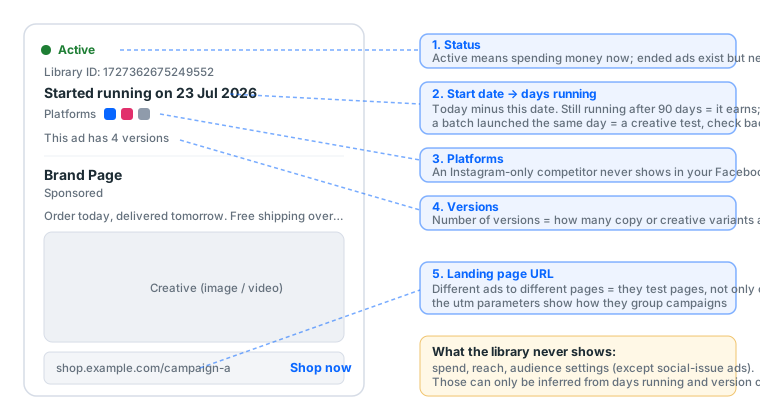
The library will not show spend, reach or audience. But a card carries five fields, and together they let you infer most of what you wanted to know:
| Field | Reads directly as | Infers |
|---|---|---|
| Start date | When the ad went live | Today minus that date = days running. The single most valuable number in the library |
| Versions ("This ad has N versions") | How many variants of one ad | How many copy or creative variants are being A/B tested |
| Platforms | Which of FB, IG, Messenger it runs on | Where their audience is; Instagram-only usually means younger buyers or visual products |
| Landing page URL | Where the click goes | Different ads to different pages = they are testing pages; utm parameters reveal how they group campaigns |
| Status | Whether it is spending now | With the date: long-running and active = working; launched days ago and ended = failed the test |
Why days running matters more than anything else
Advertisers do not keep paying for ads that lose money. An ad still active after 90 days has passed their performance bar: they pay every day to keep it running, and they can see the Ads Manager numbers you cannot. You are borrowing their A/B test results for free.
The reverse signal: a batch launched on one day, ten or more cards with the same start date, means one of two things, and the copy tells you which. Different copy, same product: a creative test; come back a week later and the survivors are the winners. Identical copy, different products (one template, many SKUs): catalog ads, generated automatically per product, not a human test, and not worth reading.
5. Four steps to reverse-engineer a competitor
This is the order we use when we look at a competitor ourselves. It takes about 20 minutes and teaches more than any ads course.
Step 1: find the three longest-running ads. Page search, status active, convert every start date on page one into days, take the top three. Those are the creatives they have proven profitable. Study the first three seconds, the offer, and the landing page.
Step 2: count versions. How many versions do the long-runners have? Many versions means they keep iterating on that creative direction (it works, dig into it). One version running for months is an evergreen ad that never needed changing.
Step 3: list the landing pages. Write down the URL of every active ad. All to one page: they are testing creatives. Different pages: they are testing pages, and usually one page has already clearly won.
Step 4: read the launch rhythm. Switch status to all and look at the last three months: how many launched, how many ended. A new batch every week means a creative team producing continuously; nothing new for three months means either stability or neglect.
After four steps you know their lead offer, their creative direction, their landing page and whether their budget is stable or in testing. That is the homework your first ad should copy: not the creative, but the structure they have already proven. Done weekly and kept in one sheet, three months of it is your own ad swipe file; if the manual version feels slow, Ads Library vs spy tools says whether paying fixes that.
The 12 Taiwanese brands we checked
On 13 September 2026 we ran keyword searches for 12 household-name Taiwanese brands (country Taiwan, status active) and recorded the start date of every ad on the first results page. Page one is the default sort, total impressions descending, so it holds the 24-30 biggest ads rather than all of them, which is exactly the slice worth reading.
| Brand | Type | Active results | Longest on page one | Page-one median | Share over 90 days | Most launched on one day |
|---|---|---|---|---|---|---|
| momo | E-commerce | ~7,300 | 353 days | 133 days | 57% | 6 |
| Shopee TW | E-commerce | ~5,400 | 434 days | 133 days | 67% | 8 |
| PChome 24h | E-commerce | ~1,200 | 228 days | 198 days | 86% | 14 |
| Buy123 | E-commerce | ~1,100 | 605 days* | 159 days | 56% | 2 |
| books.com.tw | E-commerce | ~510 | 378 days | 25 days | 25% | 4 |
| ETmall | E-commerce | ~310 | 186 days | 23 days | 14% | 5 |
| McDonald's TW | Service | ~750 | 218 days | 25 days | 33% | 6 |
| Taiwan Mobile | Service | ~480 | 345 days | 55 days | 22% | 4 |
| Cathay United Bank | Service | ~440 | 138 days | 28 days | 17% | 6 |
| PX Mart | Service | ~350 | 570 days | 10 days | 12% | 11 |
| E.SUN Bank | Service | ~270 | 402 days | 13 days | 4% | 9 |
| FarEasTone | Service | ~220 | 72 days | 12 days | 0% | 6 |
* The longest ad on Buy123's page one (live since 2025-01-16) is not Buy123's: it is a STAYREAL character-keychain ad whose copy contains the word "market", pulled in by the keyword match. It stays in the table because it demonstrates the keyword-search noise perfectly.
Three things the table shows that no "how to use the ad library" article will tell you:
- E-commerce and services run on different clocks. The six retailers have a page-one median of 133 days running; the six service brands, 25. Retailers keep a bench of evergreen ads (Shopee's longest on page one has run 434 days, momo's 353); service brands run in campaign waves, and 68% of PX Mart's page one launched within the last two weeks. If you are a retailer with no ad past 90 days, you have not found your evergreen yet.
- "Launched the same day" needs the copy read before you conclude. PChome's page one has 14 ads that all started on 27 February 2026 and were still running in September. We opened them: every one reads "Popular items almost sold out, limited-time offer" with a different product (a NT$99 dust plug, a NT$299 iPad screen protector). That is a catalog campaign, dynamic product ads generated per SKU, not 14 creatives under test. PX Mart's 11 on 3 September, by contrast, is a new campaign wave. The rule: same copy, different products = catalog ads; different copy, same product = creative test.
- Result count says nothing about budget. momo's 7,300 results include a large share of other people's ads that merely mention momo, scam warnings included. To compare budgets, use Page search and compare the distribution of days running on page one, not the result count.
6. Seven reasons you cannot find an ad
"No ads found" does not mean they are not advertising. Eliminate in this order:
- Wrong country. They run in another market. Set all countries and retry.
- Status is active but they are between campaigns. Set all and look at their history.
- Wrong platform. Instagram selected while they only run on Facebook, or the reverse. Set all.
- Keyword search for a word that is not in their copy. Brand names are often absent from ad text. Use Page search.
- They advertise from a different Page. Many brands run ads from a sub-brand Page or an agency's Page. Click the Page name on any ad card to confirm.
- Age or region restrictions on the ad. Alcohol, gambling-adjacent and adult products are hidden from logged-out or ineligible viewers. Log in with an eligible account.
- They really are not advertising. Only conclude this after the six above.
Point 5 is especially common in Taiwan: since the 2026 advertiser and payer verification, many brands moved all delivery to one verified Page and their main Page now shows nothing.
6b. Using the library to check a Page or account before you accept it
This is a use only a site like ours would write about. A bought Page, or an account with an ad account inside, can be checked in the library before you ever log in: what it advertised before. Page search, status set to all, lists every ad that Page ran in the last year.
What you see maps to three decisions:
| The library shows | It means | What to do |
|---|---|---|
| No ads at all | The Page never advertised; a clean blank | Normal, most bought Pages look like this; the first ad starts the spend ramp from zero |
| Ended ads with ordinary content | The Page has an advertising history | A plus: Pages with history are less often asked to verify when an ad account is opened |
| Ended ads in a category you do not want to be associated with | The Page was used for high-risk content | Return it. Even if the account logs in today, that history stays with the Page and surfaces at the next review |
In our acceptance SOP this step comes before logging in, because it needs no credentials, triggers no security check, and a return based on the library's public record leaves the seller nothing to argue. The full order is in the acceptance SOP; the questions to ask before buying are in six things to know before buying.
7. The extra data on social-issue and political ads
Three fields hidden for commercial ads appear for the "social issues, elections or politics" category: a spend range, reach, and the payer's name.
Since Taiwan's 2026 advertiser verification, the payer field on this category is mandatory and shows the verified name. It matters little to ordinary advertisers, but if you run NGO, public-issue or election-adjacent content, this data is public: your competitors see what you spend, and you see theirs.
Meta also publishes an Ad Library Report aggregating this category's spend by advertiser and region, downloadable. Commercial ads are not in it.
8. The other platforms' ad libraries
The library covers Meta only. For what a competitor runs elsewhere, each platform has its own transparency tool:
| Platform | Tool | Shows | Does not show |
|---|---|---|---|
| Meta | Ads Library | Any Page's ads, start date, versions, platforms | Spend, audience (except social issues) |
| TikTok | Creative Center | Top-ads rankings, trends, creative insights, filterable by industry, region and objective | A specific advertiser's full ad list (only what ranks) |
| Ads Transparency Center | Verified advertisers' ads, formats, regions and dates | Spend, keywords | |
| Ad Library | An advertiser's ads and dates; impression ranges in the EU | Spend |
The four tools expose different fields; "what does this competitor run on all four" has to be searched separately and assembled by hand, and the field-by-field comparison is in every platform's ad library. TikTok's Creative Center is the furthest from Meta's logic: it is a leaderboard, not a search engine.
9. The Ad Library API: who can actually use it
Meta offers an Ad Library API. The path is identity verification, then a developer app, then an access token. It sounds like "automate pulling competitor ads". In practice:
- It returns two kinds of ad: the social-issue, electoral and political category, and any ad that delivered to the EU. The second is the Digital Services Act at work: an ad that produced even one impression in the EU enters the API whatever its category, with impression ranges and an audience summary, and stays for a year after its last impression. The flip side: commercial ads run only in Taiwan, the US or Southeast Asia are not in the API; an API query for a Taiwanese retailer returns nothing.
- Political ads are kept seven years; EU ads one year; every other commercial ad is web-only, also for one year.
For anyone running commercial ads outside the EU, the API is useless; the access steps, endpoint parameters and EU-only fields are in the Ad Library API guide. What can be automated is the web version's filter set written as a URL (the tool in section 2 does exactly that), opened on a schedule. Beyond that are paid third-party tools, which store the web data over time and add sorting.
10. They are running ads, you want to run ads: which layer are you missing
After seeing what a competitor runs, the next step is running your own. Most people stall here, and not because they cannot make a creative. It is because they have no account that can run ads: advertising needs four layers, and any missing one blocks delivery:
| Your situation | Missing layer | Read |
|---|---|---|
| A personal account, no Page | A Page (the ad's publishing identity, mandatory) | The account map |
| A Page, but cannot open an ad account | Business Manager and an ad account | What is a BM |
| Everything, but verification is demanded on first launch | Taiwan advertiser verification | Passing Taiwan verification |
| Everything, first campaign | A setup sequence in the right order | Facebook ad setup |
Whichever layer you lack is in the catalog, and the first-run bundle assembles all four. Work out which layer you are missing before buying; every guide on this site says the same thing.
11. Glossary
| Term | Plain meaning |
|---|---|
| Ads Library / Ad Library / Facebook Ad Library | The same thing: Meta's public ad search page |
| Start date | When the ad went live; today minus it = days running |
| Versions | Copy or creative variants of one ad |
| Platforms | Which of FB / IG / Messenger / Audience Network the ad runs on |
| Social issues, elections or politics | The only category that shows spend and reach |
| Page transparency | The About-page block with the Page ID and the Go to Ad Library link |
| Creative Center | TikTok's version; a leaderboard, not a search |
| Ads Transparency Center | Google's version |
12. Common mistakes
| You did | Result | Do instead |
|---|---|---|
| Keyword-searched a brand name | Impersonators and warnings mixed in | Page search |
| Left the country on your own while checking a foreign brand | Zero results | Select their main market, or all countries |
| Judged from page one | Page one is highest impressions, not everything | Filter to the last 30 days by start date |
| Read a high result count as a big budget | Counts include other people's ads | Read the distribution of days running |
| Copied a competitor's creative | You lack their audience and landing page; the copy will not perform the same | Copy the structure: offer, opening, landing-page logic |
| Applied for the API to track competitors | Commercial ads are not in the API | Use the web version with filters saved as a URL |
Sources, checked 2026-09-13
- Ads Library — facebook.com/ads/library
- Ad Library Report (social-issue spend) — facebook.com/ads/library/report
- Ad Library API — facebook.com/ads/library/api
- About the Ad Library — Meta Business Help Center — facebook.com/business/help
- TikTok Creative Center — ads.tiktok.com/business/creativecenter
- Google Ads Transparency Center — adstransparency.google.com
- LinkedIn Ad Library — linkedin.com/ad-library
- Meta Advertising Standards (the basis for rejected and restricted categories) — transparency.meta.com
- The 12-brand data in section 5 was collected by us on 2026-09-13; result counts are the approximate figures the library displays.
FAQ
Where is the Meta Ads Library?
At facebook.com/ads/library, with no login required. You can also reach it from any Page via About, then Page transparency, then Go to Ad Library, which opens with that Page's ads already listed.
Is the Facebook Ad Library the same as the Meta Ads Library?
Yes. Meta renamed it; both names point to the same URL, and the old "Facebook Ad Library" name is still the one most people search for.
Does the Ads Library show how much an ad spent?
Not for ordinary commercial ads. Spend range, reach and the payer name are shown only for ads in the social issues, elections or politics category.
Why does a brand show "no ads found"?
Usually the country filter. The library defaults to ads delivered to your own region; if the brand only runs ads in the US and you are searching from elsewhere, you get zero. Next most common: status set to active while they are not currently running anything, or platform set to Instagram while they only run on Facebook. Set country to all and status to all and search again.
What is the difference between keyword search and Page search?
Keyword search returns every ad whose copy or Page name contains the word, including ads that mention the brand, impersonate it, or warn people about it. Page search returns only ads that one Page runs. To see what a competitor actually runs, use Page search.
How are Ads Library results sorted?
By total impressions, highest first. Page one is the advertiser's biggest ads, not the newest. Use the start-date filter to see recent ones.
Can I see ads that have already ended?
Yes, set status to all or to inactive. Meta keeps ordinary commercial ads for one year and social-issue ads for seven.
How do I tell whether a competitor's ad is working?
Convert the start date into days running. Advertisers do not keep paying for losing ads; anything still active after 90 days has passed their own performance bar. A batch launched on the same day is a creative test; check back a week later to see which survived.
Can the Ads Library show TikTok or Google ads?
No. It covers only Meta's platforms. TikTok has its Creative Center and Google has the Ads Transparency Center; each is searched separately.
Can anyone use the Ad Library API?
Anyone can apply, but it returns only two kinds of ad: the social-issue, electoral or political category, and any ad that delivered to the EU (a Digital Services Act requirement). Commercial ads run only in Taiwan, the US or Southeast Asia are not in the API and can only be viewed on the web.
Does the library include Instagram Stories and Reels ads?
Yes when the platform filter is set to Instagram. The placements are listed inside each ad's details, but the URL cannot filter to Stories alone.
A competitor keeps changing ads. Does that mean they are good at this?
Not necessarily. Frequent creative changes mean either active testing or nothing that works. Look for at least one anchor ad that has run more than 60 days; if there is one, the churn is testing, if there is none, they are still searching.
Ready to start?
See the catalogRead next
TikTok Creative Center Explained: The TikTok Ad Library That Is a Leaderboard, Not a Search
People look for a "TikTok ad library" and cannot find one, because it
How to Build an Ad Swipe File From the Ads Library in 30 Minutes a Week
The biggest free ad swipe file already exists: it is the Meta Ads Libr
Ads Library vs Paid Ad Spy Tools: What $49 to $459 a Month Actually Buys Over the Free Version
Every ad spy tool is built on the same public data the Meta Ads Librar
Every Platform's Ad Library Compared: Meta, TikTok, Google and LinkedIn, and What Each One Hides
A competitor who runs on four platforms has to be looked up in four pl
Meta Ad Library API: Who Gets Access, What It Returns, and Why Commercial Ads Outside the EU Are Not in It
The Ad Library API sounds like a way to pull competitor ads automatica
What Is Facebook Ads Manager? Interface Tour and First Setup
Ads Manager is Meta's console for building, running and monitoring ads
Personal Account, Page, BM, Ad Account, Developer Account: One Map of What Hangs Off What
These terms get used interchangeably, but there is only one root. This
Advertiser and Payer Verification for Taiwan Ads (September 2026)
The Page-level entry point is gone, and a verification no longer carri
Facebook ad setup: from zero to your first live ad
Step by step, with a suggested value for every field. Follow it and yo
Running Facebook Ads: the complete path from nothing to your first live ad
The whole route on one page. From "where is Ads Manager" to "how do I