How to Get Blue Tick on WhatsApp Business (and Why Most Fail)
To get the blue tick on WhatsApp Business you need three things: a WhatsApp Business Platform (API/WABA) account, a verified Business Manager, and enough brand notability that journalists have written about you. The badge itself is free, and the WhatsApp Business app cannot get it — that is a different product. Since August 2025 the BSP submission route has been suspended, so many applications are not rejected at all; they never enter review. When one genuinely does fail, the usual cause is notability, not paperwork.
Three things decide whether you get it, and only one of them is paperwork. This covers what the requirements actually are, why most applications fail anyway, and the category of applicant since August 2025 who was never rejected at all — the door was closed. Those two situations need opposite responses.
Start here: the badge is free. What is hard is qualifying for it.
You need three things: a WhatsApp Business Platform (API/WABA) account, a verified Business Manager, and third-party press coverage of your brand. The third is where almost everyone stalls, and it is the only one you cannot fix by resubmitting documents.
In 2026 there is a fourth thing: the submission route has been suspended since August 2025. So there is now a whole category of applicant who was never rejected: their application never entered review. Those two situations need opposite responses.
Below: the three different things called "blue tick" (get this wrong and everything after it is wasted), then the failure reasons ranked by how often they actually occur, each with how to tell whether it is your problem and what fixes it. Two cannot be fixed, and that is stated plainly.
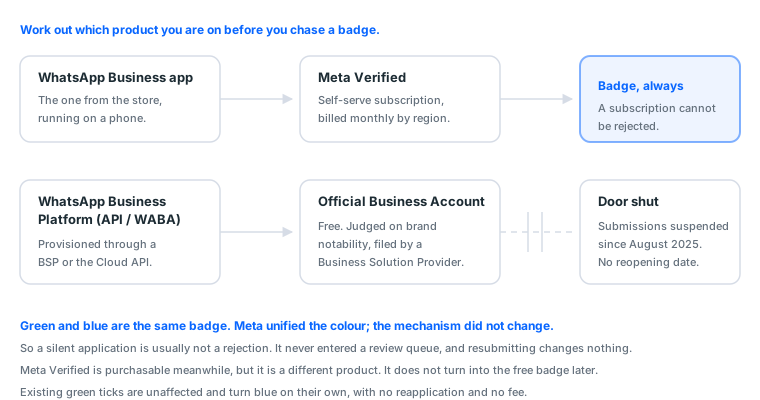
1. First, work out which badge you are chasing
Skip this step and everything after it is wasted effort. Three different things share the name "blue tick":
| What you see | What it actually is | How you get it | Cost |
|---|---|---|---|
| A badge inside the WhatsApp Business app | Meta Verified subscription | Self-serve, inside the app | About USD 11.99/mo web, USD 14.99/mo mobile, varies by region |
| A blue tick on an API account | Official Business Account (OBA), the old green tick | Submitted to Meta through a Business Solution Provider (BSP) | Free via the official route |
| A "ready-made verified account" someone sells you | A WABA owned by the seller | Purchase | Not advisable, see section 5 |
What happened to the WhatsApp green tick?
Green and blue are the same badge. Meta unified the colour; the mechanism is unchanged. Accounts that already had a green tick turn blue on their own, with no resubmission and no fee. So the answer to "the green tick became blue, do I need to reapply" is no.
The middle row is the one that gets rejected. The top row cannot be rejected, because it is a subscription. So the first question to answer honestly is: do I want the free one that requires review, or the paid one that does not?
If your goal is simply "customers should not mistake me for a scammer," Meta Verified is enough and you can stop reading. If you need API broadcasting, a customer-service platform integration, or your brand name shown on the customer's phone instead of a raw number, then only the OBA badge will do.
2. The timeline, and why 2026 does not match the guide you found
Most application walkthroughs online were written in 2023 or 2024, when the process genuinely worked as described. Three things changed since, and each one strands a different set of people:
| When | What happened | What it means for you |
|---|---|---|
| Before 2023 | Green tick (OBA) submitted through a BSP, judged on notability | The era that produced most of the walkthroughs |
| 2024 | Meta unified badge colour to blue; Meta Verified for Business launched | Two different "blue ticks" now exist, and people conflate them |
| August 2025 | BSP-routed blue tick submissions suspended | New applications go quiet; BSPs can only say "waiting" |
| 2026 (now) | Suspension continues, no reopening date published | Following an old guide sends your application nowhere |
The tell: if the guide you are reading does not mention August 2025, it is describing a process whose entrance is currently shut. The steps are not wrong. The door is.
This is also why "my competitor got one last year" proves nothing; they applied while it was open.
2b. How to verify a WhatsApp Business account, step by step
This is the whole procedure, in the order it actually happens. Steps 1 to 4 are open right now. Step 5 is the one sitting behind the August 2025 suspension, and step 6 is what to do about that.
Step 1. Get onto the API (WABA), not the app. The badge is only ever issued to a WhatsApp Business Platform account. Two routes exist: a BSP (Business Solution Provider) who hosts it for you, or Meta's Cloud API directly if you have someone who can wire it up. Either way you end up with a WABA sitting inside a Business Manager you control. If you are still on the green WhatsApp Business app from the store, nothing below applies to you yet; see Reason 2.
Step 2. Verify the business itself. Business Manager → Security Centre → Start Verification. Meta checks your legal entity name, registered address and phone number against the document you upload and against public records. The usual failure here is not a bad document. It is that the name on your company registration, your website footer and your utility bill are three different strings. Make them one string before you submit anything.
Step 3. Register the number and get the display name approved. The display name has to be recognisably your brand and has to match the website you are claiming. Generic category phrases and promotional words fail at this gate, before anyone has looked at your notability at all.
Step 4. Build the notability before you submit, not after. Everyone does this step last, and it is the step that decides the outcome. What counts is third-party press a journalist wrote, naming your brand, on a publication that is not a paid-release wire. Reason 1 covers what qualifies. Submitting without it and hoping is how most of the rejections in section 3 happen.
Step 5. File the badge request. Historically: Business Manager → the WABA → Account overview → request verification, or your BSP files it for you. As of 2026 this route is suspended; see the table above. A BSP who says they can still push one through is either quoting the old process from memory or selling something they cannot deliver.
Step 6. What to do while the door is shut. Complete steps 1 to 4 properly and keep the evidence in one folder. When submissions reopen, the applications that clear quickly are the ones where the notability already existed and the business was already verified, not the ones that start assembling paperwork on reopening day. Meta Verified for Business remains purchasable in the meantime, but it is a different product: it does not become this badge later.
3. The seven reasons
Reason 1: Not enough brand notability (most common, hardest to fix)
This carries the most weight in the review and is the only factor that resubmitting documents cannot touch.
Meta is not asking "is this a legally registered company." It is asking "is anyone outside this company talking about this brand." A registration certificate proves you are legal. It cannot prove you are known. What counts is third-party press coverage written by journalists, not coverage you paid for.
A frequently quoted figure is at least three non-promotional articles. Treat that as folklore, because Meta publishes no threshold, and in practice source quality beats volume. One genuine interview in a trade publication outweighs ten wire-service releases.
How to tell it is this one: your file is complete, the company is real, and two or three submissions have come back with no specific reason attached.
What fixes it (only approaches that hold up long term):
- Target vertical trade media rather than national outlets. Lower bar, and to Meta it still counts as third party
- Give a reporter an actual news hook: a launch, funding, a new market, industry data. "We are a good company" is not a hook
- Turn your own operating data into something quotable. Reporters are short on numbers, not adjectives
- If you operate in a non-English market, get English-language coverage too. Reviewers may not be able to weigh the standing of a local-language outlet
What not to do: buy fabricated coverage or farm out placements on content mills. Failing review over it is the small problem. Passing and then being stripped of the badge is the large one, because a clawback reaches your entire Business Manager.
Reason 2: You are on the app, not the API
The blue tick is only issued to WhatsApp Business Platform (API/WABA) accounts. Submitting from the WhatsApp Business app will never work, because that path contains no such entry point.
How to tell it is this one: you are hunting for the option in a phone app rather than in Business Manager, or you cannot say whether you have a WABA ID.
What fixes it: get a WABA provisioned first, through a BSP or Meta's direct sales channel, since individuals cannot apply to Meta on their own. You will receive a WABA ID, which is the prerequisite for everything else.
Worth noting: the API bills per conversation. In Hong Kong, for example, the marketing, utility, authentication and service categories are priced differently, the first 1,000 service conversations each month are free, and the rest generally fall between USD 0.03 and 0.09 each. That is a running cost, and it belongs in the decision. Do not price the badge alone.
Reason 3: Business verification failed, or your details do not line up
The blue tick assumes your Business Manager has completed business verification. Without it, the badge application is not even looked at.
More common than "not verified" is verified but inconsistent:
| The mismatch | Why it blocks you |
|---|---|
| Business Manager legal name ≠ registration certificate | Review compares registered names, not brand names |
| The phone number is nowhere on your website | The link between number and brand cannot be confirmed |
| Domain registrant unrelated to the applying company | Reads as borrowing someone else's brand |
| Site sits on a free subdomain | Insufficient evidence of an independent brand |
What fixes it: make the name and contact details identical across your website, your registration documents and your Business Manager, then resubmit. This is the most fixable of the seven, an afternoon's work.
How Business Manager itself works and how assets sit inside it is covered in what a Business Manager is, so it is not repeated here.
Reason 4: A non-compliant display name
The display name is what customers see on their phone. It is reviewed separately and is rejected often.
Names that get rejected:
- Promotional wording: free, discount, cheapest, offer
- Bare category terms: electronics store, travel agency, consultancy
- Anything that does not match the brand name on your website
- Single letters or numbers only
- Names containing a URL or phone number
What a passing name looks like: exactly the brand name in your website header, character for character. If you need a region or branch, put it after the brand name, not before.
How to tell it is this one: the rejection notice mentions the display name specifically. This reason usually comes with the clearest feedback of the seven.
Reason 5: The number's quality rating is too low
If the number has been used for bulk sending, or has collected reports and blocks, its quality rating will be low, and a low-rated number has a much harder time carrying a verification badge.
⚠️ This one is a judgement call. Meta has not publicly documented a link between quality rating and blue tick review, but it shows up often enough in rejected cases to be worth ruling out.
What fixes it: move to a clean number, or cut send volume and let the block rate recover before reapplying. Note that changing the number restarts the whole process, so confirm this is really the problem first.
Reason 6: A restricted business category
Some industries are restricted under Meta's commerce and business policies. In that case no amount of documentation will pass.
How to tell it is this one: your business sits in a regulated or restricted category, and the rejection cites business policy rather than verification requirements.
What fixes it: nothing. Either change the operating entity or accept life without the badge. Any agency claiming it can "handle" this category is handling it by concealing what you actually do, and that badge gets clawed back.
Reason 7: The door is closed. You were not rejected
This is the one that matters most in 2026, and the one that wastes the most effort.
Since August 2025, Meta has suspended BSP-routed blue tick submissions. New applicants are pushed toward the Meta Verified subscription instead. Existing green ticks are unaffected and turn blue on their own.
During this period that means:
- Your submission may never have entered a review queue at all
- Your BSP telling you "still waiting" is probably honest, because they have no better answer
- Resubmitting, or adding another document, changes nothing
How to tell it is this one: complete file, adequate notability, and a long silence after submission, not a rejection, just no outcome.
What fixes it: nothing but waiting, or one of the alternatives below. Meta has published no timeline, and anyone quoting a specific date is guessing. How to read "the rules changed but nobody announced it" situations in general is covered in Meta policy changes.
4. Pre-submission checklist
Walk this before you submit. Any "no" is something to fix first, because the cost of a resubmission is not money, it is the cooling-off period.
| # | Check | Why it matters |
|---|---|---|
| 1 | I have a WABA ID, not just the WhatsApp Business app | Without a WABA this path does not exist |
| 2 | Business verification is complete in Business Manager | Unverified applications are not reviewed |
| 3 | Business Manager legal name = registration certificate | Review compares registered names |
| 4 | The domain registrant is connected to the applying company | Otherwise it reads as a borrowed brand |
| 5 | The website is not on a free subdomain | Evidence of an independent brand |
| 6 | The number being submitted appears on the website | Links the number to the brand |
| 7 | Display name matches the brand in the site header exactly | Reviewed separately, high rejection rate |
| 8 | Display name has no promo words, URL or phone number | Straight rejection triggers |
| 9 | At least one third-party outlet has mentioned the brand | Notability carries the most weight |
| 10 | The number has no history of mass reports or blocks | A low quality rating drags the review down |
| 11 | The business is not in a restricted category | Restricted categories never pass |
| 12 | I know the BSP channel is currently suspended | So silence is not mistaken for personal failure |
The first eight you can verify in an afternoon. Items 9 to 11 take time. Item 12 is just knowing what you are looking at.
The order that saves the most time: fix 3, 4, 5 and 6 first (align the details), then 7 and 8 (rename), and resubmit. If it still goes quiet after that, the problem is no longer your paperwork.
5. What your options actually are after a rejection
| Path | Who it suits | Cost | Risk |
|---|---|---|---|
| Subscribe to Meta Verified | Small businesses that only need to look credible | ~USD 12–15/month | Low, but it is not the API badge |
| Build notability, then reapply | Real businesses that only lack coverage | 3–6 months | Low, and useful to the brand anyway |
| Wait for the BSP channel to reopen | Everything in place except the door | Unpredictable | Low |
| Use an agency | Urgent, and self-submission has failed | One-off fee | Medium to high, depending on their method |
| Buy a ready-made verified account | — | — | High. Do not |
On that last row: a verified WABA sits inside the seller's Business Manager. You are buying access, not ownership, the seller can pull the asset back at any time, and if Meta treats the transfer as irregular the whole set disappears. Do not buy these. We do not sell them.
6. After approval: how not to lose it again
People treat approval as the end of the process. The badge can be taken back, and when it is, the badge is not the only thing that goes.
Three things that trigger a clawback:
- The original submission contained falsified information. Post-approval checks are stricter than the initial review and happen at random. The fallout reaches the whole Business Manager
- The brand stops meeting the criteria. A closed company, a website taken down, a changed display name: any of these can trigger a re-review
- The number's quality rating stays low. High send volume against a high block rate reads as harassment
Three things worth doing once you have it:
- Stop changing the display name. A rename triggers re-review, which means clearing a gate you already cleared
- Keep the website consistent with what you submitted. Do not let a redesign drop the brand name, phone number or company details
- Manage send quality. Marketing messages need a visible opt-out; keeping the block rate low matters more than sending more
7. Three questions to ask any agency before paying
Using an agency is not the problem. The variation in how they work is. Three questions filter out most of the field:
- "What information will you submit?" If the answer includes "we'll arrange coverage for you" or "don't worry about the paperwork," end the conversation. Falsified submissions get clawed back, and a clawback reaches your entire Business Manager, a far bigger loss than the fee.
- "If it fails, do I get a refund, and how much?" No clear written answer means no payment. The badge attaches to your WABA, so a failed application cannot be made good by handing you a replacement. A refund is the only possible remedy; no refund policy means no after-sales at all.
- "Is the BSP channel still suspended?" This tests whether they are tracking reality. Anyone who says there is no such thing, or talks around it, has no real channel.
Our own terms are printed on the product page: you must already have a WABA, completed business verification, and a website consistent with your brand. All three, or we do not take the order; a failed application is refunded in full to your wallet; and we do not submit falsified information. That is not politeness. Clawbacks land as complaints on us.
Checking over a delivered service follows the same logic as checking over a delivered account; see the acceptance SOP. If you are also running Meta ads, the full Facebook ads guide covers how the rest of the asset chain should be arranged.
8. Does your market actually need this badge
Read this before spending any time. The badge is worth exactly as much as WhatsApp matters to your customers.
| Market | Is WhatsApp the primary channel | What the badge is worth |
|---|---|---|
| Indonesia | Yes, and the most active market for hiring help with it | High. Local searches are literally "jasa centang biru" (agency service for the blue tick) and they arrive comparing prices |
| India | Yes, the largest user base anywhere | High, though your competitors have it too |
| Hong Kong | Yes, near-universal | High. Customers read the badge as "this is the official account" |
| Malaysia / Singapore | Yes | High, especially retail and services |
| Middle East | Yes | High, because business conversation lives on WhatsApp |
| Brazil / Latin America | Yes | High, particularly for commerce |
| Cross-border sellers out of China | The main outbound channel | High. Buyers do not know your brand; the badge is the only trust signal |
| Taiwan | No, conversation lives on LINE | Low. Rarely worth the effort |
| Japan / South Korea | No (LINE / KakaoTalk) | Low |
Indonesia is the most decisive market on this table. Locally the badge is centang biru (blue tick) and the old green one is centang hijau. Search behaviour there is unusually far down the funnel: jasa (agency service), syarat (requirements), biaya and harga (cost, price), murah (cheap). Those are people who already decided to get verified and are now choosing who does it for them. One caution if you are researching in Indonesian: centang biru on its own also returns TikTok and Instagram results, and centang hijau returns people looking for the ✅ emoji, so keep WhatsApp Business in the query or you will read the wrong market.
If your customers are not on WhatsApp, a verified WhatsApp account will not move your conversion rate, because they will never open that thread. Confirm the channel before you invest three months in press coverage.
8b. What WhatsApp Business actually costs: API conversation pricing vs the Meta Verified subscription
The pricing questions get mixed up because there are four separate bills, and most guides only mention one.
| Line item | Who charges | What it costs (checked September 2026) | Do you need it for the badge |
|---|---|---|---|
| WhatsApp Business app | Nobody | Free | Not for the OBA badge; the app cannot get it |
| Meta Verified subscription (the self-serve badge) | Meta | About USD 11.99/mo on web, 14.99/mo on mobile, priced per region | Only if you want the subscription badge, not the OBA one |
| Official Business Account verification (the OBA badge) | Nobody | Free through Meta or your BSP | This is the badge, and it costs nothing to apply |
| WhatsApp Business Platform (API) messaging | Meta, billed through your BSP | Per message, by category and by the recipient's country: marketing roughly USD 0.02-0.09, utility and authentication roughly USD 0.003-0.02; replies inside a customer-opened 24-hour window are free | Yes: the OBA badge is only issued to API accounts |
| BSP platform fee | The BSP (Twilio, 360dialog, Gupshup, a local partner) | From free to a few hundred dollars a month, plus an optional markup per message | Yes, because an API account has to sit with a BSP |
Two things follow from this table.
The badge itself has never been the cost. What costs money is the API account it requires: a BSP subscription and per-message fees that scale with volume. Anyone quoting a price for the blue tick is quoting for their time, or for the API onboarding, or is selling you something from section 5.
Per-message pricing changed the maths in 2025. Meta moved template messages from per-conversation to per-message billing, so a marketing broadcast to 10,000 numbers is now 10,000 marketing messages, not 10,000 conversations that could each carry several. Utility and authentication messages got cheaper; marketing got more expensive in most regions. If you are estimating a monthly bill, take the rate for your customers' country from Meta's current rate card rather than a number in an old guide, including this one.
We checked these rates against Meta's published rate card and two BSP price pages on 2026-09-13; the per-message bands above are the spread across the ten countries our customers message most, not a single country's rate. If your market is not in that spread, look it up before quoting a client.
If what you actually need is the account the badge sits on rather than the badge itself, the verified WhatsApp Business setup in the catalog is the API account with business verification already cleared; the badge review is the part nobody can sell.
Where the verification itself sits in that budget: nowhere. It is free and it is a review, which is why sections 3 and 5 are about notability and evidence rather than about paying.
9. Four persistent misconceptions
"With a blue tick my messages stop getting blocked." No. Delivery and blocking are driven by quality rating and how recipients actually react. The badge addresses credibility and impersonation, not deliverability.
"The blue tick is expensive, so it must be better." The official badge is free. What you pay for is either an agency's labour or a Meta Verified subscription, never the badge itself.
"Everyone should get one." See the previous section. Outside WhatsApp-first markets the effect is close to zero.
"One rejection and I am blacklisted." No. A rejection is not a permanent mark, it is this submission being insufficient. Fixing the checklist in section 4 and reapplying is the normal path. What does leave a lasting problem is being caught submitting falsified information.
Sources (all official pages, checked 2026-09-08). Prices, catalogue distributions and warranty ratios in this article are our own catalogue and ticket data, not taken from these pages:
- WhatsApp Official Business Accounts (OBA) — Meta for Developers — developers.facebook.com
- WhatsApp Business Platform (API) — WhatsApp for Business — business.whatsapp.com
- WhatsApp Help Centre — faq.whatsapp.com
- Business verification — Meta Business Help Centre — facebook.com
- Meta Verified plans and pricing — meta.com — meta.com
FAQ
Are the green tick and the blue tick the same thing?
Yes. Meta standardised the verification badge colour to blue. The mechanism did not change. Accounts that already had a green tick turn blue automatically, with no reapplication and no fee.
How much does the blue tick cost?
Through the official route it is free. What costs money is a different product — the Meta Verified subscription, roughly USD 11.99 per month on web and USD 14.99 on mobile, varying by region. The free badge is hard to get because of eligibility, not price.
Can I get the blue tick on the WhatsApp Business app?
No. The badge is only issued to WhatsApp Business Platform (API/WABA) accounts. The app can carry a Meta Verified subscription badge, which is a separate path.
Is it impossible without press coverage?
Not impossible, but the odds drop sharply. Notability carries the most weight in this review, and it is the one factor you cannot fix by resubmitting documents.
How many articles are enough?
A commonly cited figure is at least three non-promotional third-party articles, but Meta publishes no threshold and in practice source quality matters more than count. Treat the number as folklore, not a rule.
Does a paid press release count?
Wire-service releases carry very little weight because you wrote them. What works is a journalist independently covering or quoting you.
How soon can I reapply after a rejection?
There is usually a cooling-off period, and resubmitting the same information changes nothing. Change the underlying facts first, then reapply.
Can the display name differ from my brand?
Not advisable. It has to match your website and brand. Names with promotional words or generic category terms get rejected.
Can a blue tick be taken away?
Yes. Brands that stop meeting the criteria, or that obtained the badge with falsified information, can lose it — and the fallout reaches the whole Business Manager.
Does the blue tick improve message delivery?
The badge is not the lever. Delivery is driven by quality rating and block rate. What the badge buys you is credibility and impersonation protection.
When will the BSP submission channel reopen?
Meta has not announced a date. Anyone quoting you a specific one is guessing.
Is it safe to use an agency?
It depends on two answers — whether they ask you for falsified information, and whether they refund a failed application. Walk away from anyone who offers to manufacture your credentials.
Does the badge survive a change of BSP?
The badge attaches to the WABA rather than to the provider, so migrating between providers normally keeps it. What breaks it is changing the display name or the number during the move, because either one triggers a fresh review.
Can one business verify several numbers?
Yes. Business verification happens once at the Business Manager level, and each number underneath is registered and reviewed separately. Adding a second number does not mean redoing the company paperwork.
Is Meta Verified for Business the same badge?
No, and one does not convert into the other. Meta Verified is a paid subscription you can start today. The Official Business Account badge is free, judged on notability, and currently sitting behind a suspended submission route. Buying the subscription does not shorten the queue for the other one.
How much does the WhatsApp Business API cost?
Messaging is billed per message by category and by the recipient's country: marketing messages roughly USD 0.02-0.09 each, utility and authentication roughly USD 0.003-0.02, and replies inside a customer-opened 24-hour window are free. On top of that your Business Solution Provider charges a platform fee, from nothing to a few hundred dollars a month.
Is the WhatsApp blue tick free?
The Official Business Account badge is free to apply for through Meta or a BSP; what costs money is the API account it requires. The other badge, Meta Verified, is a subscription of about USD 11.99-14.99 a month and does not require a review.
Want the parts this article talks about?
See WhatsApp verification serviceRead next
Meta Verified and the Blue Tick: Three Badges That Look Identical, Priced Completely Differently
The blue tick on Instagram, Facebook and WhatsApp looks like one thing
How Much Is the Instagram Blue Tick? Meta Verified Cost 2026
The blue tick on Instagram is a subscription now, not a status you ear
How Meta policy changes affect account survival
When accounts start dying in batches, it is usually not something you
What Is BM in Facebook Ads? Business Manager, BM3 and BM50
BM is the container your ad assets live in, not the place you run ads
Acceptance SOP: what to do in the first 30 minutes
One checklist. Finishing it is what counts as taking delivery. Miss th