Before You Buy a BM: Empty Slots vs Ad Account Included
The "3" in BM3 is the maximum number of ad accounts that Business Manager can hold — not three accounts already opened for you. BMs come in two kinds: empty-slot (no ad account inside, you open one yourself) and ad-account-included. Almost everything on the market, bundles included, is the empty-slot kind. If what you actually want is to skip the account-opening step, the thing to buy is an ad account, not a BM.
The "3" in BM3 is a ceiling, not a gift of three ad accounts. Get that wrong and you buy a container you cannot open an account in, then assume you were scammed. This covers both kinds of BM, who each one suits, and whether a fresh BM gets restricted the moment you open an ad account.
Start with the misunderstanding that costs the most money:
The "3" in BM3 is a ceiling, not a quantity. It means "this Business Manager can hold at most 3 ad accounts." It does not mean three ad accounts are sitting inside it. BM50 and BM250 work the same way.
People who expect three ad accounts open the BM, find it empty, and conclude they were scammed. What they received was exactly correct. They just believed they were buying something else.
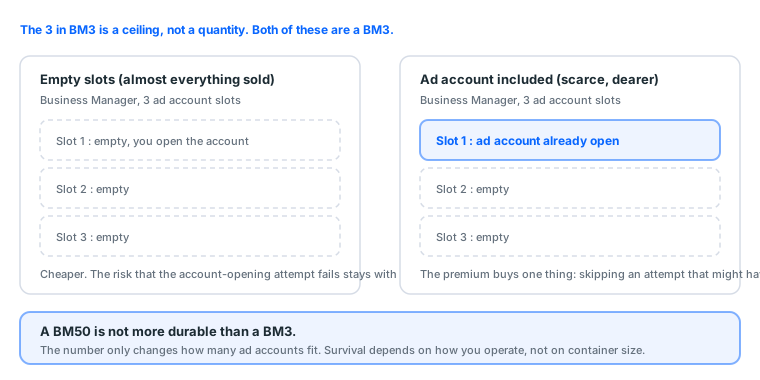
1. The two kinds of BM
| Empty slots | Ad account included | |
|---|---|---|
| Is there an ad account inside | No, the slots are empty | Yes, usable immediately |
| What you do next | Open an account yourself | Check it, change the password, start running |
| Where the risk sits | The account-opening attempt can be blocked | The account history is not yours |
| Price | Cheaper | Higher; the premium buys you the skipped step |
| Who it suits | People who can open accounts | People who keep getting blocked, or will not gamble on it |
Almost every BM on the market is the empty-slot kind, including the one inside most bundles. Nobody is hiding this; empty is simply the norm. BMs with accounts already open are scarce, expensive, and come with murkier history.
Our approach is to put the answer where you will see it: the product page has an "Ad account" row in the spec list, and bundle contents carry a tag next to the item name reading either "Empty slots, no ad account" or "Ad account included". If a listing has no label, ask. Do not infer it from the name, because the name cannot tell you, which is the entire reason this page exists.
Where to actually look
The slot count is not printed anywhere with the word BM3 next to it, which is part of why the misunderstanding survives delivery. Open business settings, go to Accounts, then Ad accounts, and count the rows. An empty-slot BM3 shows an empty list and an Add button. A BM3 with an account already open shows one row. The ceiling itself only becomes visible from the other direction: when you try to create one account too many, Meta tells you at that moment rather than in advance.
So the check after delivery is a count, not a label. If the listing said empty slots and the list is empty, you received what you paid for, and the next step is opening an account rather than raising a ticket.
2. Which one should you buy
Answer one question first: have you been blocked opening an ad account before?
Never blocked, or never tried → buy empty-slot. It is cheaper, and for plenty of people opening an account is not a problem at all. Paying the premium means paying for a problem you may never hit.
Tried and blocked, repeatedly → what you need is not a BM, it is an ad account. These get conflated constantly: the BM is the container, the ad account is the thing inside. Buying ten more empty BMs will not help, because the container was never what blocked you.
Need to be live today → buy a ready-made ad account. What you save is not money, it is the "blocked → appeal → wait → retry" loop.
One more way to frame the choice: an empty-slot BM is a purchase of capacity, and an ad-account-included BM is a purchase of an outcome. Capacity is cheap precisely because the risk of converting it into an outcome stays with you. If you would rather not carry that risk, the honest way to buy it off is a ready-made ad account, not a larger container.
3. Will a fresh BM get restricted when you open an account
Yes, it happens, and anyone promising otherwise is betting you will not come back to complain.
We sell BMs and will still say it plainly: there is no guarantee. In practice it tracks with:
- Environment: IP, device, browser fingerprint. Running many assets from one environment is the most common trigger
- The personal account attached: a freshly registered account with no usage history has a visibly lower pass rate
- Pace: opening an account the same day you receive the BM, then immediately raising budget, is the riskiest sequence
- Creatives and vertical: some categories are simply reviewed harder
The first three are addressable; see the first hour and the budget ramp. They are worth addressing, because they matter far more than which BM you bought.
4. The first ten minutes after delivery
The order matters. Do not skip ahead:
- Confirm you can get in: reach business.facebook.com settings and see the asset list
- Confirm the tier: the available ad account slots should match what you paid for
- Confirm whether it is empty: if you bought the included version, the ad account should be visible now. If it is not, report it inside the warranty window before touching anything else
- Change the password, enable two-factor
- Do not open an account and raise budget on day one
Step 3 is the one people skip. The warranty window starts at delivery, so spending two days researching before reporting usually means it has already expired.
5. Persistent misconceptions
"BM50 is more durable than BM3." No. The number only changes how many ad accounts fit. There is exactly one reason to buy a BM50: you genuinely intend to run more than three ad accounts.
"A BM is enough to run ads." It is not. You also need an ad account (inside the BM) and a Page (the identity ads publish as). Missing the Page is the step people get stuck on without realising, which is why every bundle here includes one.
"More BMs means more safety." Spreading assets is right, but running ten BMs from one environment is more dangerous than running one. Association is judged on environment, not on count.
"A BM with an ad account thrown in is the better deal." Check what that account's history is first. An ad account with real spend history is worth paying for. One that was opened yesterday and never ran anything is no better than what you would have opened yourself.
What a BM actually is and what lives inside it is covered in what a Business Manager is; picking a tier is covered in BM3 / BM50 / BM250 explained.
Sources (all official pages, checked 2026-09-08). Prices, catalogue distributions and warranty ratios in this article are our own catalogue and ticket data, not taken from these pages:
- Create and manage a business portfolio (Business Manager) — Meta Business Help Centre — facebook.com
- Business portfolio ownership and full control — Meta Business Help Centre — facebook.com
- Business verification — Meta Business Help Centre — facebook.com
- Advertising Standards — Meta Transparency Center — transparency.meta.com
- How two-factor authentication works on Facebook — Facebook Help Centre — facebook.com
- Get verification codes with Google Authenticator — Google Account Help — support.google.com
FAQ
What does the 3 in BM3 mean?
It is the ceiling on how many ad accounts that BM can hold. It says nothing about spend limits and does not mean three are already open.
Does buying a BM mean I have an ad account?
No. The BM is the container; the ad account is what goes inside it. An empty-slot BM arrives empty and you open the account yourself.
How do I know which kind I am buying?
Our product pages and bundle contents label it as either "Empty slots, no ad account" or "Ad account included". If a listing carries no label, ask before paying.
Will a new BM get restricted as soon as I open an ad account?
It can. This is common and nobody can promise otherwise. It depends on your environment, account history and creatives.
So should I buy empty-slot or ad-account-included?
Depends where you get stuck. If you can open accounts, empty-slot is cheaper. If you keep getting blocked, or you do not want to spend the time, buy a ready-made ad account instead.
Is a BM50 more durable than a BM3?
No. The number only changes how many ad accounts fit. Survival depends on how you operate, not on container size.
How many BMs can one person have?
Meta caps it, and a new account can usually only create one. Needing more is normally why people buy existing ones.
If the BM gets disabled, what happens to the ad accounts inside?
They are usually affected too. That is exactly why you should not keep every asset in one BM.
What do I actually receive?
Typically a BM ID plus login details. The first thing to do is confirm you can get in and see the business settings.
How much cheaper is empty-slot?
It varies, but the premium on the included version buys you one thing: skipping an account-opening attempt that might fail.
Can a BM3 become a BM50 later?
Not by buying an upgrade from us. Meta raises the limit on its own once the BM has a spending history it trusts, and no seller controls that. If you already know you need more than three ad accounts, buy the tier you need.
Does a BM come with a Page?
Not by itself. The BM is a container and a Page is a separate asset that has to be created inside it or added to it. Our bundles include one because an ad cannot publish without a publishing identity, but a bare BM listing does not imply a Page.
Can I move my existing Page and pixel into a bought BM?
Yes, and that is the normal way to use one. Pages and pixels move between BMs through business settings, so a replacement BM can pick up whatever survived from an old one.
When does the warranty start?
At delivery, not at first use. That is why the delivery check matters more than it looks: researching for two days and reporting afterwards usually means reporting after the window has closed.
How do I count the slots after delivery?
Business settings, then Accounts, then Ad accounts. Count the rows. An empty-slot BM3 shows an empty list and an Add button, which is what you paid for rather than a fault.
Want the parts this article talks about?
See BMs and ad accountsRead next
Running Facebook Ads: the complete path from nothing to your first live ad
The whole route on one page. From "where is Ads Manager" to "how do I
What Is BM in Facebook Ads? Business Manager, BM3 and BM50
BM is the container your ad assets live in, not the place you run ads
BM3 vs BM50 vs BM250, and how allowances actually work
That number is not how much you can spend. It is how many ad accounts
What is an ad account? How personal accounts, ad accounts, BMs and Pages relate
Four things get talked about interchangeably, but they are four separa